 MANTENIENDO PRESIONADOS
  ACTIVADOR,
  PULSA
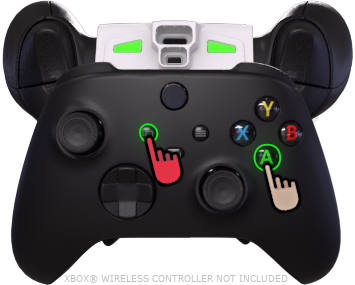
PULSA  para sincronizar, indicado como un AMARILLO LED RGB, y en el panel Arma primaria resalta.
| Instrucciones | Imagen | |
|---|---|---|
| Cambia a tu "en-arma principal del juego", ⚠️ NO mantén pulsado el gatillo izquierdo ⚠️, luego mientras MANTENIENDO PRESIONADOS ACTIVADOR, PULSA para sincronizar, indicado como un AMARILLO LED RGB, y en el panel Arma primaria resalta. | |
 ***ACTIVADOR*** está ***PRESIONADO***, :warning: **NO** mantén pulsado el gatillo izquierdo :warning:, luego los botones ***FRONTALES*** de tu mando pueden ***TOCADO*** usarse para alternar entre las siguientes ranuras: |
| ------------------------------------------------------------------------------------------------------------------------------------------------------------------------------------------------------------------------------------------------------------------------------------------------------------------------------------------------------------------------------------------------------------------------------------------------------------------------------------------------------------------------------------------------------------------------------------------------------------------------------------------------------------------------------------------------------------------------------------------------------------------------------------------------------------------------------------------------------------------------------------------------------------------------------------------------------------------------------------------------------------------------------------------------------------------------------------------------------------------------------------------------------------------------------------------------------------------------------------------------------------------------------------------------------------------------------------------------------------------------------------------------------------ |
|
***ACTIVADOR*** está ***PRESIONADO***, :warning: **NO** mantén pulsado el gatillo izquierdo :warning:, luego los botones ***FRONTALES*** de tu mando pueden ***TOCADO*** usarse para alternar entre las siguientes ranuras: |
| ------------------------------------------------------------------------------------------------------------------------------------------------------------------------------------------------------------------------------------------------------------------------------------------------------------------------------------------------------------------------------------------------------------------------------------------------------------------------------------------------------------------------------------------------------------------------------------------------------------------------------------------------------------------------------------------------------------------------------------------------------------------------------------------------------------------------------------------------------------------------------------------------------------------------------------------------------------------------------------------------------------------------------------------------------------------------------------------------------------------------------------------------------------------------------------------------------------------------------------------------------------------------------------------------------------------------------------------------------------------------------------------------------------ |
| Principal(1) Usar arma principal del juego
 Secundarias(2) Usar arma secundaria del juego
 Arma 3
 Arma 4
toca una ranura **una vez** para cambiar a ella. Los toques repetidos irán alternando la ranura entre su modo de disparo asignado actualmente, disparo normal y disparo rápido. |
| Comprueba qué ranura está **ACTIVO** mediante el resaltado del panel o el LED RGB. |
| :warning: Si ***ACTIVADOR*** está ***PULSADO RÁPIDAMENTE*** o ***MANTENIDO MUCHO TIEMPO**,* pasará al juego*.* Usa el **acceso directo del mando** antes de que aparezca un menú del juego. |
| {% endtab %} |
{% tab title="Híbrido - 5-8" %}
:video\_game: **Ver todas las pestañas**...
 ***ACTIVADOR*** está ***PRESIONADO***,
  ***GATILLO IZQUIERDO*** está ***PRESIONADO*** junto a él, el ***FRONTALES*** de tu mando pueden ***TOCADO*** de tu mando puede usarse para alternar entre las siguientes ranuras: |
| ------------------------------------------------------------------------------------------------------------------------------------------------------------------------------------------------------------------------------------------------------------------------------------------------------------------------------------------------------------------------------------------------------------------------------------------------------------------------------------------------------------------------------------------------------------------------------------------------------------------------------------------------------------------------------------------------------------------------------------------------------------------------------------------------------------------------------------------------------------------------------------------------------------------------------------------------------------------------------------------------------------------------------------------------------------------------------------------------------------------------------------------------------------------------------------------------------------------------------------------------------------------------------------------------------------------------------------------------------------------------------------------------------------------------------------------------------------------------------------------------------------------------ |
|
***GATILLO IZQUIERDO*** está ***PRESIONADO*** junto a él, el ***FRONTALES*** de tu mando pueden ***TOCADO*** de tu mando puede usarse para alternar entre las siguientes ranuras: |
| ------------------------------------------------------------------------------------------------------------------------------------------------------------------------------------------------------------------------------------------------------------------------------------------------------------------------------------------------------------------------------------------------------------------------------------------------------------------------------------------------------------------------------------------------------------------------------------------------------------------------------------------------------------------------------------------------------------------------------------------------------------------------------------------------------------------------------------------------------------------------------------------------------------------------------------------------------------------------------------------------------------------------------------------------------------------------------------------------------------------------------------------------------------------------------------------------------------------------------------------------------------------------------------------------------------------------------------------------------------------------------------------------------------------------------------------------------------------------------------------------------------------------ |
| - Arma 5
- Arma 6
- Arma 7
- Arma 8
toca una ranura **una vez** para cambiar a ella. Los toques repetidos irán alternando la ranura entre su modo de disparo asignado actualmente, disparo normal y disparo rápido. |
| Comprueba qué ranura está **ACTIVO** mediante el resaltado del panel o **pulsando** LED RGB. |
| :warning: Si ***ACTIVADOR*** está ***PULSADO RÁPIDAMENTE*** o ***MANTENIDO MUCHO TIEMPO**,* pasará al juego*.* Usa el **acceso directo del mando** antes de que aparezca un menú del juego. |
| {% endtab %} |
{% tab title="Vista de la aplicación" %}
| (Control de la aplicación)
Arma activa
| |
| ---------------------------------------------------------------------------------------------------------------------------------------------------------------------------------------------------------------------------------------------------------------------------------------- | ------------------------------------------------------------------------------------------------------------------------------------------------------------------------------------------------------------------------------------------------------------------------------------------------------------------------------------------------------------------------------------------------------------------------ |
| |
|
| ---------------------------------------------------------------------------------------------------------------------------------------------------------------------------------------------------------------------------------------------------------------------------------------- | ------------------------------------------------------------------------------------------------------------------------------------------------------------------------------------------------------------------------------------------------------------------------------------------------------------------------------------------------------------------------------------------------------------------------ |
| | 
Principal
(1)
| | |
| 
Secundarias
(2)
| | |
| 
Arma 3
| | | **Arma 4** |
|
| **Arma 4** |
|  |
| Arma 5
(Pulsando)
| | |
| Arma 6
(Pulsando)
| | |
| Arma 7
(Pulsando)
| | |
| Arma 8
(Pulsando)
| | {% endtab %} | | | {% endtabs %} | | --- # Agent Instructions This documentation is published with GitBook. GitBook is the documentation platform designed so that both humans and AI agents can read, navigate, and reason over technical content effectively. Learn more at gitbook.com. ## Querying This Documentation If you need additional information that is not directly available in this page, you can query the documentation by asking a question. Perform an HTTP GET request on the following URL with the `ask` and `goal` query parameters: ``` GET https://guide.strikepack.com/horizon-es/manuals/militaryshooter18/weaponswap/hybrid.md?ask=