
 |
| 

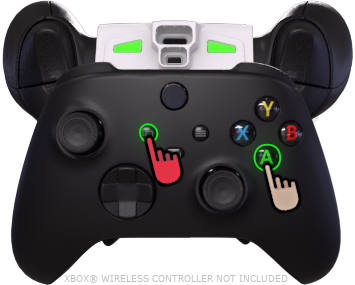
 ***ACTIVADOR*** está
  ***PRESIONADO***, :warning: **NO** mantén pulsado el gatillo izquierdo :warning:, luego los botones ***FRONTALES*** de tu mando pueden
  ***TOCADO*** usarse para alternar entre las siguientes ranuras: |
| ----------------------------------------------------------------------------------------------------------------------------------------------------------------------------------------------------------------------------------------------------------------------------------------------------------------------------------------------------------------------------------------------------------------------------------------------------------------------------------------------------------------------------------------------------------------------------------------------------------------------------------------------------------------------------------------------------------------------------------------------------------------------------------------------------------------------------------------------------------------------------------------------------------------------------------------------------------------------------------------------------------------------------------------------------------------------------------------------------------------------------------------------------------------------------------------------------------------------------------------------------------------------------- |
|
***TOCADO*** usarse para alternar entre las siguientes ranuras: |
| ----------------------------------------------------------------------------------------------------------------------------------------------------------------------------------------------------------------------------------------------------------------------------------------------------------------------------------------------------------------------------------------------------------------------------------------------------------------------------------------------------------------------------------------------------------------------------------------------------------------------------------------------------------------------------------------------------------------------------------------------------------------------------------------------------------------------------------------------------------------------------------------------------------------------------------------------------------------------------------------------------------------------------------------------------------------------------------------------------------------------------------------------------------------------------------------------------------------------------------------------------------------------------- |
|  Arma 1
 Arma 2
 Arma 3
 Arma 4
toca una ranura **una vez** para cambiar a ella. Los toques repetidos irán alternando la ranura entre su modo de disparo asignado actualmente, disparo normal y disparo rápido. |
| Comprueba qué ranura está **ACTIVO** mediante el resaltado del panel o el LED RGB. |
| :warning: Si ***ACTIVADOR*** está ***PULSADO RÁPIDAMENTE*** o ***MANTENIDO MUCHO TIEMPO**,* pasará al juego*.* Usa el **acceso directo del mando** antes de que aparezca un menú del juego. |
| {% endtab %} |
{% tab title="Directo - 5-8" %}
:video\_game: **Ver todas las pestañas**...
 ***ACTIVADOR*** está ***PRESIONADO***,
  ***GATILLO IZQUIERDO*** está ***PRESIONADO*** junto a él, el ***FRONTALES*** de tu mando pueden ***TOCADO*** de tu mando puede usarse para alternar entre las siguientes ranuras: |
| ------------------------------------------------------------------------------------------------------------------------------------------------------------------------------------------------------------------------------------------------------------------------------------------------------------------------------------------------------------------------------------------------------------------------------------------------------------------------------------------------------------------------------------------------------------------------------------------------------------------------------------------------------------------------------------------------------------------------------------------------------------------------------------------------------------------------------------------------------------------------------------------------------------------------------------------------------------------------------------------------------------------------------------------------------------------------------------------------------------------------------------------------------------------------------------------------------------------------------------------------------------------------------------------------------------------------------------------------------------------------------------------------------------------------------------------------------------------------------------------------------------------------ |
|
***GATILLO IZQUIERDO*** está ***PRESIONADO*** junto a él, el ***FRONTALES*** de tu mando pueden ***TOCADO*** de tu mando puede usarse para alternar entre las siguientes ranuras: |
| ------------------------------------------------------------------------------------------------------------------------------------------------------------------------------------------------------------------------------------------------------------------------------------------------------------------------------------------------------------------------------------------------------------------------------------------------------------------------------------------------------------------------------------------------------------------------------------------------------------------------------------------------------------------------------------------------------------------------------------------------------------------------------------------------------------------------------------------------------------------------------------------------------------------------------------------------------------------------------------------------------------------------------------------------------------------------------------------------------------------------------------------------------------------------------------------------------------------------------------------------------------------------------------------------------------------------------------------------------------------------------------------------------------------------------------------------------------------------------------------------------------------------ |
| - Arma 5
- Arma 6
- Arma 7
- Arma 8
toca una ranura **una vez** para cambiar a ella. Los toques repetidos irán alternando la ranura entre su modo de disparo asignado actualmente, disparo normal y disparo rápido. |
| Comprueba qué ranura está **ACTIVO** mediante el resaltado del panel o **pulsando** LED RGB. |
| :warning: Si ***ACTIVADOR*** está ***PULSADO RÁPIDAMENTE*** o ***MANTENIDO MUCHO TIEMPO**,* pasará al juego*.* Usa el **acceso directo del mando** antes de que aparezca un menú del juego. |
| {% endtab %} |
{% tab title="Vista de la aplicación" %}
| (Control de la aplicación)
Arma activa
| |
| ------------------------------------------------------------------------------------------------------------------------------------------------------------------------------------------------------------------------------------------------------------------------------------------------- | --------------------------------------------------------------------------------------------------------------------------------------------------------------------------------------------------------------------------------------------------------------------------------------------------------------------------------------------------- |
|
|
| ------------------------------------------------------------------------------------------------------------------------------------------------------------------------------------------------------------------------------------------------------------------------------------------------- | --------------------------------------------------------------------------------------------------------------------------------------------------------------------------------------------------------------------------------------------------------------------------------------------------------------------------------------------------- |
| 

Arma 1
| | |
| 
Arma 2
| | |
| 
Arma 3
| | | **Arma 4** |
|
| **Arma 4** |
|  |
| Arma 5
(Pulsando)
| | |
| Arma 6
(Pulsando)
| | |
| Arma 7
(Pulsando)
| | |
| Arma 8
(Pulsando)
| | {% endtab %} | | | {% endtabs %} | | ### :question: [**Solución de problemas**](broken://pages/4d63945619297eaa53e4db08698e8b47a3108152)