> For the complete documentation index, see [llms.txt](https://guide.strikepack.com/llms.txt). Markdown versions of documentation pages are available by appending `.md` to page URLs; this page is available as [Markdown](https://guide.strikepack.com/horizon/faq.md).
# FAQ
## FAQ: STRIKEPACK HORIZON™
Expand each box to see the answer:
***
Expand for Strikepack PS5®/PC FAQ...
**Q**. **Does Strikepack Vista for DualSense® work with DualSense Edge™? How about a third party PS5® controller?**
**A**. **No sorry**. A **standard** DualSense® controller from Sony® is required. **We do not make any Strikepack products that work with Edge or third party controllers at this time**.
***
**Q**. **How about a custom modified standard DualSense®?**
**A**. **Yes, but only if it's just a paint job or superficial addons**. For example, thumbstick grips are fine. Physical changes to the controller shell, especially the back, could prevent the Strikepack from attaching properly or at all.
***
**Q**. **Can I charge my controller through the Strikepack Vista for DualSense®?**
**A**. **No sorry**. If your controller's battery is healthy enough, it can hold onto an existing charge. Just fully charge your controller before attaching the Strikepack.
***
**Q**. **Does Strikepack Vista for DualSense® come with M.O.D.s?**
**A**. The **Strikepack Vista for DualSense®** comes with M.O.D.s in the form of Gamepacks through the **Strikepack Central** app. A persistent connection to the app is required to access M.O.D.s. Our Development Team adds more content every now and then.
***
**Q**. **Do I have to use the Strikepack Central app?**
**A**. **Yes, for the initial setup steps for PS5® use. Yes, for most of the newer Gamepacks and M.O.D.s.** You will miss out on many features if you don't use the app but once you've completed the setup process, if you don't care about M.O.D. access and just want to use Tournament Mode to map Paddle Buttons, see [**Mapping on Controller**](/horizon/strikepack-horizon-app-guide/mapping-on-controller.md) or the video link below.
[**https://youtu.be/0vRZC3vwyd4?si=elX\_flhF88klCC0h**](https://youtu.be/0vRZC3vwyd4?si=elX_flhF88klCC0h)
***
**Q**. **What are the requirements for the Strikepack Central app?**
**A**. **Android® 9** or **iOS® 15**, or higher.
***
**Q**. **Does the Strikepack Central app need to stay open while I use M.O.D.s?**
**A**. If the app is closed, you will be mostly confined to Tournament Mode. You can also **press both unlabeled buttons together** to select the last Gamepack you used. This will only work for Gamepacks that don't rely on resources from the smart device running the app, such as **Action**, which is a lighter and less-featured button recorder. If you want to use the fully-featured Macro or newer Gamepacks with cutting edge features, you'll need to keep your smart device charged and the app open.
***
**Q**. **Can I add my own M.O.D.s?**
**A**. **No**, but you can create and share macros using the **Macro** Gamepack, and if you take the time to learn how to create (or record) and edit button events, and make use of the various special events, we believe you'd be surprised at just what you can create with **Macro**. Macros can be imported into the Macro Gamepack, but also many newer Gamepacks too, such as BEAM Gamepacks.
* While somewhat more advanced, you can create and share your own Recoil Assist patterns in the **Recoil Studio** Gamepack tool. With the Custom Weapons feature and the **Shooter** Gamepack, you can import these Recoil Assist patterns, and you can actually create and share your own optimized "Custom Weapons" with others.
* You can also reach out to our Support Team with feedback and requests, which will be passed onto our Development Team. We can't always fulfill these requests but we'll try our best to accommodate where possible.
***
**Q**. **What cable does the Strikepack Vista for DualSense® come with? And can I use another cable?**
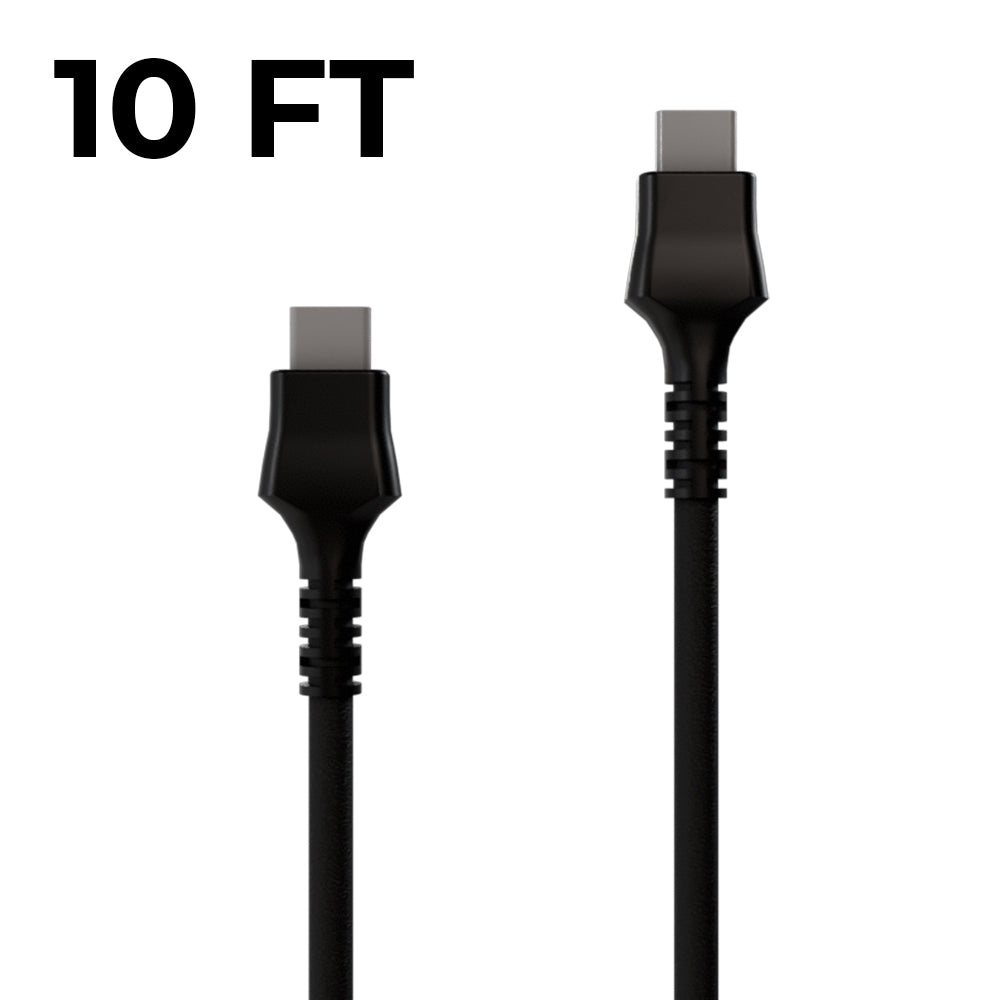
**A**. **A 10 ft (3 m) USB-C to USB-C cable is included**. **Yes**, if it fits the USB-C guide on the Strikepack, and supports data transfer, but just don't exceed 10 ft (3 m). 100W USB-C to USB-C cables are recommended (*our latest Strikepack cable meets that standard*):
You can also use a 5W USB-A to USB-C cable if you'd prefer to occupy a USB-A port on your PS5® or PC.
***
**Q**. **How do I attach/detach the Strikepack Vista for DualSense® from my controller without damaging it?**
**A**. **Please pay close attention to both video links below**, as they demonstrate the correct way to safely attach and detach the Strikepack from your standard DualSense® controller.
**Attach/Detach**: [**https://youtu.be/1OkoPF0BWro?si=U\_satYf8LyXV1IJh**](https://youtu.be/1OkoPF0BWro?si=U_satYf8LyXV1IJh)
**Hinge Clip**: [**https://youtu.be/Vc7\_0FrM6V0?si=jEGU51en0lrQzQs4**](https://youtu.be/Vc7_0FrM6V0?si=jEGU51en0lrQzQs4)
#### Attaching:
* Start by lining up the Strikepack’s USB-C connector with your controller’s USB-C port.
* Gently push the Strikepack down alongside the controller’s body until its USB-C connector is **fully** inserted into the controller’s USB-C port, closing any obvious gap at the top.
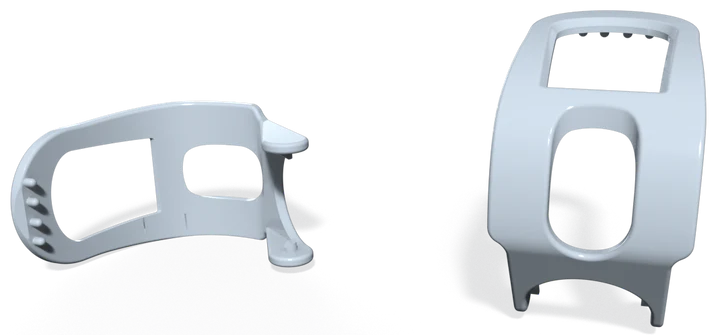
* Finally, swing the hinge clip around to the front of the controller and secure it into place. The **four pins** on the clip must be **pressed** into the **bottom four holes** on the controller's speaker grill. This secures the clip to the controller, preventing the Strikepack from sliding off.
* If the clip doesn't reach the speaker grill, don't panic. Check the Strikepack is fully slid onto the controller, then guide the clip upward with your thumb until it reaches and you can easily **press** it into place.
**Detaching**:
* You are basically going in reverse now.
* **Do not** forcefully pull the Strikepack off. Be gentle and slow.
* Use your fingernail to **gently** lift the hinge clip from the speaker grill, and swing it away.
* Now **use your thumbs to slide the Strikepack upward and off** your controller.
⚠️ **Never remove the Strikepack at an angle or in a rush!** This can damage the hinge clip or destroy the Strikepack USB-C connector. Bending the USB-C connector at an angle can warp or break it off, and risks damaging your controller's port. **Damage caused by improper attachment or removal is not covered under warranty!** Hinge clip replacements are available to purchase, but damage to the USB-C connector will require a new Strikepack.
***
**Q**. **Can I remove the Paddle Buttons from the Strikepack Vista for DualSense®?**
**A**. **No, as any physical modification will void your warranty!** However, you can leave them unmapped if you don't wish to use them.
***
**Q**. **What if my Strikepack fails under warranty?**
**A**. Contact our Support Team, so we can troubleshoot the issue with you and get you to a solution or replacement if within warranty. **Do not attempt self-repair or physical modification of the product. Do not discard the product** (unless instructed to do so by our Support Team). **Such improper actions will void your warranty!**
***
On STRIKEPACK HORIZON™, can I remove the paddle guards, remove the paddles, or rearrange the paddles?
Removing/rearranging the Paddle Guards or paddles will void the warranty. The preinstalled Paddle Guards on the STRIKEPACK Horizon (CM00141) protect its four flexible paddles from being bent backwards and broken. This product is ONLY to be used with all four paddles, each paddle is numbered as are the guards, and they are NOT to be rearranged from the layout below:
All new CM00141 have preinstalled Paddle Guards. It is NOT to be sold in any other state. If you receive a CM00141 that is missing its Paddle Guards, please return it to the store it was purchased from.
***
I need support, so what is the best way to get it?
Read through our FAQ and Troubleshooting page first. However, should you need more technical help, the best way to email our Support Team is through the app in the "Support" section of the GAMEPACK profile you experienced the issue in. Please answer all questions. This then attaches crash data and information about your settings to the email which can be invaluable to our team. Please DO NOT remove the file attachments. They can help us to resolve the issue far more quickly.
If you do happen to email us directly, please clearly state which STRIKEPACK HORIZON™ product you have and describe the issue in detail. Otherwise, we'll have to ask a lot more questions before we can start troubleshooting. Please remember that the more information you provide, the faster we can help you!
***
How do I return the product for a refund?
We are unable to provide returns label for refunds, regardless of stated reason for return. For instructions, please see the **Product Returns** section of our **Shipping** & **Returns Policy**:
[**https://collectivemindsstore.myshopify.com/pages/shipping-policy**](https://collectivemindsstore.myshopify.com/pages/shipping-policy)
Ensure you follow all instructions correctly, otherwise you could introduce a delay or issue with your refund.
***
How can I safely attach and detach the PS5®/PC STRIKEPACK HORIZON™ from the DualSense® controller without damaging it?
[**https://youtu.be/1OkoPF0BWro**](https://youtu.be/1OkoPF0BWro)
***
Is it normal for STRIKEPACK HORIZON™ products to get warm?
STRIKEPACK HORIZON™ products can get warm as there is a CPU inside. However, it is important to NEVER plug the device into a wall charger or USB fast charger, as this may damage it, which will void your warranty. If your device feels uncomfortably hot, or there are any other accompanying issues, please contact our **Support Team** at [**support@collectiveminds.ca**](mailto:support@collectiveminds.ca) for help.
***
What is a GAMEPACK?
A GAMEPACK is a pack containing M.O.D.s (Macros On Demand). Several of them are available on the **STRIKEPACK CENTRAL**™ app. Some GAMEPACKs work well with many different games. Others are optimized for specific games.
***
How do I do Bumpers/Triggers Flipped on STRIKEPACK HORIZON™?
If you are used to the built-in M.O.D.s of the older STRIKEPACK™ model and that is all you have used, then you may be unaware that we have long moved away from what we call "physical flipped". These days we support the in-game flipped or remapping whenever a game has it through the GAMEPACK Settings. Here you can configure the GAMEPACK to match the buttons or button layout that you will be using. In the case of the Shooter GAMEPACK, if your game lacks a way to flip your bumpers/triggers, you can remap on your console, and match its GAMEPACK settings to that.
***
How do I match my in-game buttons in GAMEPACK settings?
Most GAMEPACKs need you to match how your buttons are setup or M.O.D.s will activate on the wrong buttons. The GAMEPACK Settings section is accessed through the gear icon at the top-right of a GAMEPACK's Dashboard. Settings that you need to match to your game will be surrounded by a distinct border and clearly labeled. If a game has custom button mapping, it will be reflected here. If you are using any customized buttons, you MUST keep Button Layout set to Custom, and you MUST match all buttons individually.
***
Does STRIKEPACK HORIZON™ include macros or GAMEPACKs?
**STRIKEPACK HORIZON**™ accesses its macros through the **STRIKEPACK HORIZON**™ app. This app **REQUIRES** a smartphone or tablet device running **Android 9** or **iOS 15**, or **later**. The app includes **Shooter Studio**, **Tournament Studio**, and more.
***
Is the content on STRIKEPACK HORIZON™ the same as previous STRIKEPACK™?
The team wanted to start fresh with **STRIKEPACK HORIZON**™ to ensure a consistent and high quality experience. There is older legacy content on STRIKEPACK™ M.O.D.|PASS™ that is no longer updateable or suitable for STRIKEPACK HORIZON™. Our team is open to recreating certain content based on popular demand. The Shooter GAMEPACK also is extremely configurable to reach different games, including ones that cycle through multiple weapons.
As far as new content goes, STRIKEPACK HORIZON™ is a more capable and powerful device. Features such as the Macro GAMEPACK with its up to 500 button recording, and the code import/export system that allows you to share your macros online, are simply technically impossible on older devices.
***
How do I configure macros and how many GAMEPACKs can I add?
**STRIKEPACK HORIZON**™ works differently from any previous STRIKEPACK™. All configuration is done through the app. This means that you can change any setting immediately at will.
As GAMEPACKs are essentially beamed over to the STRIKEPACK HORIZON™, there is NO longer a concept of GAMEPACK slots. Instead, you can have up to **27** different settings profiles **per** GAMEPACK (*this used to be 9 but we increased it*).
***
Can I use STRIKEPACK HORIZON™ products without the STRIKEPACK HORIZON™ app?
Without the app running, you still have access to the base experience of **Tournament Mode** and its base Action Button (paddle) mapping, but there will be no macros.
***
Can I use STRIKEPACK HORIZON™ products without a firmware update?
If you do not update, you will not be able to access the app, and you may experience issues with connecting to the console.
***
Can I update my controller while STRIKEPACK HORIZON™ is attached?
Yes, even with it attached, you can still update your controller as normal.
***
Can I charge my DualSense® controller while STRIKEPACK HORIZON™ is attached?
No, but if your controller's battery is healthy, it can hold an existing charge. Fully charge your controller before attaching the STRIKEPACK.
***
Do I have to use the USB-C to USB-C cable that comes with my STRIKEPACK HORIZON™ for DualSense®, or can I use USB-A to USB-C?
You can use a USB-A to USB-C if you want; just ensure it is a cable of data transmission, and a 15W cable. We sell replacement official USB-C to USB-A cables [**here**](https://bit.ly/3FGwt8U) but most decent 10 ft cables should work. If you are using a different USB-C to USB-C cable, ensure it is 100W.
***
Can I use STRIKEPACK HORIZON™ for PC gaming?
All STRIKEPACK HORIZON™ series products can be used for PC gaming.
***
I don't like M.O.D.s. Does STRIKEPACK HORIZON™ have any use for me?
M.O.D.s (Macros On Demand) are entirely **optional**. If you want, you can just use your STRIKEPACK HORIZON™ in Tournament Mode with Paddle Button Mapping.
***
How many controller buttons can I map to each Paddle Button?
Up to **4** per Paddle Button. When you press the Paddle Button, it will press any mapped buttons **simultaneously**.
For more advanced functionality, there are Paddle Button M.O.D.s on the app, such as Turbo Mapped Buttons & also Recorded Combo/Macro which allows you to have a Paddle Button sequentially press controller buttons in a combo/macro through the Action or Macro GAMEPACK.
***
Does my STRIKEPACK HORIZON™ have to be WIRED?
Yes, however on the flip side, this also means responsive **lag free** operation with a **10 ft** cable. The STRIKEPACK HORIZON™ **REQUIRES** a **WIRED** connection. It ONLY connects wirelessly to your smartphone or tablet for the STRIKEPACK CENTRAL™ app.
***
Will STRIKEPACK HORIZON™ make permanent changes to my controller?
**NO**. A feature of all STRIKEPACK™ devices is that they are adapter devices that **DO NOT** permanently alter your controller. It is literally technically impossible for a STRIKEPACK™ to do this. It sits between your controller & your console as a middle man. It **CANNOT** write to your controller or console. When you remove it, **all** of its effects go away. Should effects remain after removing it, you should check your console's mapping settings & your game's settings, as this has nothing to do with the STRIKEPACK HORIZON™ device.
***
How does STRIKEPACK HORIZON™ work?
As with previous STRIKEPACK™ adapters, the STRIKEPACK HORIZON™ is a transparent device, as is its mapping capability. This means that it seamlessly makes a wired connection between your controller and console, providing full functionality, while your console simply sees this setup as a standard controller. The STRIKEPACK CENTRAL™ companion app, connected via Bluetooth® on a compatible smart device (Android 9, iOS 15, or later), provides optional M.O.D.s which are Macros On Demand in the form of GAMEPACKs. These macros are simply sets of controller commands (or button presses if you will) that need to be seen by your console to function. Our team is always looking to improve upon these macros.
***
Will STRIKEPACK HORIZON™ be accepted into a tournament?
Most likely NOT. Even though it does have a Tournament Mode. Unless a tournament exists where everyone is using a STRIKEPACK. STRIKEPACK HORIZON™ is intended to bring immense fun and enjoyment to your personal gaming, respectfully, in public matches. We DO NOT condone using M.O.D.s to attempt to gain a "perceived competitive advantage" in ranked, tournament, or other organized competitive environments.
***
Can I use STRIKEPACK HORIZON™ for Android® or iOS® gaming?
No, as it connects to your Android® 9 or iOS® 15, or later smart device solely for the purpose of configuration. We've also never tested it on these devices but you wouldn't be able to play on the device you are using to run the app.
***
---
# Agent Instructions
This documentation is published with GitBook. GitBook is the documentation platform designed so that both humans and AI agents can read, navigate, and reason over technical content effectively. Learn more at gitbook.com.
## Querying This Documentation
If you need additional information that is not directly available in this page, you can query the documentation dynamically by asking a question.
Perform an HTTP GET request on the current page URL with the `ask` query parameter, and the optional `goal` query parameter:
```
GET https://guide.strikepack.com/horizon/faq.md?ask=&goal=
```
`ask` is the immediate question: it should be specific, self-contained, and written in natural language.
`goal` is optional and describes the broader end goal you are ultimately trying to accomplish on behalf of the user. GitBook uses it to tailor the answer towards what is most useful for that goal.
The response will contain a direct answer to the question and relevant excerpts and sources from the documentation.
Use this mechanism when the answer is not explicitly present in the current page, you need clarification or additional context, or you want to retrieve related documentation sections.

 **press both unlabeled buttons together** to select the last Gamepack you used. This will only work for Gamepacks that don't rely on resources from the smart device running the app, such as **Action**, which is a lighter and less-featured button recorder. If you want to use the fully-featured Macro or newer Gamepacks with cutting edge features, you'll need to keep your smart device charged and the app open.
***
**Q**. **Can I add my own M.O.D.s?**
**A**. **No**, but you can create and share macros using the **Macro** Gamepack, and if you take the time to learn how to create (or record) and edit button events, and make use of the various special events, we believe you'd be surprised at just what you can create with **Macro**. Macros can be imported into the Macro Gamepack, but also many newer Gamepacks too, such as BEAM Gamepacks.
* While somewhat more advanced, you can create and share your own Recoil Assist patterns in the **Recoil Studio** Gamepack tool. With the Custom Weapons feature and the **Shooter** Gamepack, you can import these Recoil Assist patterns, and you can actually create and share your own optimized "Custom Weapons" with others.
* You can also reach out to our Support Team with feedback and requests, which will be passed onto our Development Team. We can't always fulfill these requests but we'll try our best to accommodate where possible.
***
**Q**. **What cable does the Strikepack Vista for DualSense® come with? And can I use another cable?**
**A**. **A 10 ft (3 m) USB-C to USB-C cable is included**. **Yes**, if it fits the USB-C guide on the Strikepack, and supports data transfer, but just don't exceed 10 ft (3 m). 100W USB-C to USB-C cables are recommended (*our latest Strikepack cable meets that standard*):
**press both unlabeled buttons together** to select the last Gamepack you used. This will only work for Gamepacks that don't rely on resources from the smart device running the app, such as **Action**, which is a lighter and less-featured button recorder. If you want to use the fully-featured Macro or newer Gamepacks with cutting edge features, you'll need to keep your smart device charged and the app open.
***
**Q**. **Can I add my own M.O.D.s?**
**A**. **No**, but you can create and share macros using the **Macro** Gamepack, and if you take the time to learn how to create (or record) and edit button events, and make use of the various special events, we believe you'd be surprised at just what you can create with **Macro**. Macros can be imported into the Macro Gamepack, but also many newer Gamepacks too, such as BEAM Gamepacks.
* While somewhat more advanced, you can create and share your own Recoil Assist patterns in the **Recoil Studio** Gamepack tool. With the Custom Weapons feature and the **Shooter** Gamepack, you can import these Recoil Assist patterns, and you can actually create and share your own optimized "Custom Weapons" with others.
* You can also reach out to our Support Team with feedback and requests, which will be passed onto our Development Team. We can't always fulfill these requests but we'll try our best to accommodate where possible.
***
**Q**. **What cable does the Strikepack Vista for DualSense® come with? And can I use another cable?**
**A**. **A 10 ft (3 m) USB-C to USB-C cable is included**. **Yes**, if it fits the USB-C guide on the Strikepack, and supports data transfer, but just don't exceed 10 ft (3 m). 100W USB-C to USB-C cables are recommended (*our latest Strikepack cable meets that standard*):
 **Detaching**:
* You are basically going in reverse now.
* **Do not** forcefully pull the Strikepack off. Be gentle and slow.
* Use your fingernail to **gently** lift the hinge clip from the speaker grill, and swing it away.
* Now **use your thumbs to slide the Strikepack upward and off** your controller.
⚠️ **Never remove the Strikepack at an angle or in a rush!** This can damage the hinge clip or destroy the Strikepack USB-C connector. Bending the USB-C connector at an angle can warp or break it off, and risks damaging your controller's port. **Damage caused by improper attachment or removal is not covered under warranty!** Hinge clip replacements are available to purchase, but damage to the USB-C connector will require a new Strikepack.
***
**Q**. **Can I remove the Paddle Buttons from the Strikepack Vista for DualSense®?**
**A**. **No, as any physical modification will void your warranty!** However, you can leave them unmapped if you don't wish to use them.
***
**Q**. **What if my Strikepack fails under warranty?**
**A**. Contact our Support Team, so we can troubleshoot the issue with you and get you to a solution or replacement if within warranty. **Do not attempt self-repair or physical modification of the product. Do not discard the product** (unless instructed to do so by our Support Team). **Such improper actions will void your warranty!**
**Detaching**:
* You are basically going in reverse now.
* **Do not** forcefully pull the Strikepack off. Be gentle and slow.
* Use your fingernail to **gently** lift the hinge clip from the speaker grill, and swing it away.
* Now **use your thumbs to slide the Strikepack upward and off** your controller.
⚠️ **Never remove the Strikepack at an angle or in a rush!** This can damage the hinge clip or destroy the Strikepack USB-C connector. Bending the USB-C connector at an angle can warp or break it off, and risks damaging your controller's port. **Damage caused by improper attachment or removal is not covered under warranty!** Hinge clip replacements are available to purchase, but damage to the USB-C connector will require a new Strikepack.
***
**Q**. **Can I remove the Paddle Buttons from the Strikepack Vista for DualSense®?**
**A**. **No, as any physical modification will void your warranty!** However, you can leave them unmapped if you don't wish to use them.
***
**Q**. **What if my Strikepack fails under warranty?**
**A**. Contact our Support Team, so we can troubleshoot the issue with you and get you to a solution or replacement if within warranty. **Do not attempt self-repair or physical modification of the product. Do not discard the product** (unless instructed to do so by our Support Team). **Such improper actions will void your warranty!**
 All new CM00141 have preinstalled Paddle Guards. It is NOT to be sold in any other state. If you receive a CM00141 that is missing its Paddle Guards, please return it to the store it was purchased from.
 Settings. Here you can configure the GAMEPACK to match the buttons or button layout that you will be using. In the case of the Shooter GAMEPACK, if your game lacks a way to flip your bumpers/triggers, you can remap on your console, and match its GAMEPACK settings to that.