# Controller (DS)

## <img src="https://1841283601-files.gitbook.io/~/files/v0/b/gitbook-x-prod.appspot.com/o/spaces%2FFYraHizgjOptWmwCAGKE%2Fuploads%2FLpgI9J2gUIWRPEZFAqN9%2FDS_Triangle_Button_V2.png?alt=media&#x26;token=37a130ed-a31f-4a14-83e0-7146f240ae43" alt="" data-size="line"><img src="https://1841283601-files.gitbook.io/~/files/v0/b/gitbook-x-prod.appspot.com/o/spaces%2FFYraHizgjOptWmwCAGKE%2Fuploads%2FLMSGgQ7xmg6SyBH2uWMm%2FDS_Circle_Button_V2.png?alt=media&#x26;token=775c9d83-db47-4720-8022-a5ab4c883678" alt="" data-size="line"><img src="https://1841283601-files.gitbook.io/~/files/v0/b/gitbook-x-prod.appspot.com/o/spaces%2FFYraHizgjOptWmwCAGKE%2Fuploads%2FxCaLTLUnKHWBKzGZz8C1%2FDS_Cross_Button_V2.png?alt=media&#x26;token=d50d853f-87ba-4894-a358-a613ebef99c5" alt="" data-size="line"><img src="https://1841283601-files.gitbook.io/~/files/v0/b/gitbook-x-prod.appspot.com/o/spaces%2FFYraHizgjOptWmwCAGKE%2Fuploads%2FfZhS2BopPAxkoVNe2P9W%2FDS_Square_Button_V2.png?alt=media&#x26;token=16a5364d-2640-4ee6-a17d-ad23393f3f4c" alt="" data-size="line">

***

<figure><img src="https://1841283601-files.gitbook.io/~/files/v0/b/gitbook-x-prod.appspot.com/o/spaces%2FFYraHizgjOptWmwCAGKE%2Fuploads%2FTfmAGiSjZda1qLX7RCfA%2Fline_horizon_flipped.png?alt=media&#x26;token=89672410-9e30-495d-9551-51526f156405" alt=""><figcaption></figcaption></figure>

## <img src="https://1841283601-files.gitbook.io/~/files/v0/b/gitbook-x-prod.appspot.com/o/spaces%2FFYraHizgjOptWmwCAGKE%2Fuploads%2Fol5W9apm6hNF6sbVK0eR%2F__controller.png?alt=media&#x26;token=e92335d9-99b7-4f26-8d23-a6aa07510f1e" alt="" data-size="line"> Controller

<figure><img src="https://1841283601-files.gitbook.io/~/files/v0/b/gitbook-x-prod.appspot.com/o/spaces%2FFYraHizgjOptWmwCAGKE%2Fuploads%2F5Jx5Tu6u1wor8lUxYxMw%2Fline_horizon.png?alt=media&#x26;token=7db97041-9d92-468c-9c18-a0fcbb400984" alt=""><figcaption></figcaption></figure>

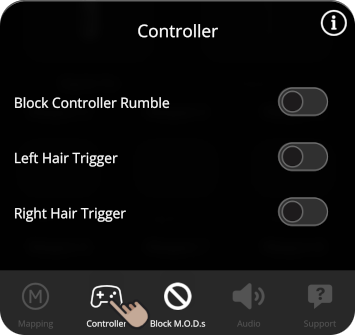
<table data-header-hidden><thead><tr><th>Instructions</th><th>Image</th><th data-hidden></th></tr></thead><tbody><tr><td><img src="https://1841283601-files.gitbook.io/~/files/v0/b/gitbook-x-prod.appspot.com/o/spaces%2FFYraHizgjOptWmwCAGKE%2Fuploads%2F0zAKxtU3XqgjkE0tSZ9u%2FTap_Icon.png?alt=media&#x26;token=5e6ad0e0-afcf-4a92-993e-837c83422b7f" alt="" data-size="line">Tap the <img src="https://1841283601-files.gitbook.io/~/files/v0/b/gitbook-x-prod.appspot.com/o/spaces%2FFYraHizgjOptWmwCAGKE%2Fuploads%2Fol5W9apm6hNF6sbVK0eR%2F__controller.png?alt=media&#x26;token=e92335d9-99b7-4f26-8d23-a6aa07510f1e" alt="" data-size="line"><strong>Controller</strong> icon, located on the bottom-bar, to either open or close the "<strong>Controller</strong>" section.</td><td><img src="https://1841283601-files.gitbook.io/~/files/v0/b/gitbook-x-prod.appspot.com/o/spaces%2FFYraHizgjOptWmwCAGKE%2Fuploads%2FCoUmfzE9hlHBoJwWliPF%2FBottom_Bar_Controller.png?alt=media&#x26;token=e19a5c3c-07c1-4170-a830-70462d0ac0e7" alt="" data-size="original"></td><td></td></tr></tbody></table>

This ***usually*** features **Block Controller Rumble**, as well as **Hair Trigger & Trigger Stop** (exclusive to **Shooter**-**style GAMEPACKs**) settings, which are <img src="https://1841283601-files.gitbook.io/~/files/v0/b/gitbook-x-prod.appspot.com/o/spaces%2FFYraHizgjOptWmwCAGKE%2Fuploads%2Ffq6pvzgYIzNYCuRMECmg%2FToggle_Off.png?alt=media&#x26;token=8da93e98-e5f5-4cbf-b033-ff6ec06f0ea9" alt="" data-size="line">OFF by default.

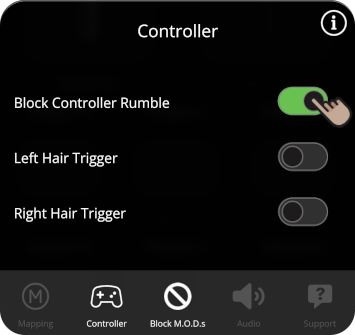
<table data-header-hidden><thead><tr><th>Instructions</th><th>Image</th><th data-hidden></th></tr></thead><tbody><tr><td><strong>Block Controller Rumble</strong>, when toggled <img src="https://1841283601-files.gitbook.io/~/files/v0/b/gitbook-x-prod.appspot.com/o/spaces%2FFYraHizgjOptWmwCAGKE%2Fuploads%2FAqayLbEmTbPr7qeipb4N%2FToggle_On.png?alt=media&#x26;token=fb772aa5-c15e-49ce-bfef-e22935546d30" alt="" data-size="line">ON, will block the feeling of in-game controller vibration, while leaving GAMEPACK indicator rumbles and M.O.D. functionality alone.</td><td><img src="https://1841283601-files.gitbook.io/~/files/v0/b/gitbook-x-prod.appspot.com/o/spaces%2FFYraHizgjOptWmwCAGKE%2Fuploads%2FVK22BCnzCYQSqg9Z8egG%2FController_Settings_Block_Rumble.png?alt=media&#x26;token=e0c8eef2-ff93-4573-b572-021f11ea02c1" alt="" data-size="original"></td><td></td></tr></tbody></table>

To avoid any GAMEPACK related problems, **PRIOR** to toggling <img src="https://1841283601-files.gitbook.io/~/files/v0/b/gitbook-x-prod.appspot.com/o/spaces%2FFYraHizgjOptWmwCAGKE%2Fuploads%2FAqayLbEmTbPr7qeipb4N%2FToggle_On.png?alt=media&#x26;token=fb772aa5-c15e-49ce-bfef-e22935546d30" alt="" data-size="line">ON **Block Controller Rumble**, play your game enough to confirm that the **game itself** is rumbling your controller.

***

:bangbang: **In Action**-**style GAMEPACKs such as Action & Macro**, **Block Controller Rumble** is useful for ![](https://1841283601-files.gitbook.io/~/files/v0/b/gitbook-x-prod.appspot.com/o/spaces%2FFYraHizgjOptWmwCAGKE%2Fuploads%2FVHtShCfA1rZRQHKARP05%2FLOOP_COMBO_TEXTBODY_PS.png?alt=media\&token=28f97b6c-a628-4288-8dbc-e5ec535335b4), allowing you to safely place down your controller.

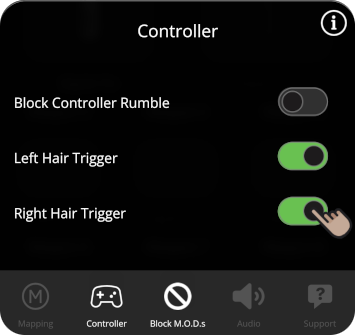
<table data-header-hidden><thead><tr><th>Instructions</th><th>Image</th><th data-hidden></th></tr></thead><tbody><tr><td><em><strong>If present</strong></em>, <strong>Left</strong> &#x26; <strong>Right Hair Trigger</strong> can be independently toggled <img src="https://1841283601-files.gitbook.io/~/files/v0/b/gitbook-x-prod.appspot.com/o/spaces%2FFYraHizgjOptWmwCAGKE%2Fuploads%2FAqayLbEmTbPr7qeipb4N%2FToggle_On.png?alt=media&#x26;token=fb772aa5-c15e-49ce-bfef-e22935546d30" alt="" data-size="line">ON, which can improve your reaction time by replacing trigger analog sensitivity with <strong>100% pressed</strong>, as soon as your console and game can register your press.</td><td><img src="https://1841283601-files.gitbook.io/~/files/v0/b/gitbook-x-prod.appspot.com/o/spaces%2FFYraHizgjOptWmwCAGKE%2Fuploads%2FFv1gbhm00PyA98bU55wL%2FController_Settings_Hair_Trigger.png?alt=media&#x26;token=ce578008-22ed-4d2f-86bd-14c50901839d" alt="" data-size="original"></td><td></td></tr></tbody></table>

**Unless** you are using the **Trigger Stop** feature which compresses the range of motion, M.O.D.s that use trigger analog sensitivity will still function as expected.

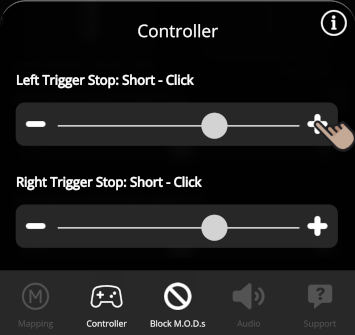
<table data-header-hidden><thead><tr><th>Instructions</th><th>Image</th><th data-hidden></th></tr></thead><tbody><tr><td><em><strong>If present</strong></em>, <strong>Left</strong> &#x26; <strong>Right Trigger Stop</strong> can be independently set to one of available settings.  This will simulate a physical trigger stop by leveraging the "Adaptive Trigger" technology in your controller.</td><td><img src="https://1841283601-files.gitbook.io/~/files/v0/b/gitbook-x-prod.appspot.com/o/spaces%2FFYraHizgjOptWmwCAGKE%2Fuploads%2F5zg8U3XTumyo52CJIVnD%2FController_Settings_Adaptive_Trigger_Stop_PS.png?alt=media&#x26;token=c045801a-1186-4678-b7da-e87fd72003a6" alt="" data-size="original"></td><td></td></tr></tbody></table>

**Trigger Stops** will override any in-game "Adaptive Trigger" effects.  Depending on your preferences and how it best suits your game, you can adjust the range to have a short stop, medium stop, or long stop.  You can also choose to have simulated "click-like" effect to make it feel slightly more tactile.

{% hint style="info" %}
Remember that tapping the <img src="https://1841283601-files.gitbook.io/~/files/v0/b/gitbook-x-prod.appspot.com/o/spaces%2FFYraHizgjOptWmwCAGKE%2Fuploads%2Fol5W9apm6hNF6sbVK0eR%2F__controller.png?alt=media&#x26;token=e92335d9-99b7-4f26-8d23-a6aa07510f1e" alt="" data-size="line">**Controller** icon again will close the section.
{% endhint %}

***

## Block M.O.D.s Next