# Weapon Swap Mode

<details>

<summary><mark style="color:green;">Weapon Swap Mode</mark> On This Page</summary>

[<mark style="color:green;">**Overview**</mark>](#overview)

[<mark style="color:green;">**Weapon Swap Mode**</mark>](#weapon-swap-mode)

[<mark style="color:green;">**Options Explained**</mark>](#options-explained)

[<mark style="color:green;">**Weapon Setup Next**</mark>](#weapon-setup-next)

</details>

<div data-full-width="false"><figure><img src="https://1841283601-files.gitbook.io/~/files/v0/b/gitbook-x-prod.appspot.com/o/spaces%2FFYraHizgjOptWmwCAGKE%2Fuploads%2FTfmAGiSjZda1qLX7RCfA%2Fline_horizon_flipped.png?alt=media&#x26;token=89672410-9e30-495d-9551-51526f156405" alt=""><figcaption></figcaption></figure></div>

## <mark style="color:green;">Weapon Swap Mode</mark> <img src="https://1841283601-files.gitbook.io/~/files/v0/b/gitbook-x-prod.appspot.com/o/spaces%2FFYraHizgjOptWmwCAGKE%2Fuploads%2FZKh4ehZEFvhyfhRC4UZl%2Fy_new.png?alt=media&#x26;token=4a17d0da-696e-4d72-8e2b-da88a7be4dc2" alt="" data-size="line"><img src="https://1841283601-files.gitbook.io/~/files/v0/b/gitbook-x-prod.appspot.com/o/spaces%2FFYraHizgjOptWmwCAGKE%2Fuploads%2FaR7Rw3jYzYuVqdG7balf%2Fb_new.png?alt=media&#x26;token=b2298ccc-a59b-4cc9-b642-00c6196d6e6c" alt="" data-size="line"><img src="https://1841283601-files.gitbook.io/~/files/v0/b/gitbook-x-prod.appspot.com/o/spaces%2FFYraHizgjOptWmwCAGKE%2Fuploads%2FAsrGw8CNz6zfzVpG8ciR%2Fa_new.png?alt=media&#x26;token=7402d46c-c453-4930-841a-8706a175cadd" alt="" data-size="line"><img src="https://1841283601-files.gitbook.io/~/files/v0/b/gitbook-x-prod.appspot.com/o/spaces%2FFYraHizgjOptWmwCAGKE%2Fuploads%2F5Q4j07G4mRUK7EmSOUZ7%2Fx_new.png?alt=media&#x26;token=bd1aa945-65da-4356-9cdc-0a52bd5aadbb" alt="" data-size="line">

<figure><img src="https://1841283601-files.gitbook.io/~/files/v0/b/gitbook-x-prod.appspot.com/o/spaces%2FFYraHizgjOptWmwCAGKE%2Fuploads%2F5Jx5Tu6u1wor8lUxYxMw%2Fline_horizon.png?alt=media&#x26;token=7db97041-9d92-468c-9c18-a0fcbb400984" alt=""><figcaption></figcaption></figure>

| ***Commonly featured under*** <img src="https://1841283601-files.gitbook.io/~/files/v0/b/gitbook-x-prod.appspot.com/o/spaces%2FFYraHizgjOptWmwCAGKE%2Fuploads%2FX8HTWU7KRxdrP81G4yrN%2FSettings_Icon.png?alt=media&#x26;token=944585bb-7223-4d4a-b87b-1b0068e80520" alt="" data-size="line">***Settings in Shooter**-**style GAMEPACKs**,* "**Weapon Swap Mode**" covers managing Weapon M.O.D.s (Macros On Demand) through **8** Weapon Slots, and swapping between slots during gameplay. | <img src="https://1841283601-files.gitbook.io/~/files/v0/b/gitbook-x-prod.appspot.com/o/spaces%2FFYraHizgjOptWmwCAGKE%2Fuploads%2FtP9GRQdgQuRkESVKfqoO%2FSHOOTER_150.png?alt=media&#x26;token=2c0b34f9-2f02-4653-b056-c8b7b2db2356" alt="" data-size="original"> |
| ------------------------------------------------------------------------------------------------------------------------------------------------------------------------------------------------------------------------------------------------------------------------------------------------------------------------------------------------------------------------------------------------------------------------------------------------------------------------------------------- | ---------------------------------------------------------------------------------------------------------------------------------------------------------------------------------------------------------------------------------------------------------------- |

Weapon Swap Mode determines the arrangement of the 8 Weapon Slots on the Dashboard.  Each slot can be fully customized to meet your needs, but only one slot can be **ACTIVE** at a time.  It is important to be aware of this to avoid unintentionally applying the wrong M.O.D.s to the wrong weapon.  Fortunately, RGB LED indication on the STRIKEPACK™, and indication in the app will help you to keep track of the current position and exactly what is being applied.

***

<figure><img src="https://1841283601-files.gitbook.io/~/files/v0/b/gitbook-x-prod.appspot.com/o/spaces%2FFYraHizgjOptWmwCAGKE%2Fuploads%2FTfmAGiSjZda1qLX7RCfA%2Fline_horizon_flipped.png?alt=media&#x26;token=89672410-9e30-495d-9551-51526f156405" alt=""><figcaption></figcaption></figure>

### <mark style="color:green;">Options</mark> <img src="https://1841283601-files.gitbook.io/~/files/v0/b/gitbook-x-prod.appspot.com/o/spaces%2FFYraHizgjOptWmwCAGKE%2Fuploads%2FZKh4ehZEFvhyfhRC4UZl%2Fy_new.png?alt=media&#x26;token=4a17d0da-696e-4d72-8e2b-da88a7be4dc2" alt="" data-size="line"><img src="https://1841283601-files.gitbook.io/~/files/v0/b/gitbook-x-prod.appspot.com/o/spaces%2FFYraHizgjOptWmwCAGKE%2Fuploads%2FaR7Rw3jYzYuVqdG7balf%2Fb_new.png?alt=media&#x26;token=b2298ccc-a59b-4cc9-b642-00c6196d6e6c" alt="" data-size="line"><img src="https://1841283601-files.gitbook.io/~/files/v0/b/gitbook-x-prod.appspot.com/o/spaces%2FFYraHizgjOptWmwCAGKE%2Fuploads%2FAsrGw8CNz6zfzVpG8ciR%2Fa_new.png?alt=media&#x26;token=7402d46c-c453-4930-841a-8706a175cadd" alt="" data-size="line"><img src="https://1841283601-files.gitbook.io/~/files/v0/b/gitbook-x-prod.appspot.com/o/spaces%2FFYraHizgjOptWmwCAGKE%2Fuploads%2F5Q4j07G4mRUK7EmSOUZ7%2Fx_new.png?alt=media&#x26;token=bd1aa945-65da-4356-9cdc-0a52bd5aadbb" alt="" data-size="line">

<figure><img src="https://1841283601-files.gitbook.io/~/files/v0/b/gitbook-x-prod.appspot.com/o/spaces%2FFYraHizgjOptWmwCAGKE%2Fuploads%2F5Jx5Tu6u1wor8lUxYxMw%2Fline_horizon.png?alt=media&#x26;token=7db97041-9d92-468c-9c18-a0fcbb400984" alt=""><figcaption></figcaption></figure>

<table data-header-hidden><thead><tr><th>Instructions</th><th>Image</th><th data-hidden></th></tr></thead><tbody><tr><td><img src="https://1841283601-files.gitbook.io/~/files/v0/b/gitbook-x-prod.appspot.com/o/spaces%2FFYraHizgjOptWmwCAGKE%2Fuploads%2F0zAKxtU3XqgjkE0tSZ9u%2FTap_Icon.png?alt=media&#x26;token=5e6ad0e0-afcf-4a92-993e-837c83422b7f" alt="" data-size="line">Tap the <img src="https://1841283601-files.gitbook.io/~/files/v0/b/gitbook-x-prod.appspot.com/o/spaces%2FFYraHizgjOptWmwCAGKE%2Fuploads%2FX8HTWU7KRxdrP81G4yrN%2FSettings_Icon.png?alt=media&#x26;token=944585bb-7223-4d4a-b87b-1b0068e80520" alt="" data-size="line"><em><strong>GEAR</strong></em> icon at the top-right of the Dashboard to go to the "<strong>Settings</strong>" area, then find the "<strong>Weapon Swap Mode</strong>" setting.</td><td><img src="https://1841283601-files.gitbook.io/~/files/v0/b/gitbook-x-prod.appspot.com/o/spaces%2FFYraHizgjOptWmwCAGKE%2Fuploads%2FSswXIBcCzx7OLVhpCTuQ%2FEnter_Settings_Alt_Example.png?alt=media&#x26;token=112c0e6f-9bca-4190-827b-3d94f30fc8be" alt="" data-size="original"></td><td></td></tr></tbody></table>

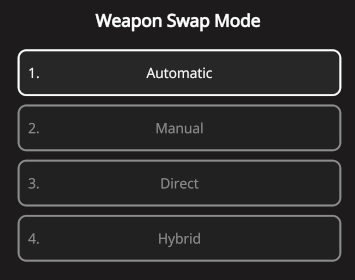
There are ***usually*** **4** options to select from; **Automatic**, **Manual**, **Direct**, and **Hybrid**.  If any of these options are deemed unsuitable for a specific game, its GAMEPACK may feature fewer options, or even **NO** Weapon Swap Mode setting.

| <img src="https://1841283601-files.gitbook.io/~/files/v0/b/gitbook-x-prod.appspot.com/o/spaces%2FFYraHizgjOptWmwCAGKE%2Fuploads%2FgMRiQVLnoKDqPLo71KeH%2FWeapon_Swap_Mode_Option_Selector.png?alt=media&#x26;token=02cf10a6-e94a-4346-8686-81c9c775ddca" alt="" data-size="original"> | <img src="https://1841283601-files.gitbook.io/~/files/v0/b/gitbook-x-prod.appspot.com/o/spaces%2FFYraHizgjOptWmwCAGKE%2Fuploads%2FxI9tv72tvC7V3YvRmBjE%2FWeapon_Swap_Mode.png?alt=media&#x26;token=23ecd5f6-9ffa-4f5d-bb11-cc58f03a4cf2" alt="" data-size="original"> |
| ------------------------------------------------------------------------------------------------------------------------------------------------------------------------------------------------------------------------------------------------------------------------------------- | --------------------------------------------------------------------------------------------------------------------------------------------------------------------------------------------------------------------------------------------------------------------- |

"**Automatic**" & "**Hybrid**" Swap are designed for games employing the standard two-weapon system, consisting of <img src="https://1841283601-files.gitbook.io/~/files/v0/b/gitbook-x-prod.appspot.com/o/spaces%2FFYraHizgjOptWmwCAGKE%2Fuploads%2FP2lTgr3G1riBRCms73jb%2FRGB_PRI_TEXTBODY_NEW.png?alt=media&#x26;token=7848da37-06da-43f2-a561-190372f85c74" alt="" data-size="line"> / <img src="https://1841283601-files.gitbook.io/~/files/v0/b/gitbook-x-prod.appspot.com/o/spaces%2FFYraHizgjOptWmwCAGKE%2Fuploads%2FzcPE0QCN74FQHcdPhmgi%2FRGB_SEC_TEXTBODY_NEW.png?alt=media&#x26;token=5385e0e3-b988-4ee0-beb6-700064e53a3f" alt="" data-size="line">.  Either option will track your Switch Weapon button (default:<img src="https://1841283601-files.gitbook.io/~/files/v0/b/gitbook-x-prod.appspot.com/o/spaces%2FFYraHizgjOptWmwCAGKE%2Fuploads%2FZKh4ehZEFvhyfhRC4UZl%2Fy_new.png?alt=media&#x26;token=4a17d0da-696e-4d72-8e2b-da88a7be4dc2" alt="" data-size="line">) presses, enabling synchronization with in-game weapon switching:

{% hint style="info" %}
You have probably already noticed the LED swap between ![](https://1841283601-files.gitbook.io/~/files/v0/b/gitbook-x-prod.appspot.com/o/spaces%2FFYraHizgjOptWmwCAGKE%2Fuploads%2FxF37bfHDGBbODGJMmBw7%2FRGB_LED_YELLOW_TEXTBODY.png?alt=media\&token=5b93b49f-aa18-4599-af99-eea1fc4118fd) / ![](https://1841283601-files.gitbook.io/~/files/v0/b/gitbook-x-prod.appspot.com/o/spaces%2FFYraHizgjOptWmwCAGKE%2Fuploads%2FkZXqRG5oHPXxYUgAvo9h%2FRGB_LED_RED_TEXTBODY.png?alt=media\&token=62016ad1-760b-4ddc-a61a-0feaa3fe35a6).
{% endhint %}

Frequently, it is necessary to resynchronize this feature with your game:

<table data-header-hidden><thead><tr><th>Instructions</th><th>Image</th><th data-hidden></th></tr></thead><tbody><tr><td>Switch to your <strong>in</strong>-<strong>game Primary Weapon</strong>, <span data-gb-custom-inline data-tag="emoji" data-code="26a0">⚠️</span><strong>DO NOT</strong> hold left trigger<span data-gb-custom-inline data-tag="emoji" data-code="26a0">⚠️</span>, then while <img src="https://1841283601-files.gitbook.io/~/files/v0/b/gitbook-x-prod.appspot.com/o/spaces%2FFYraHizgjOptWmwCAGKE%2Fuploads%2FZJbYYncrEvgR9kdjLoL0%2FHold_Icon.png?alt=media&#x26;token=d690c237-048b-48d3-b147-0f0a52116811" alt="" data-size="line"><em><strong>HOLDING</strong></em> <img src="https://1841283601-files.gitbook.io/~/files/v0/b/gitbook-x-prod.appspot.com/o/spaces%2FFYraHizgjOptWmwCAGKE%2Fuploads%2FjeFucKQmm4rrUhSHlHZZ%2Fview.png?alt=media&#x26;token=a2cc8763-fb61-455c-a427-838c9d2b0042" alt="" data-size="line"><em><strong>ACTIVATOR</strong>,</em> <img src="https://1841283601-files.gitbook.io/~/files/v0/b/gitbook-x-prod.appspot.com/o/spaces%2FFYraHizgjOptWmwCAGKE%2Fuploads%2F0zAKxtU3XqgjkE0tSZ9u%2FTap_Icon.png?alt=media&#x26;token=5e6ad0e0-afcf-4a92-993e-837c83422b7f" alt="" data-size="line"><em><strong>TAP</strong></em> <img src="https://1841283601-files.gitbook.io/~/files/v0/b/gitbook-x-prod.appspot.com/o/spaces%2FFYraHizgjOptWmwCAGKE%2Fuploads%2FZKh4ehZEFvhyfhRC4UZl%2Fy_new.png?alt=media&#x26;token=4a17d0da-696e-4d72-8e2b-da88a7be4dc2" alt="" data-size="line"> to sync...</td><td><p><img src="https://1841283601-files.gitbook.io/~/files/v0/b/gitbook-x-prod.appspot.com/o/spaces%2FFYraHizgjOptWmwCAGKE%2Fuploads%2FoVZqHSN6pafVEW2uEotA%2FController_Shortcut_Weapon_1_Pri.png?alt=media&#x26;token=7e55f3f2-a645-4ad6-a501-d6c9539f950e" alt="" data-size="original"></p><hr><p><img src="https://1841283601-files.gitbook.io/~/files/v0/b/gitbook-x-prod.appspot.com/o/spaces%2FFYraHizgjOptWmwCAGKE%2Fuploads%2FnoU78ONMpEheD5c56Psu%2FPrimary_Weapon_No_Button.png?alt=media&#x26;token=62d35a52-06e7-4c99-b92a-c22651b52f9e" alt="" data-size="original"></p></td><td></td></tr></tbody></table>

Automatic has four selectable tracking Loadouts, whereas Hybrid has one tracking Loadout and six spare slots.  "**Manual**" Swap is structurally identical to Automatic, but without the Switch Weapon button tracking.  "**Direct**" Swap supports almost every shooter, with eight numbered Weapon Slots for you to **manually** swap between, and assign as you see fit.

{% hint style="info" %}
We know it is a lot to take in.  Automatic is the default option for most GAMEPACKs and if you are comfortable with it "as is", you can skip to [**Weapon Setup**](#weapon-setup-next).
{% endhint %}

***

### <mark style="color:green;">Extended Options</mark> <img src="https://1841283601-files.gitbook.io/~/files/v0/b/gitbook-x-prod.appspot.com/o/spaces%2FFYraHizgjOptWmwCAGKE%2Fuploads%2FZKh4ehZEFvhyfhRC4UZl%2Fy_new.png?alt=media&#x26;token=4a17d0da-696e-4d72-8e2b-da88a7be4dc2" alt="" data-size="line"><img src="https://1841283601-files.gitbook.io/~/files/v0/b/gitbook-x-prod.appspot.com/o/spaces%2FFYraHizgjOptWmwCAGKE%2Fuploads%2FaR7Rw3jYzYuVqdG7balf%2Fb_new.png?alt=media&#x26;token=b2298ccc-a59b-4cc9-b642-00c6196d6e6c" alt="" data-size="line"><img src="https://1841283601-files.gitbook.io/~/files/v0/b/gitbook-x-prod.appspot.com/o/spaces%2FFYraHizgjOptWmwCAGKE%2Fuploads%2FAsrGw8CNz6zfzVpG8ciR%2Fa_new.png?alt=media&#x26;token=7402d46c-c453-4930-841a-8706a175cadd" alt="" data-size="line"><img src="https://1841283601-files.gitbook.io/~/files/v0/b/gitbook-x-prod.appspot.com/o/spaces%2FFYraHizgjOptWmwCAGKE%2Fuploads%2F5Q4j07G4mRUK7EmSOUZ7%2Fx_new.png?alt=media&#x26;token=bd1aa945-65da-4356-9cdc-0a52bd5aadbb" alt="" data-size="line">

Certain GAMEPACKs such as **Shooter GAMEPACK**, have options that are designed for games that switch between a larger number of weapons.

***

"**Cycle**" Swap is designed for games that enable you to carry & cycle through multiple weapons, often through a weapon bar that expands as you pick up more weapons.  It is adjustable up to **8** Cycle Slots, and supports Switch Weapon button layouts such as Switch (default:<img src="https://1841283601-files.gitbook.io/~/files/v0/b/gitbook-x-prod.appspot.com/o/spaces%2FFYraHizgjOptWmwCAGKE%2Fuploads%2FZKh4ehZEFvhyfhRC4UZl%2Fy_new.png?alt=media&#x26;token=4a17d0da-696e-4d72-8e2b-da88a7be4dc2" alt="" data-size="line">), Bumpers, Triggers (Flipped), and D-Pad cycling.

<div align="left"><figure><img src="https://1841283601-files.gitbook.io/~/files/v0/b/gitbook-x-prod.appspot.com/o/spaces%2FFYraHizgjOptWmwCAGKE%2Fuploads%2FzGvYFXDTmTFx3NUZhTx8%2FExample_Cycle_Bar.png?alt=media&#x26;token=0f54bb79-cffe-4ba1-bb9f-acf23abdaa83" alt=""><figcaption></figcaption></figure></div>

{% hint style="info" %}
This type of inventory layout has been spotted in some Battle Royale games :wink:...
{% endhint %}

***

"**Select**" Swap is designed for games that assign weapons to the D-Pad <img src="https://1841283601-files.gitbook.io/~/files/v0/b/gitbook-x-prod.appspot.com/o/spaces%2FFYraHizgjOptWmwCAGKE%2Fuploads%2FcsMJvNL7JbrEUiO9dNlj%2Fdpad_up.png?alt=media&#x26;token=efc370a6-9846-4bc1-ba60-d0d977fe8f77" alt="" data-size="line"><img src="https://1841283601-files.gitbook.io/~/files/v0/b/gitbook-x-prod.appspot.com/o/spaces%2FFYraHizgjOptWmwCAGKE%2Fuploads%2FC3AjtBgEd1NBQ0T4oeUY%2Fdpad_right.png?alt=media&#x26;token=e0d7aebd-46d6-4de1-b4b4-4db2cab7e99e" alt="" data-size="line"><img src="https://1841283601-files.gitbook.io/~/files/v0/b/gitbook-x-prod.appspot.com/o/spaces%2FFYraHizgjOptWmwCAGKE%2Fuploads%2FCjU4ltqS1IKCiiNU9V7L%2Fdpad_down.png?alt=media&#x26;token=1d93c318-cc72-4d99-abcd-6306b45acb32" alt="" data-size="line"><img src="https://1841283601-files.gitbook.io/~/files/v0/b/gitbook-x-prod.appspot.com/o/spaces%2FFYraHizgjOptWmwCAGKE%2Fuploads%2Flsg3N9o9cN17lvwnMKqn%2Fdpad_left.png?alt=media&#x26;token=db84d363-05f4-4b91-b1f8-74f1569b4964" alt="" data-size="line">.

***

"**Third**" Swap is designed for games where <img src="https://1841283601-files.gitbook.io/~/files/v0/b/gitbook-x-prod.appspot.com/o/spaces%2FFYraHizgjOptWmwCAGKE%2Fuploads%2FZJbYYncrEvgR9kdjLoL0%2FHold_Icon.png?alt=media&#x26;token=d690c237-048b-48d3-b147-0f0a52116811" alt="" data-size="line">holding your Switch Weapon button (default:<img src="https://1841283601-files.gitbook.io/~/files/v0/b/gitbook-x-prod.appspot.com/o/spaces%2FFYraHizgjOptWmwCAGKE%2Fuploads%2FZKh4ehZEFvhyfhRC4UZl%2Fy_new.png?alt=media&#x26;token=4a17d0da-696e-4d72-8e2b-da88a7be4dc2" alt="" data-size="line">) will switch to your Third Weapon.  It assumes that switching back will always switch to your Primary Weapon.

{% hint style="info" %}
This type of weapon system has been spotted in some Looter Shooter games :wink:...
{% endhint %}

***

See the links below for a full breakdown of each option, then after making your selection, <img src="https://1841283601-files.gitbook.io/~/files/v0/b/gitbook-x-prod.appspot.com/o/spaces%2FFYraHizgjOptWmwCAGKE%2Fuploads%2F0zAKxtU3XqgjkE0tSZ9u%2FTap_Icon.png?alt=media&#x26;token=5e6ad0e0-afcf-4a92-993e-837c83422b7f" alt="" data-size="line">tap the <img src="https://1841283601-files.gitbook.io/~/files/v0/b/gitbook-x-prod.appspot.com/o/spaces%2FFYraHizgjOptWmwCAGKE%2Fuploads%2FWe9m0nwKLCdpphfPtiEl%2F__back_arrow.png?alt=media&#x26;token=0e7bf075-4e3a-4570-8554-3aaf56b047c3" alt="" data-size="line">back-arrow at the top-left to return to the Dashboard and observe the Weapon Slot layout.

<figure><img src="https://1841283601-files.gitbook.io/~/files/v0/b/gitbook-x-prod.appspot.com/o/spaces%2FFYraHizgjOptWmwCAGKE%2Fuploads%2FTfmAGiSjZda1qLX7RCfA%2Fline_horizon_flipped.png?alt=media&#x26;token=89672410-9e30-495d-9551-51526f156405" alt=""><figcaption></figcaption></figure>

## <mark style="color:green;">**Options Explaine**</mark><mark style="color:green;">d</mark> <img src="https://1841283601-files.gitbook.io/~/files/v0/b/gitbook-x-prod.appspot.com/o/spaces%2FFYraHizgjOptWmwCAGKE%2Fuploads%2FZKh4ehZEFvhyfhRC4UZl%2Fy_new.png?alt=media&#x26;token=4a17d0da-696e-4d72-8e2b-da88a7be4dc2" alt="" data-size="line"><img src="https://1841283601-files.gitbook.io/~/files/v0/b/gitbook-x-prod.appspot.com/o/spaces%2FFYraHizgjOptWmwCAGKE%2Fuploads%2FaR7Rw3jYzYuVqdG7balf%2Fb_new.png?alt=media&#x26;token=b2298ccc-a59b-4cc9-b642-00c6196d6e6c" alt="" data-size="line"><img src="https://1841283601-files.gitbook.io/~/files/v0/b/gitbook-x-prod.appspot.com/o/spaces%2FFYraHizgjOptWmwCAGKE%2Fuploads%2FAsrGw8CNz6zfzVpG8ciR%2Fa_new.png?alt=media&#x26;token=7402d46c-c453-4930-841a-8706a175cadd" alt="" data-size="line"><img src="https://1841283601-files.gitbook.io/~/files/v0/b/gitbook-x-prod.appspot.com/o/spaces%2FFYraHizgjOptWmwCAGKE%2Fuploads%2F5Q4j07G4mRUK7EmSOUZ7%2Fx_new.png?alt=media&#x26;token=bd1aa945-65da-4356-9cdc-0a52bd5aadbb" alt="" data-size="line">

<figure><img src="https://1841283601-files.gitbook.io/~/files/v0/b/gitbook-x-prod.appspot.com/o/spaces%2FFYraHizgjOptWmwCAGKE%2Fuploads%2F5Jx5Tu6u1wor8lUxYxMw%2Fline_horizon.png?alt=media&#x26;token=7db97041-9d92-468c-9c18-a0fcbb400984" alt=""><figcaption></figcaption></figure>

See the links below and decide before moving onto Weapon Setup:

{% content-ref url="weaponswapmode/automaticmanual" %}
[automaticmanual](https://guide.strikepack.com/horizon/manuals/gamepack/weaponswapmode/automaticmanual)
{% endcontent-ref %}

{% content-ref url="weaponswapmode/direct" %}
[direct](https://guide.strikepack.com/horizon/manuals/gamepack/weaponswapmode/direct)
{% endcontent-ref %}

{% content-ref url="weaponswapmode/hybrid" %}
[hybrid](https://guide.strikepack.com/horizon/manuals/gamepack/weaponswapmode/hybrid)
{% endcontent-ref %}

{% content-ref url="weaponswapmode/cycle" %}
[cycle](https://guide.strikepack.com/horizon/manuals/gamepack/weaponswapmode/cycle)
{% endcontent-ref %}

{% content-ref url="weaponswapmode/select" %}
[select](https://guide.strikepack.com/horizon/manuals/gamepack/weaponswapmode/select)
{% endcontent-ref %}

{% content-ref url="weaponswapmode/third" %}
[third](https://guide.strikepack.com/horizon/manuals/gamepack/weaponswapmode/third)
{% endcontent-ref %}

***

## <mark style="color:green;">Weapon Setup Next</mark> <img src="https://1841283601-files.gitbook.io/~/files/v0/b/gitbook-x-prod.appspot.com/o/spaces%2FFYraHizgjOptWmwCAGKE%2Fuploads%2FZKh4ehZEFvhyfhRC4UZl%2Fy_new.png?alt=media&#x26;token=4a17d0da-696e-4d72-8e2b-da88a7be4dc2" alt="" data-size="line"><img src="https://1841283601-files.gitbook.io/~/files/v0/b/gitbook-x-prod.appspot.com/o/spaces%2FFYraHizgjOptWmwCAGKE%2Fuploads%2FaR7Rw3jYzYuVqdG7balf%2Fb_new.png?alt=media&#x26;token=b2298ccc-a59b-4cc9-b642-00c6196d6e6c" alt="" data-size="line"><img src="https://1841283601-files.gitbook.io/~/files/v0/b/gitbook-x-prod.appspot.com/o/spaces%2FFYraHizgjOptWmwCAGKE%2Fuploads%2FAsrGw8CNz6zfzVpG8ciR%2Fa_new.png?alt=media&#x26;token=7402d46c-c453-4930-841a-8706a175cadd" alt="" data-size="line"><img src="https://1841283601-files.gitbook.io/~/files/v0/b/gitbook-x-prod.appspot.com/o/spaces%2FFYraHizgjOptWmwCAGKE%2Fuploads%2F5Q4j07G4mRUK7EmSOUZ7%2Fx_new.png?alt=media&#x26;token=bd1aa945-65da-4356-9cdc-0a52bd5aadbb" alt="" data-size="line">

{% content-ref url="weaponsetup" %}
[weaponsetup](https://guide.strikepack.com/horizon/manuals/gamepack/weaponsetup)
{% endcontent-ref %}