> For the complete documentation index, see [llms.txt](https://guide.strikepack.com/llms.txt). Markdown versions of documentation pages are available by appending `.md` to page URLs; this page is available as [Markdown](https://guide.strikepack.com/horizon/manuals/gamepack/weaponswapmode/cycle.md).

# Cycle

<details>

<summary><mark style="color:green;">Cycle</mark> Page Contents</summary>

[**Cycle**](#cycle-page-contents)

[**Settings**](#settings)

[**Sync Your Cycle Slots**](#sync-your-cycle-slots)

[**Controller Shortcuts**](#controller-shortcuts)

</details>

<figure><img src="/files/n1hXc4rkEVnRhEinN7AO" alt=""><figcaption></figcaption></figure>

## <mark style="color:green;">Cycle</mark> <img src="/files/fvVC6wrWV6BWwKVYqLt3" alt="" data-size="line"><img src="/files/ilkFWEeFpdOXsfrfVtbr" alt="" data-size="line"><img src="/files/60KiXgw0TMf9wdBWr0BI" alt="" data-size="line"><img src="/files/KTgTEhflcmfesjVzlElM" alt="" data-size="line">

<figure><img src="/files/EoZ7m9C4dcmsd1t0Vcxd" alt=""><figcaption></figcaption></figure>

"**Cycle**" Swap is designed for games that enable you to carry & cycle through multiple weapons, often through a weapon bar that expands as you pick up more weapons.

<div align="left"><figure><img src="/files/mll2DlISQE2yMVMd69zk" alt=""><figcaption></figcaption></figure></div>

{% hint style="info" %}
This type of inventory layout has been spotted in some Battle Royale games :wink:...
{% endhint %}

<figure><img src="/files/n1hXc4rkEVnRhEinN7AO" alt=""><figcaption></figcaption></figure>

### <mark style="color:green;">Settings</mark> <img src="/files/fvVC6wrWV6BWwKVYqLt3" alt="" data-size="line"><img src="/files/ilkFWEeFpdOXsfrfVtbr" alt="" data-size="line"><img src="/files/60KiXgw0TMf9wdBWr0BI" alt="" data-size="line"><img src="/files/KTgTEhflcmfesjVzlElM" alt="" data-size="line">

<figure><img src="/files/EoZ7m9C4dcmsd1t0Vcxd" alt=""><figcaption></figcaption></figure>

"**Cycle**" Swap is designed for games that enable you to carry & cycle through multiple weapons, often through a weapon bar that expands as you pick up more weapons.

In <img src="/files/QD9qVpfY3MElYlZAzy8a" alt="" data-size="line">Settings, remember to select the appropriate **Cycle** option for your game's controls:

| **Cycle** - **Switch** is for games where <img src="/files/FTIPMMo2lFVsDuBcyTX7" alt="" data-size="line">tapping your Switch Weapon button (default:<img src="/files/fvVC6wrWV6BWwKVYqLt3" alt="" data-size="line">) cycles through weapons:                                                                                                                                              | <img src="/files/DMemDX069MVKiVvPW3gF" alt="" data-size="original"> |
| ----------------------------------------------------------------------------------------------------------------------------------------------------------------------------------------------------------------------------------------------------------------------------------------------------------------------------------------------------------------------------------------- | ------------------------------------------------------------------- |
|                                                                                                                                                                                                                                                                                                                                                                                           |                                                                     |
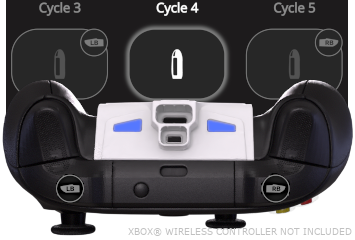
| **Cycle** - **Bumpers** is for games where <img src="/files/FTIPMMo2lFVsDuBcyTX7" alt="" data-size="line">tapping <img src="/files/ES0iUnH7AMh4bZLZ9UTq" alt="" data-size="line"> Left or Right <img src="/files/JuYAV8qiifX5GsoPndjj" alt="" data-size="line"> Bumper cycles back & forth between weapons.  (**Cycle** - **Triggers** is available for compatibility with flipped play): | <img src="/files/cRnoKivEdVwl7RV8Rjen" alt="" data-size="original"> |
|                                                                                                                                                                                                                                                                                                                                                                                           |                                                                     |
| **Cycle** - **D**-**Pad** is for games where <img src="/files/FTIPMMo2lFVsDuBcyTX7" alt="" data-size="line">tapping <img src="/files/7bpZiJ7hhGGyJ1JzROKw" alt="" data-size="line"> Left or Right <img src="/files/NDNZLOYoDmE3IzE9oVsi" alt="" data-size="line"> D-Pad cycles back & forth between weapons:                                                                              | <img src="/files/yoSYWIOjs3zWQTKsKoec" alt="" data-size="original"> |

After making your selection, <img src="/files/FTIPMMo2lFVsDuBcyTX7" alt="" data-size="line">tap the <img src="/files/dpReF9U32yw5i8PfsY5K" alt="" data-size="line">back-arrow at the top-left to return to the Dashboard.  If none of the **Cycle** options sufficiently support your game, you will need to fallback to Direct.

***

<figure><img src="/files/n1hXc4rkEVnRhEinN7AO" alt=""><figcaption></figcaption></figure>

### <mark style="color:green;">Sync Your Cycle Slots</mark> <img src="/files/fvVC6wrWV6BWwKVYqLt3" alt="" data-size="line"><img src="/files/ilkFWEeFpdOXsfrfVtbr" alt="" data-size="line"><img src="/files/60KiXgw0TMf9wdBWr0BI" alt="" data-size="line"><img src="/files/KTgTEhflcmfesjVzlElM" alt="" data-size="line">

<figure><img src="/files/EoZ7m9C4dcmsd1t0Vcxd" alt=""><figcaption></figcaption></figure>

Weapon Slots, or Weapon Selection Buttons if you prefer, serve as the interface for managing different Weapon M.O.D.s, Anti-Recoil, and settings to each of your preferred weapons.

***

<table data-header-hidden data-full-width="false"><thead><tr><th>Info</th><th>Image</th></tr></thead><tbody><tr><td>You <mark style="color:red;"><strong>MUST ALWAYS</strong></mark> adjust the "<strong>Cycle Slots</strong>" setting on the Dashboard to align with your current number of in-game weapons:</td><td><img src="/files/DqiZBgpKNg3u128daB0S" alt="" data-size="original"></td></tr></tbody></table>

"**Cycle**" Slots, or Weapon Slots that are included within the cycle, will track your button presses, enabling them to synchronize with in-game weapon switching.

***

The consistency of this synchronization will depend on how well you organize your in-game weapons inventory, and how much you stay on top of the Cycle Slots setting when your weapon count changes.

***

Frequently, it is necessary to resynchronize this feature with your game, especially after respawns, accessing menus, or picking up more weapons and adjusting the Cycle Slots setting.  To do this:

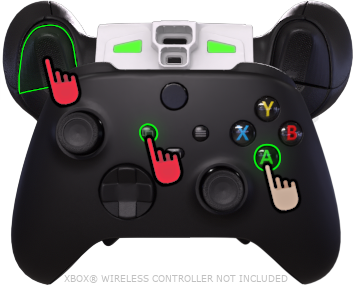
<table data-header-hidden><thead><tr><th>Instructions</th><th>Image</th><th data-hidden></th></tr></thead><tbody><tr><td><strong>In your game</strong>, switch to the "<strong>first weapon in the in</strong>-<strong>game cycle</strong>", <span data-gb-custom-inline data-tag="emoji" data-code="26a0">⚠️</span> <strong>DO NOT</strong> hold left trigger <span data-gb-custom-inline data-tag="emoji" data-code="26a0">⚠️</span>, then while <img src="/files/WKxGM5nEvfMbZOqHLzmA" alt="" data-size="line"><em><strong>HOLDING</strong></em> <img src="/files/2lTbgkJvbrlMoA8jc7kj" alt="" data-size="line"><em><strong>ACTIVATOR</strong>,</em> <img src="/files/FTIPMMo2lFVsDuBcyTX7" alt="" data-size="line"><em><strong>TAP</strong></em> <img src="/files/fvVC6wrWV6BWwKVYqLt3" alt="" data-size="line"> to sync...</td><td><p><img src="/files/1fs2mof3eSw0d3JzjT34" alt="" data-size="original"></p><hr><p>...indicated as a <img src="/files/U9fqo30mcRX9AQDOBYX0" alt=""> RGB LED &#x26; Dashboard <strong>Cycle 1</strong> highlight.</p></td><td></td></tr></tbody></table>

Any remaining numbered slots that are NOT included within the cycle will be labelled "**Weapon**".  Should the automatic swapping of button tracking become inconvenient, you can put it on pause by manually swapping to any of these remaining "**Weapon**" Slots.

<figure><img src="/files/n1hXc4rkEVnRhEinN7AO" alt=""><figcaption></figcaption></figure>

### <mark style="color:green;">Controller Shortcuts</mark> <img src="/files/fvVC6wrWV6BWwKVYqLt3" alt="" data-size="line"><img src="/files/ilkFWEeFpdOXsfrfVtbr" alt="" data-size="line"><img src="/files/60KiXgw0TMf9wdBWr0BI" alt="" data-size="line"><img src="/files/KTgTEhflcmfesjVzlElM" alt="" data-size="line">

<figure><img src="/files/EoZ7m9C4dcmsd1t0Vcxd" alt=""><figcaption></figcaption></figure>

**Controller Shortcuts** enable you to swap between Slots without reaching for the app.  Explore the **Indicators** tab for a more visual breakdown:

{% tabs %}
{% tab title="Cycle - 1-4" %}

<figure><img src="/files/i4kKWlHVEXnMyHbDtfhl" alt=""><figcaption></figcaption></figure>

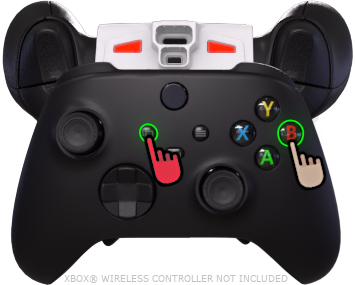
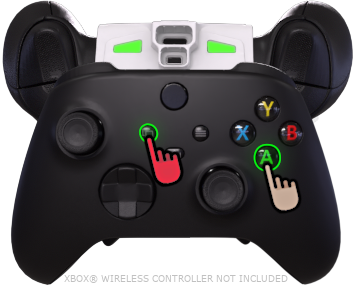
While <img src="/files/2lTbgkJvbrlMoA8jc7kj" alt="" data-size="line">***ACTIVATOR*** is <img src="/files/WKxGM5nEvfMbZOqHLzmA" alt="" data-size="line">***HELD***, :warning:**DO NOT** hold left trigger:warning:, then ***FACE*** buttons can be <img src="/files/FTIPMMo2lFVsDuBcyTX7" alt="" data-size="line">***TAPPED*** to swap between the following:

<img src="/files/fvVC6wrWV6BWwKVYqLt3" alt="" data-size="line">![](/files/wRY4b3nBOtZUGKHmwARW)

*(Cycle 1)*

<img src="/files/ilkFWEeFpdOXsfrfVtbr" alt="" data-size="line">![](/files/xyZkpuZtmHjL9kcKQ6cm)

*(Cycle 2)*

<img src="/files/60KiXgw0TMf9wdBWr0BI" alt="" data-size="line">![](/files/9vMMILCViAjvjEXkiI8Q)

*(Cycle 3)*

<img src="/files/KTgTEhflcmfesjVzlElM" alt="" data-size="line">![](/files/UNloOwycYFI3jsnQ85nZ)

*(Cycle 4)*

Identify the **ACTIVE** slot via the Dashboard highlight or RGB LED indicator.

***

See the other tab for Weapon Slots **5**-**8**.

***

{% hint style="info" %}
On the Dashboard, you can cycle through **Active Weapon**, or a single <img src="/files/FTIPMMo2lFVsDuBcyTX7" alt="" data-size="line">tap on a slot will swap to it.  Repeated <img src="/files/FTIPMMo2lFVsDuBcyTX7" alt="" data-size="line">taps will cycle the slot between its currently assigned Fire Mode, Regular Fire, and Rapid Fire.
{% endhint %}

{% hint style="warning" %}
Quickly releasing or holding <img src="/files/2lTbgkJvbrlMoA8jc7kj" alt="" data-size="line">***ACTIVATOR*** for too long will allow its normal game input to pass through, triggering in-game menus, so strive to activate shortcuts swiftly.
{% endhint %}
{% endtab %}

{% tab title="Cycle - 5-8" %}

<div align="center"><figure><img src="/files/tn62MxSkklQe3EN85aFA" alt=""><figcaption></figcaption></figure></div>

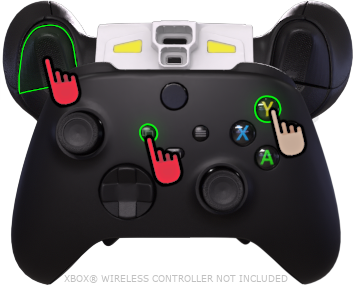
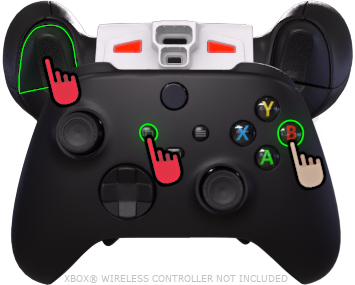
If while <img src="/files/2lTbgkJvbrlMoA8jc7kj" alt="" data-size="line">***ACTIVATOR*** is <img src="/files/WKxGM5nEvfMbZOqHLzmA" alt="" data-size="line">***HELD***, <img src="/files/IDH9ui7OWxRTcEOMhIbn" alt="" data-size="line">***LEFT TRIGGER*** is also <img src="/files/WKxGM5nEvfMbZOqHLzmA" alt="" data-size="line">***HELD***, then ***FACE*** buttons can be <img src="/files/FTIPMMo2lFVsDuBcyTX7" alt="" data-size="line">***TAPPED*** to swap between the following:

<img src="/files/fvVC6wrWV6BWwKVYqLt3" alt="" data-size="line">![](/files/L2i7hsNPGUvMCZ8eS3Wl)

*(Cycle 5)*

<img src="/files/ilkFWEeFpdOXsfrfVtbr" alt="" data-size="line">![](/files/IU5brU6IY7UEIEzYqxli)

*(Cycle 6)*

<img src="/files/60KiXgw0TMf9wdBWr0BI" alt="" data-size="line">![](/files/EOcnEC1AG5JPNjAAJSXR)

*(Cycle 7)*

<img src="/files/KTgTEhflcmfesjVzlElM" alt="" data-size="line">![](/files/PKelWBslGnM5PrHI1GUQ)

*(Cycle 8)*

Identify the **ACTIVE** slot via the Dashboard highlight or **PULSING** RGB LED indicator.

***

See the other tab for Weapon Slots **1**-**4**.

***

{% hint style="info" %}
On the Dashboard, you can cycle through **Active Weapon**, or a single <img src="/files/FTIPMMo2lFVsDuBcyTX7" alt="" data-size="line">tap on a slot will swap to it.  Repeated <img src="/files/FTIPMMo2lFVsDuBcyTX7" alt="" data-size="line">taps will cycle the slot between its currently assigned Fire Mode, Regular Fire, and Rapid Fire.
{% endhint %}

{% hint style="warning" %}
Quickly releasing or holding <img src="/files/2lTbgkJvbrlMoA8jc7kj" alt="" data-size="line">***ACTIVATOR*** for too long will allow its normal game input to pass through, triggering in-game menus, so strive to activate shortcuts swiftly.
{% endhint %}
{% endtab %}

{% tab title="Indicators" %}

| <p>(App Control)</p><p><strong>Active Weapon</strong></p>           | <p><img src="/files/7OwOwpw0S1jTGGiW7GpV" alt="" data-size="original"></p><hr><p>While <img src="/files/2lTbgkJvbrlMoA8jc7kj" alt="" data-size="line"><em><strong>ACTIVATOR</strong></em> is <img src="/files/WKxGM5nEvfMbZOqHLzmA" alt="" data-size="line"><em><strong>HELD</strong></em>, shortcuts can be activated in quick succession.</p> |
| ------------------------------------------------------------------- | ----------------------------------------------------------------------------------------------------------------------------------------------------------------------------------------------------------------------------------------------------------------------------------------------------------------------------------------------- |
| <img src="/files/1fs2mof3eSw0d3JzjT34" alt="" data-size="original"> | <p><img src="/files/t7y9ol4TOaDw3qBriJT2" alt="" data-size="original"></p><p><img src="/files/wRY4b3nBOtZUGKHmwARW" alt=""></p><p>(<strong>Cycle 1</strong>)</p>                                                                                                                                                                                |
| <img src="/files/n4aSLh811jijFnu4YECx" alt="" data-size="original"> | <p><img src="/files/jUS1DUow5iSGQ4mbFnkg" alt="" data-size="original"></p><p><img src="/files/xyZkpuZtmHjL9kcKQ6cm" alt=""></p><p>(<strong>Cycle 2</strong>)</p>                                                                                                                                                                                |
| <img src="/files/cCWAJhs3CNuJsEjoxihO" alt="" data-size="original"> | <p><img src="/files/i9AaaiXUdU1U0zGNgSLl" alt="" data-size="original"></p><p><img src="/files/9vMMILCViAjvjEXkiI8Q" alt=""></p><p>(<strong>Cycle 3</strong>)</p>                                                                                                                                                                                |
| <img src="/files/8ODft5rUnmEa36R3BiIC" alt="" data-size="original"> | <p><img src="/files/UNloOwycYFI3jsnQ85nZ" alt=""></p><p>(<strong>Cycle 4</strong>)</p>                                                                                                                                                                                                                                                          |
| <img src="/files/Js7iESXyux8YMVM5PTYf" alt="" data-size="original"> | <p><img src="/files/L2i7hsNPGUvMCZ8eS3Wl" alt=""></p><p>(<strong>Cycle 5</strong>)</p><p>(<strong>Pulsing</strong>)</p>                                                                                                                                                                                                                         |
| <img src="/files/2Ctfxww7chqwJn0MhA4D" alt="" data-size="original"> | <p><img src="/files/IU5brU6IY7UEIEzYqxli" alt=""></p><p>(<strong>Cycle 6</strong>)</p><p>(<strong>Pulsing</strong>)</p>                                                                                                                                                                                                                         |
| <img src="/files/FxyVSdqw77OYdrTbBOST" alt="" data-size="original"> | <p><img src="/files/EOcnEC1AG5JPNjAAJSXR" alt=""></p><p>(<strong>Cycle 7</strong>)</p><p>(<strong>Pulsing</strong>)</p>                                                                                                                                                                                                                         |
| <img src="/files/lu5R7Qf6rkOaWxlCMldD" alt="" data-size="original"> | <p><img src="/files/PKelWBslGnM5PrHI1GUQ" alt=""></p><p>(<strong>Cycle 8</strong>)</p><p>(<strong>Pulsing</strong>)</p>                                                                                                                                                                                                                         |
| {% endtab %}                                                        |                                                                                                                                                                                                                                                                                                                                                 |
| {% endtabs %}                                                       |                                                                                                                                                                                                                                                                                                                                                 |


---

# Agent Instructions
This documentation is published with GitBook. GitBook is the documentation platform designed so that both humans and AI agents can read, navigate, and reason over technical content effectively. Learn more at gitbook.com.

## Querying This Documentation
If you need additional information that is not directly available in this page, you can query the documentation dynamically by asking a question.

Perform an HTTP GET request on the current page URL with the `ask` query parameter, and the optional `goal` query parameter:

```
GET https://guide.strikepack.com/horizon/manuals/gamepack/weaponswapmode/cycle.md?ask=<question>&goal=<endgoal>
```

`ask` is the immediate question: it should be specific, self-contained, and written in natural language.
`goal` is optional and describes the broader end goal you are ultimately trying to accomplish on behalf of the user. GitBook uses it to tailor the answer towards what is most useful for that goal.

The response will contain a direct answer to the question and relevant excerpts and sources from the documentation.

Use this mechanism when the answer is not explicitly present in the current page, you need clarification or additional context, or you want to retrieve related documentation sections.