# Mapping

## <mark style="color:red;">Mapping</mark>

<div align="left"><figure><img src="https://1841283601-files.gitbook.io/~/files/v0/b/gitbook-x-prod.appspot.com/o/spaces%2FFYraHizgjOptWmwCAGKE%2Fuploads%2FTXpUlU0IePTnkbfcX2qn%2FBottom_Bar_Mapping.png?alt=media&#x26;token=87fe3ab6-3c0e-4d51-a262-57cd3baa11cf" alt=""><figcaption></figcaption></figure></div>

{% hint style="info" %}
"**Paddle Button**" is a universal term for Paddle or Action/Back Button.

STRIKEPACK HORIZON™ features 4 numbered Paddles:

<img src="https://1841283601-files.gitbook.io/~/files/v0/b/gitbook-x-prod.appspot.com/o/spaces%2FFYraHizgjOptWmwCAGKE%2Fuploads%2FUjFvlyVTHi2Bndqy0XmA%2FPaddles_XB_Horizon.gif?alt=media&#x26;token=01e67408-0211-4c76-aac0-3b6e7b72fb0f" alt="" data-size="original">
{% endhint %}

<figure><img src="https://1841283601-files.gitbook.io/~/files/v0/b/gitbook-x-prod.appspot.com/o/spaces%2FFYraHizgjOptWmwCAGKE%2Fuploads%2FTfmAGiSjZda1qLX7RCfA%2Fline_horizon_flipped.png?alt=media&#x26;token=89672410-9e30-495d-9551-51526f156405" alt=""><figcaption></figcaption></figure>

### <img src="https://1841283601-files.gitbook.io/~/files/v0/b/gitbook-x-prod.appspot.com/o/spaces%2FFYraHizgjOptWmwCAGKE%2Fuploads%2FC81Sjv3wduy9bCRja69o%2FMapping_Icon.png?alt=media&#x26;token=4478ed32-62a1-49b3-8a17-9317e1a633a8" alt="" data-size="line"> Paddle Button Mapping

<figure><img src="https://1841283601-files.gitbook.io/~/files/v0/b/gitbook-x-prod.appspot.com/o/spaces%2FFYraHizgjOptWmwCAGKE%2Fuploads%2F5Jx5Tu6u1wor8lUxYxMw%2Fline_horizon.png?alt=media&#x26;token=7db97041-9d92-468c-9c18-a0fcbb400984" alt=""><figcaption></figcaption></figure>

{% hint style="success" %}
STRIKEPACK HORIZON™ features per GAMEPACK Profile Paddle Button Mapping:
{% endhint %}

<figure><img src="https://1841283601-files.gitbook.io/~/files/v0/b/gitbook-x-prod.appspot.com/o/spaces%2FFYraHizgjOptWmwCAGKE%2Fuploads%2FjvuniJx1VAqlMGILHE2S%2FController_Mapping_Presentation_Twin.png?alt=media&#x26;token=58b005ff-c403-484f-9358-eb4660fa0833" alt=""><figcaption></figcaption></figure>

<table data-header-hidden><thead><tr><th>Instructions</th><th>Image</th><th data-hidden></th></tr></thead><tbody><tr><td><img src="https://1841283601-files.gitbook.io/~/files/v0/b/gitbook-x-prod.appspot.com/o/spaces%2FFYraHizgjOptWmwCAGKE%2Fuploads%2F0zAKxtU3XqgjkE0tSZ9u%2FTap_Icon.png?alt=media&#x26;token=5e6ad0e0-afcf-4a92-993e-837c83422b7f" alt="" data-size="line">Tap the <img src="https://1841283601-files.gitbook.io/~/files/v0/b/gitbook-x-prod.appspot.com/o/spaces%2FFYraHizgjOptWmwCAGKE%2Fuploads%2FC81Sjv3wduy9bCRja69o%2FMapping_Icon.png?alt=media&#x26;token=4478ed32-62a1-49b3-8a17-9317e1a633a8" alt="" data-size="line"><strong>Mapping</strong> icon, located on the bottom-bar, to either open or close the "<strong>Paddle Button Mapping</strong>" section.</td><td><img src="https://1841283601-files.gitbook.io/~/files/v0/b/gitbook-x-prod.appspot.com/o/spaces%2FFYraHizgjOptWmwCAGKE%2Fuploads%2FTXpUlU0IePTnkbfcX2qn%2FBottom_Bar_Mapping.png?alt=media&#x26;token=87fe3ab6-3c0e-4d51-a262-57cd3baa11cf" alt="" data-size="original"></td><td></td></tr></tbody></table>

This features **Controller Button to Paddle Button Mapping** & **Paddle Button M**.**O**.**D**.**s**.

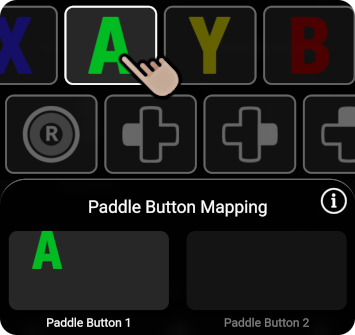
<table data-header-hidden><thead><tr><th>Instructions</th><th>Image</th><th data-hidden></th></tr></thead><tbody><tr><td><strong>On the app</strong>, <img src="https://1841283601-files.gitbook.io/~/files/v0/b/gitbook-x-prod.appspot.com/o/spaces%2FFYraHizgjOptWmwCAGKE%2Fuploads%2F0zAKxtU3XqgjkE0tSZ9u%2FTap_Icon.png?alt=media&#x26;token=5e6ad0e0-afcf-4a92-993e-837c83422b7f" alt="" data-size="line">tap the Paddle Button option that you wish to map.</td><td><img src="broken-reference" alt="" data-size="original"></td><td></td></tr></tbody></table>

It will be singled out as highlighted & selected, with **16** mappable controller buttons on display for you to swipe through.

<table data-header-hidden><thead><tr><th>Instructions</th><th>Image</th><th data-hidden></th></tr></thead><tbody><tr><td>To <strong>map</strong> to the Paddle Button, <img src="https://1841283601-files.gitbook.io/~/files/v0/b/gitbook-x-prod.appspot.com/o/spaces%2FFYraHizgjOptWmwCAGKE%2Fuploads%2F0zAKxtU3XqgjkE0tSZ9u%2FTap_Icon.png?alt=media&#x26;token=5e6ad0e0-afcf-4a92-993e-837c83422b7f" alt="" data-size="line">tap a button icon to highlight &#x26; map it.</td><td><img src="https://1841283601-files.gitbook.io/~/files/v0/b/gitbook-x-prod.appspot.com/o/spaces%2FFYraHizgjOptWmwCAGKE%2Fuploads%2F14nh2SHJfEiQdNA3bZ1W%2FPaddle_Button_Mapping_Single.png?alt=media&#x26;token=fc34eae1-8b28-45cd-80ff-398ba4569819" alt="" data-size="original"></td><td></td></tr></tbody></table>

You can map up to **4** controller buttons to be simultaneously pressed, **per** Paddle Button:

<table data-header-hidden><thead><tr><th>Instructions</th><th>Image</th><th data-hidden></th></tr></thead><tbody><tr><td><p></p><p>To <strong>unmap</strong> from the Paddle Button, <img src="https://1841283601-files.gitbook.io/~/files/v0/b/gitbook-x-prod.appspot.com/o/spaces%2FFYraHizgjOptWmwCAGKE%2Fuploads%2F0zAKxtU3XqgjkE0tSZ9u%2FTap_Icon.png?alt=media&#x26;token=5e6ad0e0-afcf-4a92-993e-837c83422b7f" alt="" data-size="line">tap a highlighted button icon to unmap it, or <img src="https://1841283601-files.gitbook.io/~/files/v0/b/gitbook-x-prod.appspot.com/o/spaces%2FFYraHizgjOptWmwCAGKE%2Fuploads%2F0zAKxtU3XqgjkE0tSZ9u%2FTap_Icon.png?alt=media&#x26;token=5e6ad0e0-afcf-4a92-993e-837c83422b7f" alt="" data-size="line">tap <strong>Clear ALL Mapped Buttons</strong> to clear the Paddle Button.</p></td><td><img src="https://1841283601-files.gitbook.io/~/files/v0/b/gitbook-x-prod.appspot.com/o/spaces%2FFYraHizgjOptWmwCAGKE%2Fuploads%2FprtH26iJ9rF7wt8PQkb3%2FPaddle_Button_Mapping_2.png?alt=media&#x26;token=938613ee-89ce-45d0-9ed3-99912fe3c614" alt="" data-size="original"></td><td></td></tr></tbody></table>

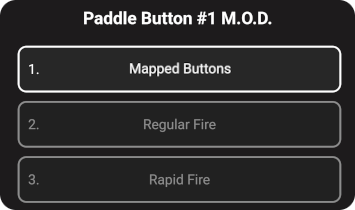
You can bring up a Paddle Button's **Option Selector** with a **M**.**O**.**D**. list to choose from:

<table data-header-hidden><thead><tr><th>Instructions</th><th>Image</th><th data-hidden></th></tr></thead><tbody><tr><td><img src="https://1841283601-files.gitbook.io/~/files/v0/b/gitbook-x-prod.appspot.com/o/spaces%2FFYraHizgjOptWmwCAGKE%2Fuploads%2FZJbYYncrEvgR9kdjLoL0%2FHold_Icon.png?alt=media&#x26;token=d690c237-048b-48d3-b147-0f0a52116811" alt="" data-size="line">Hold your finger on the Paddle Button option until it fully traces itself.</td><td><img src="https://1841283601-files.gitbook.io/~/files/v0/b/gitbook-x-prod.appspot.com/o/spaces%2FFYraHizgjOptWmwCAGKE%2Fuploads%2FkCGm3lRKgKiaZMJOiWQn%2FPaddle_Button_M.O.D._Hold.png?alt=media&#x26;token=8ef49628-0a7b-4dff-9177-5fbef7565597" alt=""></td><td></td></tr><tr><td><strong>Mapped Buttons</strong> is the default option.  If you wish, you can assign this Paddle Button to a different function instead.</td><td><p><img src="https://1841283601-files.gitbook.io/~/files/v0/b/gitbook-x-prod.appspot.com/o/spaces%2FFYraHizgjOptWmwCAGKE%2Fuploads%2FySaBIy4cHtwptAH2GNcd%2FPaddle_Button_M.O.D._Option_Selector.png?alt=media&#x26;token=967f0e48-d68f-44db-8af9-50c4d4283673" alt="" data-size="original"><img src="https://1841283601-files.gitbook.io/~/files/v0/b/gitbook-x-prod.appspot.com/o/spaces%2FFYraHizgjOptWmwCAGKE%2Fuploads%2FzippIsu4atCffcCrGoZ2%2FAlt_Activator_Toggle_M.O.D.s.png?alt=media&#x26;token=da0828c0-2460-4f8e-bbf2-1028050b6263" alt="" data-size="original"> </p><p></p><p><span data-gb-custom-inline data-tag="emoji" data-code="203c">‼️</span> <strong>Paddle Button M</strong>.<strong>O</strong>.<strong>D</strong>.<strong>s</strong> are easy to use, due to them being separate from normal controller functionality.  They will be covered much later.</p></td><td></td></tr></tbody></table>

#### Notable Paddle Button M.O.D.s:

* The optional **Alt Activator** Paddle Button M.O.D. replaces the **Controller Shortcut** <img src="https://1841283601-files.gitbook.io/~/files/v0/b/gitbook-x-prod.appspot.com/o/spaces%2FFYraHizgjOptWmwCAGKE%2Fuploads%2FjeFucKQmm4rrUhSHlHZZ%2Fview.png?alt=media&#x26;token=a2cc8763-fb61-455c-a427-838c9d2b0042" alt="" data-size="line">***ACTIVATOR*** button, while restoring <img src="https://1841283601-files.gitbook.io/~/files/v0/b/gitbook-x-prod.appspot.com/o/spaces%2FFYraHizgjOptWmwCAGKE%2Fuploads%2FjeFucKQmm4rrUhSHlHZZ%2Fview.png?alt=media&#x26;token=a2cc8763-fb61-455c-a427-838c9d2b0042" alt="" data-size="line">***VIEW*** to a normal controller button.
* The **Toggle M**.**O**.**D**.**s** Paddle Button M.O.D. is a shortcut toggle for <img src="https://1841283601-files.gitbook.io/~/files/v0/b/gitbook-x-prod.appspot.com/o/spaces%2FFYraHizgjOptWmwCAGKE%2Fuploads%2FpyVImNpmDraeUnEjh4wt%2F__red_stop.png?alt=media&#x26;token=3315e55c-f741-4557-b53e-bc0b892856cf" alt="" data-size="line">**M**.**O**.**D**.**S BLOCKED**.

{% hint style="info" %}
Remember that tapping the <img src="https://1841283601-files.gitbook.io/~/files/v0/b/gitbook-x-prod.appspot.com/o/spaces%2FFYraHizgjOptWmwCAGKE%2Fuploads%2FC81Sjv3wduy9bCRja69o%2FMapping_Icon.png?alt=media&#x26;token=4478ed32-62a1-49b3-8a17-9317e1a633a8" alt="" data-size="line">**Mapping** icon again will close the section.
{% endhint %}

<figure><img src="https://1841283601-files.gitbook.io/~/files/v0/b/gitbook-x-prod.appspot.com/o/spaces%2FFYraHizgjOptWmwCAGKE%2Fuploads%2FTfmAGiSjZda1qLX7RCfA%2Fline_horizon_flipped.png?alt=media&#x26;token=89672410-9e30-495d-9551-51526f156405" alt=""><figcaption></figcaption></figure>

### Hardware Mapping

<figure><img src="https://1841283601-files.gitbook.io/~/files/v0/b/gitbook-x-prod.appspot.com/o/spaces%2FFYraHizgjOptWmwCAGKE%2Fuploads%2F5Jx5Tu6u1wor8lUxYxMw%2Fline_horizon.png?alt=media&#x26;token=7db97041-9d92-468c-9c18-a0fcbb400984" alt=""><figcaption></figcaption></figure>

It is possible to map Paddle Buttons on the **STRIKEPACK HORIZON**™ controller adapter without reaching for the app.  The video below shows this process for both **Tournament Mapping** & <mark style="color:green;">**GAMEPACK Mapping**</mark>:

### Mapping Video

{% embed url="<https://youtu.be/LYjLsVwYzh4>" %}

<div align="left"><figure><img src="broken-reference" alt=""><figcaption></figcaption></figure></div>

1. <img src="https://1841283601-files.gitbook.io/~/files/v0/b/gitbook-x-prod.appspot.com/o/spaces%2FFYraHizgjOptWmwCAGKE%2Fuploads%2FZJbYYncrEvgR9kdjLoL0%2FHold_Icon.png?alt=media&#x26;token=d690c237-048b-48d3-b147-0f0a52116811" alt="" data-size="line">***HOLD*** either **one** of the ***MAPPING*** buttons on the **STRIKEPACK HORIZON**™ until the Gearhead Eyes & both RGB LEDs turn a shade of <mark style="color:purple;">**PURPLE**</mark>.  You can now ***RELEASE*** the Mapping Mode button.
   * *<mark style="color:green;">**If you are in a GAMEPACK profile**</mark>,* "**Paddle Button Mapping**" will have automatically popped up on the app to provide visual indication.
2. You can <img src="https://1841283601-files.gitbook.io/~/files/v0/b/gitbook-x-prod.appspot.com/o/spaces%2FFYraHizgjOptWmwCAGKE%2Fuploads%2FZJbYYncrEvgR9kdjLoL0%2FHold_Icon.png?alt=media&#x26;token=d690c237-048b-48d3-b147-0f0a52116811" alt="" data-size="line">***HOLD 1**-**4*** controller buttons **together** to be mapped to a Paddle Button.  While you are <img src="https://1841283601-files.gitbook.io/~/files/v0/b/gitbook-x-prod.appspot.com/o/spaces%2FFYraHizgjOptWmwCAGKE%2Fuploads%2FZJbYYncrEvgR9kdjLoL0%2FHold_Icon.png?alt=media&#x26;token=d690c237-048b-48d3-b147-0f0a52116811" alt="" data-size="line">***HOLDING*** the controller button(s) that you wish to map, <img src="https://1841283601-files.gitbook.io/~/files/v0/b/gitbook-x-prod.appspot.com/o/spaces%2FFYraHizgjOptWmwCAGKE%2Fuploads%2F0zAKxtU3XqgjkE0tSZ9u%2FTap_Icon.png?alt=media&#x26;token=5e6ad0e0-afcf-4a92-993e-837c83422b7f" alt="" data-size="line">***TAP*** the ***PADDLE BUTTON*** that you want to map to.  A successful mapping assignment will flash <mark style="color:green;">**GREEN**</mark>.
3. To unmap (**clear**) a Paddle Button, while **NO** controller buttons are held, <img src="https://1841283601-files.gitbook.io/~/files/v0/b/gitbook-x-prod.appspot.com/o/spaces%2FFYraHizgjOptWmwCAGKE%2Fuploads%2F0zAKxtU3XqgjkE0tSZ9u%2FTap_Icon.png?alt=media&#x26;token=5e6ad0e0-afcf-4a92-993e-837c83422b7f" alt="" data-size="line">***TAP*** the ***PADDLE BUTTON*** that you want to clear.  A successful unmapping will flash <mark style="color:red;">**RED**</mark>.
4. Repeat **STEP 2** for each Paddle Button that you want to map controller buttons to.
5. To **exit** Mapping Mode, <img src="https://1841283601-files.gitbook.io/~/files/v0/b/gitbook-x-prod.appspot.com/o/spaces%2FFYraHizgjOptWmwCAGKE%2Fuploads%2F0zAKxtU3XqgjkE0tSZ9u%2FTap_Icon.png?alt=media&#x26;token=5e6ad0e0-afcf-4a92-993e-837c83422b7f" alt="" data-size="line">**TAP** either **one** of the ***MAPPING*** buttons.
   * *<mark style="color:green;">**If you are in a GAMEPACK profile**</mark>,* this will close "**Paddle Button Mapping**".

<figure><img src="https://1841283601-files.gitbook.io/~/files/v0/b/gitbook-x-prod.appspot.com/o/spaces%2FFYraHizgjOptWmwCAGKE%2Fuploads%2FTfmAGiSjZda1qLX7RCfA%2Fline_horizon_flipped.png?alt=media&#x26;token=89672410-9e30-495d-9551-51526f156405" alt=""><figcaption></figcaption></figure>

## Controller

<figure><img src="https://1841283601-files.gitbook.io/~/files/v0/b/gitbook-x-prod.appspot.com/o/spaces%2FFYraHizgjOptWmwCAGKE%2Fuploads%2F5Jx5Tu6u1wor8lUxYxMw%2Fline_horizon.png?alt=media&#x26;token=7db97041-9d92-468c-9c18-a0fcbb400984" alt=""><figcaption></figcaption></figure>

And that covers "**Mapping**".  "[**Controller**](https://guide.strikepack.com/horizon/manuals/hockey/gamepacksetup/controller)" will be covered next...

<div align="left"><figure><img src="https://1841283601-files.gitbook.io/~/files/v0/b/gitbook-x-prod.appspot.com/o/spaces%2FFYraHizgjOptWmwCAGKE%2Fuploads%2FhX2MEkZEVceoVnod6D3Q%2FBottom_Bar_Controller_Rumble_Only.png?alt=media&#x26;token=b66fa4b6-3128-4319-974d-649dabf9e69a" alt=""><figcaption></figcaption></figure></div>