# 6. Event Add/Delete

<figure><img src="https://1841283601-files.gitbook.io/~/files/v0/b/gitbook-x-prod.appspot.com/o/spaces%2FFYraHizgjOptWmwCAGKE%2Fuploads%2FTfmAGiSjZda1qLX7RCfA%2Fline_horizon_flipped.png?alt=media&#x26;token=89672410-9e30-495d-9551-51526f156405" alt=""><figcaption></figcaption></figure>

## Event Add/Delete

<figure><img src="https://1841283601-files.gitbook.io/~/files/v0/b/gitbook-x-prod.appspot.com/o/spaces%2FFYraHizgjOptWmwCAGKE%2Fuploads%2F5Jx5Tu6u1wor8lUxYxMw%2Fline_horizon.png?alt=media&#x26;token=7db97041-9d92-468c-9c18-a0fcbb400984" alt=""><figcaption></figcaption></figure>

Originally, you could only change the timing of each event in a macro.  "**Event Add**/**Delete**" is a new feature that allows for a much more advanced level of editing.  You can add/remove "**Button**", **Stick**", and "**Special**" events to an existing macro, or create one from scratch.  This expanded functionality allows you to create more sophisticated macros and generators than were possible before.

<details>

<summary>Page Contents</summary>

[**Event Add/Delete**](#event-add-delete)

[**Add Event**](#add-event)

[**Special Events**](#special-events)

[**Macro Sense**](#macro-sense)

[**Delete Event/All**](#delete-event-all)

</details>

<figure><img src="https://1841283601-files.gitbook.io/~/files/v0/b/gitbook-x-prod.appspot.com/o/spaces%2FFYraHizgjOptWmwCAGKE%2Fuploads%2FTfmAGiSjZda1qLX7RCfA%2Fline_horizon_flipped.png?alt=media&#x26;token=89672410-9e30-495d-9551-51526f156405" alt=""><figcaption></figcaption></figure>

## Add Event

<figure><img src="https://1841283601-files.gitbook.io/~/files/v0/b/gitbook-x-prod.appspot.com/o/spaces%2FFYraHizgjOptWmwCAGKE%2Fuploads%2F5Jx5Tu6u1wor8lUxYxMw%2Fline_horizon.png?alt=media&#x26;token=7db97041-9d92-468c-9c18-a0fcbb400984" alt=""><figcaption></figcaption></figure>

You can add a "**Button**", "**Stick**", or "**Special**" event type to your macro.  You can either add to an existing macro recording, or you can slowly create a macro from "**No Recording**" by adding together various events.  As soon as you <img src="https://1841283601-files.gitbook.io/~/files/v0/b/gitbook-x-prod.appspot.com/o/spaces%2FFYraHizgjOptWmwCAGKE%2Fuploads%2F0zAKxtU3XqgjkE0tSZ9u%2FTap_Icon.png?alt=media&#x26;token=5e6ad0e0-afcf-4a92-993e-837c83422b7f" alt="" data-size="line">**TAP** "**Add**" to enter "**Add Mode**", the app itself will present directions to you.  You can also see below for directions:

<div><figure><img src="https://1841283601-files.gitbook.io/~/files/v0/b/gitbook-x-prod.appspot.com/o/spaces%2FFYraHizgjOptWmwCAGKE%2Fuploads%2FjpKGig0Sc6ruqvgCqdpx%2FAdd_Tap.png?alt=media&#x26;token=3d339440-7248-4835-b787-b4acca5a73ae" alt=""><figcaption><p>Tap "<strong>Add</strong>" to bring up "<strong>Add Mode</strong>".</p></figcaption></figure> <figure><img src="https://1841283601-files.gitbook.io/~/files/v0/b/gitbook-x-prod.appspot.com/o/spaces%2FFYraHizgjOptWmwCAGKE%2Fuploads%2FnLdXpoTRv2lUXTDFQMen%2FTap_Choose_Event.png?alt=media&#x26;token=1f7d9857-c33d-42f7-a3ef-2967c5a8783f" alt=""><figcaption><p>In "<strong>Add Mode</strong>", tap the "<strong>Buttons</strong>", "<strong>Sticks</strong>", or "<strong>Special</strong>" event tab.  Let's add a "<strong>Button</strong>" event!</p></figcaption></figure></div>

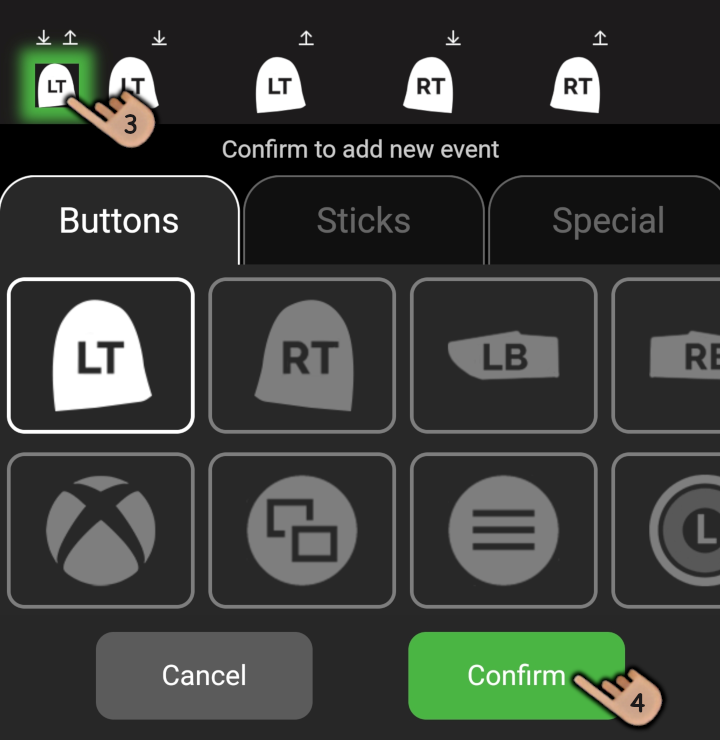
<div><figure><img src="https://1841283601-files.gitbook.io/~/files/v0/b/gitbook-x-prod.appspot.com/o/spaces%2FFYraHizgjOptWmwCAGKE%2Fuploads%2FTRrp6hCoA861XniYMW7O%2FTap_Add_Event.png?alt=media&#x26;token=897a363e-101d-4230-a5ce-cda643e2379a" alt=""><figcaption><p>1: Swipe through &#x26; tap a "<strong>Button</strong>" to add.  2: Tap a press location (<mark style="color:green;"><strong>+</strong></mark>).</p></figcaption></figure> <figure><img src="https://1841283601-files.gitbook.io/~/files/v0/b/gitbook-x-prod.appspot.com/o/spaces%2FFYraHizgjOptWmwCAGKE%2Fuploads%2FQ0jvinGX4BHDkfkSN78J%2FTap_Add_Confirm.png?alt=media&#x26;token=0ef33611-d5a1-450e-b107-841c26f4dedf" alt=""><figcaption><p>3: Tap a release location (<mark style="color:green;"><strong>+</strong></mark>), or the same location.  4: Tap "<mark style="color:green;"><strong>Confirm</strong></mark>" to add the event, or "<strong>Cancel</strong>".</p></figcaption></figure></div>

For "**Stick**" (movement) events, and "**Special**" events, instead of being asked to choose **press & release locations**, in most cases you will be asked to choose a single **event location** instead.  For "**Loop**" special events, you will be asked to choose **loop start & end locations**.

***

If you add a "**Stick**" event, for example, left stick moving to the left <img src="https://1841283601-files.gitbook.io/~/files/v0/b/gitbook-x-prod.appspot.com/o/spaces%2FFYraHizgjOptWmwCAGKE%2Fuploads%2FPphXq6RflazqWaSy1sx1%2Fstick_west_L.png?alt=media&#x26;token=b6c371c8-3aed-4d3a-82b5-34e93d7e4b6b" alt="" data-size="original">, and you want that stick movement to stop, simply add a separate Stick event to center left stick ![](https://1841283601-files.gitbook.io/~/files/v0/b/gitbook-x-prod.appspot.com/o/spaces%2FFYraHizgjOptWmwCAGKE%2Fuploads%2Fg2JdW8mpPjDBkSt5Q64T%2Fstick_neutral_L.png?alt=media\&token=20f6b4d9-7c12-4703-946a-b0f829c4b7b1), same as you can add an event to change its direction ![](https://1841283601-files.gitbook.io/~/files/v0/b/gitbook-x-prod.appspot.com/o/spaces%2FFYraHizgjOptWmwCAGKE%2Fuploads%2FrJFHJ1zkACougMtQc9BX%2Fstick_east_L.png?alt=media\&token=03f946aa-42cd-4e6e-8ca9-16ae3263d03d).  When adding events, try NOT to confuse left stick ![](https://1841283601-files.gitbook.io/~/files/v0/b/gitbook-x-prod.appspot.com/o/spaces%2FFYraHizgjOptWmwCAGKE%2Fuploads%2Fg2JdW8mpPjDBkSt5Q64T%2Fstick_neutral_L.png?alt=media\&token=20f6b4d9-7c12-4703-946a-b0f829c4b7b1) with right stick ![](https://1841283601-files.gitbook.io/~/files/v0/b/gitbook-x-prod.appspot.com/o/spaces%2FFYraHizgjOptWmwCAGKE%2Fuploads%2F7pmepneQ3SstcdkgYyWa%2Fstick_neutral_R.png?alt=media\&token=95d19363-a1c0-4b6a-bcb1-d64941a7bb48) icons.

<figure><img src="https://1841283601-files.gitbook.io/~/files/v0/b/gitbook-x-prod.appspot.com/o/spaces%2FFYraHizgjOptWmwCAGKE%2Fuploads%2FTfmAGiSjZda1qLX7RCfA%2Fline_horizon_flipped.png?alt=media&#x26;token=89672410-9e30-495d-9551-51526f156405" alt=""><figcaption></figcaption></figure>

## Special Events

<figure><img src="https://1841283601-files.gitbook.io/~/files/v0/b/gitbook-x-prod.appspot.com/o/spaces%2FFYraHizgjOptWmwCAGKE%2Fuploads%2F5Jx5Tu6u1wor8lUxYxMw%2Fline_horizon.png?alt=media&#x26;token=7db97041-9d92-468c-9c18-a0fcbb400984" alt=""><figcaption></figcaption></figure>

"**Special**" events and their functionality.  See the full list below:

| Special                                                                                                                                                                                                                                                                                 | Functionality                                                                                                                                                                                                                                                                                                                                                                                                                                                                                                                                                                                                                                                                                                                                                                                                                                                                                                                                                                   |
| --------------------------------------------------------------------------------------------------------------------------------------------------------------------------------------------------------------------------------------------------------------------------------------- | ------------------------------------------------------------------------------------------------------------------------------------------------------------------------------------------------------------------------------------------------------------------------------------------------------------------------------------------------------------------------------------------------------------------------------------------------------------------------------------------------------------------------------------------------------------------------------------------------------------------------------------------------------------------------------------------------------------------------------------------------------------------------------------------------------------------------------------------------------------------------------------------------------------------------------------------------------------------------------- |
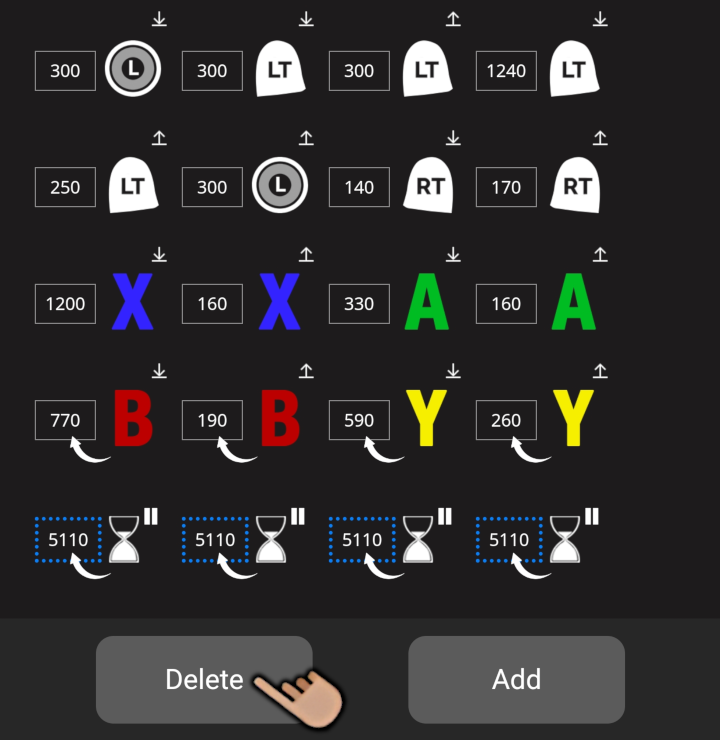
| <img src="https://1841283601-files.gitbook.io/~/files/v0/b/gitbook-x-prod.appspot.com/o/spaces%2FFYraHizgjOptWmwCAGKE%2Fuploads%2F9pXhlWnXte9FhxGoYxSu%2F__pause_time.png?alt=media&#x26;token=febaacc5-113a-49a7-a138-075da5bdd06c" alt="" data-size="line"> "**Wait For Time**".      | This special pauses the macro until a definable amount of time as passed.  The maximum time you can define per special is 5110 milliseconds (5.11 seconds).  If you are using 4ms increments, it is 2040 milliseconds (2.04 seconds).                                                                                                                                                                                                                                                                                                                                                                                                                                                                                                                                                                                                                                                                                                                                           |
| <img src="https://1841283601-files.gitbook.io/~/files/v0/b/gitbook-x-prod.appspot.com/o/spaces%2FFYraHizgjOptWmwCAGKE%2Fuploads%2FNKgfpT32rLrYPe8XK4Z9%2F__pause_rumble.png?alt=media&#x26;token=aa9ca0bf-067b-4099-a98c-ba49e51f678e" alt="" data-size="line"> "**Wait For Rumble**".  | This special pauses the macro until a definable rumble threshold is felt.  The maximum threshold you can define per special is 100% rumble strength.                                                                                                                                                                                                                                                                                                                                                                                                                                                                                                                                                                                                                                                                                                                                                                                                                            |
| <img src="https://1841283601-files.gitbook.io/~/files/v0/b/gitbook-x-prod.appspot.com/o/spaces%2FFYraHizgjOptWmwCAGKE%2Fuploads%2FTwllbQaPXITCnGIbbXAT%2F__pause_input.png?alt=media&#x26;token=2fe2064f-a6c6-4a7d-a6cf-a1d1da1b61ca" alt="" data-size="line"> "**Wait For Input**".    | This special pauses the macro until you press a definable button input.  After you add the special, the default button is <img src="https://1841283601-files.gitbook.io/~/files/v0/b/gitbook-x-prod.appspot.com/o/spaces%2FFYraHizgjOptWmwCAGKE%2Fuploads%2FAsrGw8CNz6zfzVpG8ciR%2Fa_new.png?alt=media&#x26;token=7402d46c-c453-4930-841a-8706a175cadd" alt="A" data-size="line">/ <img src="https://1841283601-files.gitbook.io/~/files/v0/b/gitbook-x-prod.appspot.com/o/spaces%2FFYraHizgjOptWmwCAGKE%2Fuploads%2FxCaLTLUnKHWBKzGZz8C1%2FDS_Cross_Button_V2.png?alt=media&#x26;token=d50d853f-87ba-4894-a358-a613ebef99c5" alt="" data-size="line">, but you can <img src="https://1841283601-files.gitbook.io/~/files/v0/b/gitbook-x-prod.appspot.com/o/spaces%2FFYraHizgjOptWmwCAGKE%2Fuploads%2F0zAKxtU3XqgjkE0tSZ9u%2FTap_Icon.png?alt=media&#x26;token=5e6ad0e0-afcf-4a92-993e-837c83422b7f" alt="" data-size="line">**TAP** its box, then change it to another button. |
| <img src="https://1841283601-files.gitbook.io/~/files/v0/b/gitbook-x-prod.appspot.com/o/spaces%2FFYraHizgjOptWmwCAGKE%2Fuploads%2FNjfF1kTv73Ybbz41DmSc%2F__loop.png?alt=media&#x26;token=4bfa878c-f289-4f1d-a99d-4756265f273e" alt="" data-size="line"> "**Loop Amount**".              | This special loops a section of the macro a definable amount of times before continuing on.  The maximum loop amount you can define per special is 511 loops.                                                                                                                                                                                                                                                                                                                                                                                                                                                                                                                                                                                                                                                                                                                                                                                                                   |

| <img src="https://1841283601-files.gitbook.io/~/files/v0/b/gitbook-x-prod.appspot.com/o/spaces%2FFYraHizgjOptWmwCAGKE%2Fuploads%2F3fz9vnP70OrBb2YsmwR5%2F__loop_rumble.png?alt=media&#x26;token=42b7f3be-4efc-49cb-acbf-8ccbe7a33852" alt="" data-size="line"> "**Loop Until Rumble**". | This special loops a section of the macro until a definable rumble threshold is felt.  The maximum threshold you can define per special is 100% rumble strength.                                                                                                                                                                                                                                                                                                                                                                                                                                                                                                                                                                                                                                                                                                                                                                                                                |
<figure><img src="https://1841283601-files.gitbook.io/~/files/v0/b/gitbook-x-prod.appspot.com/o/spaces%2FFYraHizgjOptWmwCAGKE%2Fuploads%2FTfmAGiSjZda1qLX7RCfA%2Fline_horizon_flipped.png?alt=media&#x26;token=89672410-9e30-495d-9551-51526f156405" alt=""><figcaption></figcaption></figure>

## Macro Sense

<figure><img src="https://1841283601-files.gitbook.io/~/files/v0/b/gitbook-x-prod.appspot.com/o/spaces%2FFYraHizgjOptWmwCAGKE%2Fuploads%2F5Jx5Tu6u1wor8lUxYxMw%2Fline_horizon.png?alt=media&#x26;token=7db97041-9d92-468c-9c18-a0fcbb400984" alt=""><figcaption></figcaption></figure>

{% hint style="warning" %}
Macro will recognize and automatically prevent illogical additions; for example, you can't release a button you haven't pressed yet, and you can't add a loop inside another loop.  See the full list below:
{% endhint %}

| App Message                                                | Meaning                                                                                                                                                                    |
| ---------------------------------------------------------- | -------------------------------------------------------------------------------------------------------------------------------------------------------------------------- |
| "**Release must happen after a press**".                   | Prevents adding a release of a button before it has been pressed.                                                                                                          |
| "**Can**'**t be in same event or in different sections**". | Prevents adding another press/release in between the same button's press/release.  Ensures a button's press/release both happen inside the same loop or outside of a loop. |
| "**Can**'**t be in between another loop**".                | Prevents adding a loop inside another loop.                                                                                                                                |
| "**Can**'**t be in a location with active buttons**".      | Prevents adding a loop start/end in a location that has an active button being held.                                                                                       |
| "**End must happen after start**".                         | Prevents adding a loop end before a loop start.                                                                                                                            |

<figure><img src="https://1841283601-files.gitbook.io/~/files/v0/b/gitbook-x-prod.appspot.com/o/spaces%2FFYraHizgjOptWmwCAGKE%2Fuploads%2FTfmAGiSjZda1qLX7RCfA%2Fline_horizon_flipped.png?alt=media&#x26;token=89672410-9e30-495d-9551-51526f156405" alt=""><figcaption></figcaption></figure>

## Delete Event/All

<figure><img src="https://1841283601-files.gitbook.io/~/files/v0/b/gitbook-x-prod.appspot.com/o/spaces%2FFYraHizgjOptWmwCAGKE%2Fuploads%2F5Jx5Tu6u1wor8lUxYxMw%2Fline_horizon.png?alt=media&#x26;token=7db97041-9d92-468c-9c18-a0fcbb400984" alt=""><figcaption></figcaption></figure>

You can delete any event from a macro.  See below for directions:

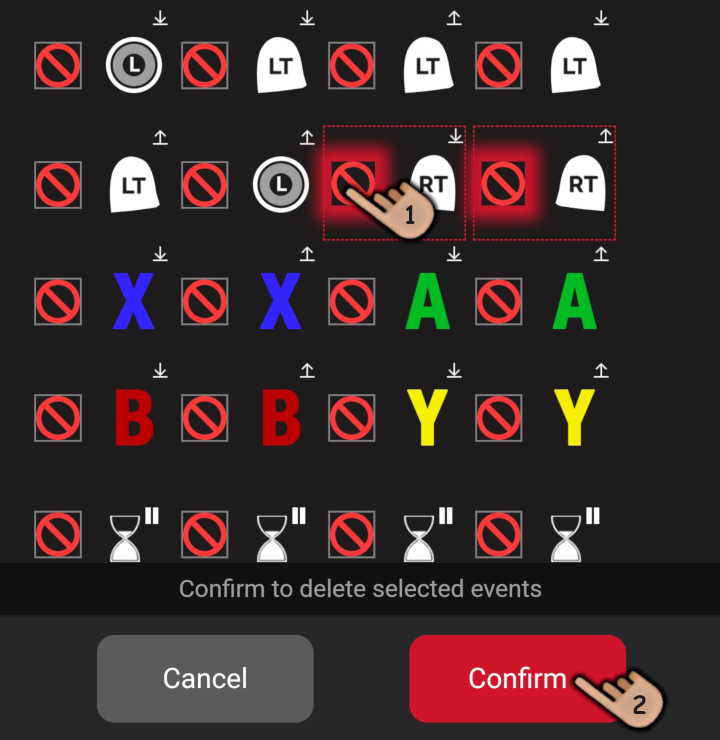
<div align="left"><figure><img src="https://1841283601-files.gitbook.io/~/files/v0/b/gitbook-x-prod.appspot.com/o/spaces%2FFYraHizgjOptWmwCAGKE%2Fuploads%2F9CU0AQvMEUbom53a4iPB%2FDelete_Tap.png?alt=media&#x26;token=391347d9-948c-4042-9053-a60e7c79b945" alt=""><figcaption><p>Tap "<strong>Delete</strong>" to bring up "<strong>Delete Mode</strong>".</p></figcaption></figure> <figure><img src="https://1841283601-files.gitbook.io/~/files/v0/b/gitbook-x-prod.appspot.com/o/spaces%2FFYraHizgjOptWmwCAGKE%2Fuploads%2FNpLgGYzK3zZr4w3tWk3a%2FDelete_Select_Confirm.png?alt=media&#x26;token=80c77299-46bd-4677-8f17-9dba315998c9" alt=""><figcaption><p>1: In "<strong>Delete Mode</strong>", tap the "<mark style="color:red;"><strong>No</strong></mark>" sign in front of an event to select its start &#x26; end.  2: Tap "<mark style="color:red;"><strong>Confirm</strong></mark>" to delete, or "<strong>Cancel</strong>".</p></figcaption></figure></div>

You can delete all of a macro at once.  See below for directions:

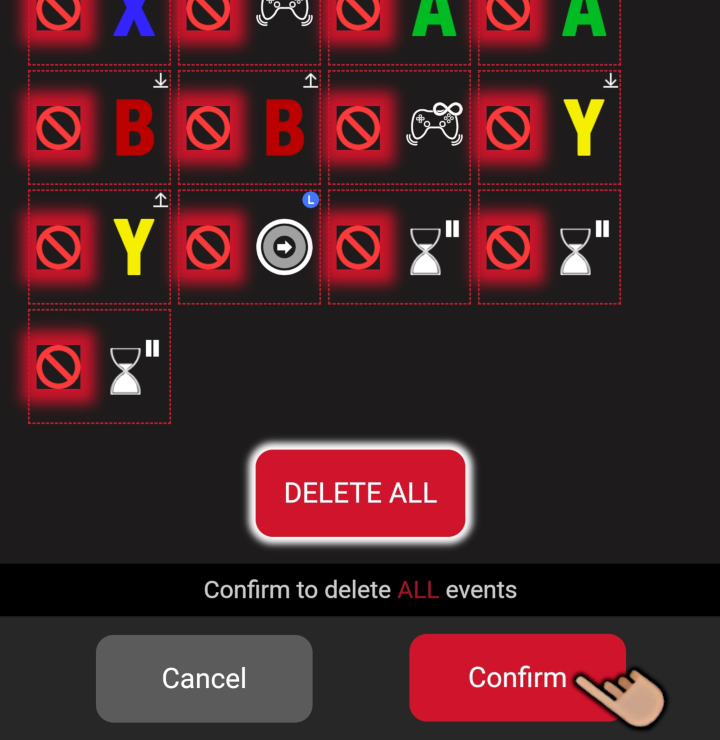
<div align="left"><figure><img src="https://1841283601-files.gitbook.io/~/files/v0/b/gitbook-x-prod.appspot.com/o/spaces%2FFYraHizgjOptWmwCAGKE%2Fuploads%2FWOhkDV29IOlOeXOooCwV%2FDelete_All_Hold.png?alt=media&#x26;token=b87b6a88-ee20-447f-9551-14117ffe9e31" alt=""><figcaption><p>In "<strong>Delete Mode</strong>", if you swipe to the end of the macro, you can hold "<mark style="color:red;"><strong>DELETE ALL</strong></mark>" until it glows to select all events for deletion.</p></figcaption></figure> <figure><img src="https://1841283601-files.gitbook.io/~/files/v0/b/gitbook-x-prod.appspot.com/o/spaces%2FFYraHizgjOptWmwCAGKE%2Fuploads%2FHeBGroptAiUuML34s5Vl%2FDelete_All_Confirm.png?alt=media&#x26;token=d188075f-65f6-4ab3-94ad-770b6bb923cf" alt=""><figcaption><p>Tap "<mark style="color:red;"><strong>Confirm</strong></mark>" to delete all events, or "<strong>Cancel</strong>".</p></figcaption></figure></div>