
 |
| 
 **Settings**, "**Weapon Swap Mode**" covers managing Weapon M.O.D.s (Macros On Demand) through **8** Weapon Slots & swapping between slots during gameplay.
***
To fully take advantage of the powerful customization on offer, such as per Weapon Slot Fire Modes, Optimized Anti-Recoil, & Quick Edit Adjustments, you will **definitely** need to be aware of which Weapon Slot is **ACTIVE** within the moment to avoid unintentionally applying the wrong M.O.D.s to the wrong weapon.
***
Fortunately, in addition to RGB LED indication on the STRIKEPACK™ itself, the app provides clear indication of the GAMEPACK's current position & exactly what is being applied.
**Settings**, "**Weapon Swap Mode**" covers managing Weapon M.O.D.s (Macros On Demand) through **8** Weapon Slots & swapping between slots during gameplay.
***
To fully take advantage of the powerful customization on offer, such as per Weapon Slot Fire Modes, Optimized Anti-Recoil, & Quick Edit Adjustments, you will **definitely** need to be aware of which Weapon Slot is **ACTIVE** within the moment to avoid unintentionally applying the wrong M.O.D.s to the wrong weapon.
***
Fortunately, in addition to RGB LED indication on the STRIKEPACK™ itself, the app provides clear indication of the GAMEPACK's current position & exactly what is being applied.
| Instructions | Image | |
|---|---|---|
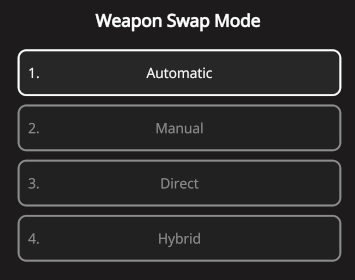
 Tap the GEAR icon at the top-right of the Dashboard to go to the "Settings" area, then find the "Weapon Swap Mode" setting. Tap the GEAR icon at the top-right of the Dashboard to go to the "Settings" area, then find the "Weapon Swap Mode" setting. |  |
 |
|  |
| ------------------------------------------------------------------------------------------------------------------------------------------------------------------------------------------------------------------------------------------------------------------------------------ | -------------------------------------------------------------------------------------------------------------------------------------------------------------------------------------------------------------------------------------------------------------------- |
See the links below to learn about each option, then after making your selection, tap the
|
| ------------------------------------------------------------------------------------------------------------------------------------------------------------------------------------------------------------------------------------------------------------------------------------ | -------------------------------------------------------------------------------------------------------------------------------------------------------------------------------------------------------------------------------------------------------------------- |
See the links below to learn about each option, then after making your selection, tap the  back-arrow at the top-left to return to the Dashboard & observe the Weapon Slot layout.