# Weapon Selector | MSZ

| <img src="https://1841283601-files.gitbook.io/~/files/v0/b/gitbook-x-prod.appspot.com/o/spaces%2FFYraHizgjOptWmwCAGKE%2Fuploads%2Fao9wRfYRCGrEHOj3kAPT%2FCOD_WZ4_APP.png?alt=media&#x26;token=117f27cb-a618-4ec5-83f3-48e4092613e6" alt="" data-size="original"> | <h2>4. Weapon Selector Mode</h2> |
| ---------------------------------------------------------------------------------------------------------------------------------------------------------------------------------------------------------------------------------------------------------------- | -------------------------------- |

<details>

<summary><mark style="color:red;">Weapon Selector Mode</mark> Page Contents</summary>

[**Overview**](#overview)

[**Options Explained**](#options-explained)

[**5. Quick Edit Anti-Recoil**](#5.-quick-edit-anti-recoil)

</details>

<figure><img src="https://1841283601-files.gitbook.io/~/files/v0/b/gitbook-x-prod.appspot.com/o/spaces%2FFYraHizgjOptWmwCAGKE%2Fuploads%2FTfmAGiSjZda1qLX7RCfA%2Fline_horizon_flipped.png?alt=media&#x26;token=89672410-9e30-495d-9551-51526f156405" alt=""><figcaption></figcaption></figure>

## Overview

<figure><img src="https://1841283601-files.gitbook.io/~/files/v0/b/gitbook-x-prod.appspot.com/o/spaces%2FFYraHizgjOptWmwCAGKE%2Fuploads%2F5Jx5Tu6u1wor8lUxYxMw%2Fline_horizon.png?alt=media&#x26;token=7db97041-9d92-468c-9c18-a0fcbb400984" alt=""><figcaption></figcaption></figure>

This section covers the "**Weapon Selector Mode**" setting, featured in our **COD WZ 4** GAMEPACK for the **STRIKEPACK HORIZON**™ controller adapter & powered by the **STRIKEPACK CENTRAL**™ smartphone app.

{% hint style="danger" %}
Before continuing, please ensure that you have at least completed [**GAMEPACK Setup**](https://guide.strikepack.com/horizon/manuals/apxroyale/gamepacksetup) & [**Weapon Swap Mode**](https://guide.strikepack.com/horizon/manuals/apxroyale/weaponswap).  You MUST be comfortable with managing your ACTIVE Weapon Slot to proceed...
{% endhint %}

As explained in [**Weapon Setup**](https://guide.strikepack.com/horizon/manuals/gamepack/weaponsetup), you can already assign Weapon Slots on the app, however, this means taking your hands off the controller & reaching for the app.

***

***Featured under*** <img src="https://1841283601-files.gitbook.io/~/files/v0/b/gitbook-x-prod.appspot.com/o/spaces%2FFYraHizgjOptWmwCAGKE%2Fuploads%2FX8HTWU7KRxdrP81G4yrN%2FSettings_Icon.png?alt=media&#x26;token=944585bb-7223-4d4a-b87b-1b0068e80520" alt="" data-size="line">**Settings**, "**Weapon Selector Mode**" covers how you can change up your **ACTIVE Weapon Slot** via your controller.

***

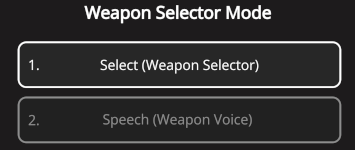
There are **3** options to select from...  Select (**Weapon Selector**), Speech (**Weapon Voice**), and now, Auto Detect (**BO6 Guns**).

***

Weapon Selector is always available to fallback to; it is also included in the Speech option, and the Auto Detect option (when it is toggled off).

| <img src="https://1841283601-files.gitbook.io/~/files/v0/b/gitbook-x-prod.appspot.com/o/spaces%2FFYraHizgjOptWmwCAGKE%2Fuploads%2Fw7Tz2D4SQhWryBHEGWeC%2FWeapon_Selector_Mode_Option_Selector_Alt.png?alt=media&#x26;token=20fb3ad3-a1f2-4b49-84ee-902ed139964d" alt="" data-size="original"> | <img src="https://1841283601-files.gitbook.io/~/files/v0/b/gitbook-x-prod.appspot.com/o/spaces%2FFYraHizgjOptWmwCAGKE%2Fuploads%2FYtpsO42EauZh3psMUHuI%2FWeapon_Selector_Mode_alt.png?alt=media&#x26;token=168c4be8-01db-420f-a7d8-2567876b062c" alt="" data-size="original"> |
| --------------------------------------------------------------------------------------------------------------------------------------------------------------------------------------------------------------------------------------------------------------------------------------------- | ----------------------------------------------------------------------------------------------------------------------------------------------------------------------------------------------------------------------------------------------------------------------------- |

COD WZ 4 now has a third option, Auto Detect (BO6 Guns).  This feature is only available for the DualSense® Strike Pack, under **Weapon Selector Mode** in the <img src="https://1841283601-files.gitbook.io/~/files/v0/b/gitbook-x-prod.appspot.com/o/spaces%2FFYraHizgjOptWmwCAGKE%2Fuploads%2FX8HTWU7KRxdrP81G4yrN%2FSettings_Icon.png?alt=media&#x26;token=944585bb-7223-4d4a-b87b-1b0068e80520" alt="" data-size="line">**GAMEPACK Settings**.  **You MUST also be using the adaptive trigger to fire with**.  As this feature uses the DualSense®, it is <mark style="color:red;">**unavailable**</mark> on Xbox®.  It will automatically any BO6 weapon that you have picked up during WZ gameplay.  Detection happens when you are firing.  It also temporarily disables the Weapon Slot tracking and Weapon Selector while it is ON.

<div align="left"><figure><img src="https://1841283601-files.gitbook.io/~/files/v0/b/gitbook-x-prod.appspot.com/o/spaces%2FFYraHizgjOptWmwCAGKE%2Fuploads%2FytsgYICTotv1B101xFSE%2FPSController_Touch_R1_DefaultLED.png?alt=media&#x26;token=82a096c4-3572-427e-82e7-d74f7b2cecf2" alt="" width="266"><figcaption><p>Once Auto Detect is selected in Weapon Selector Mode, this feature can be toggled on and off at will.</p></figcaption></figure></div>

You can toggle this feature ON/OFF using a controller shortcut (while <img src="https://1841283601-files.gitbook.io/~/files/v0/b/gitbook-x-prod.appspot.com/o/spaces%2FFYraHizgjOptWmwCAGKE%2Fuploads%2FZJbYYncrEvgR9kdjLoL0%2FHold_Icon.png?alt=media&#x26;token=d690c237-048b-48d3-b147-0f0a52116811" alt="" data-size="line">**HOLDING TOUCH ACTIVATOR**, <img src="https://1841283601-files.gitbook.io/~/files/v0/b/gitbook-x-prod.appspot.com/o/spaces%2FFYraHizgjOptWmwCAGKE%2Fuploads%2F0zAKxtU3XqgjkE0tSZ9u%2FTap_Icon.png?alt=media&#x26;token=5e6ad0e0-afcf-4a92-993e-837c83422b7f" alt="" data-size="line">**TAP** <img src="https://1841283601-files.gitbook.io/~/files/v0/b/gitbook-x-prod.appspot.com/o/spaces%2FFYraHizgjOptWmwCAGKE%2Fuploads%2FF6uwTT5C1bU2kIUYjvfJ%2Fr1.png?alt=media&#x26;token=b79bad14-b1f2-4ce1-9738-491cad483de6" alt="" data-size="line">).  When this feature is ON, the Weapon Slots will be very obviously removed from the app dashboard, replaced with the detection interface (pictured below), and the Strike Pack LEDs will also change to <mark style="color:blue;">**BLUE**</mark><mark style="color:blue;">.</mark>

<div align="left"><figure><img src="https://1841283601-files.gitbook.io/~/files/v0/b/gitbook-x-prod.appspot.com/o/spaces%2FFYraHizgjOptWmwCAGKE%2Fuploads%2FsUDjUMhD3lj8ualqIQaz%2Fimage.png?alt=media&#x26;token=88a06f6b-78a7-46d4-9586-c449858dbf14" alt="" width="311"><figcaption></figcaption></figure></div>

{% stepper %}
{% step %}

### Detection

When you start firing, your weapon will be detected.  This will be remembered until you press the button for picking up a weapon or the button for switching weapons... which will cause it to try and detect the next weapon you fire again.
{% endstep %}

{% step %}

### Preferred Detection

Certain weapons are harder for us to tell apart.  For this weapons, you can simply <img src="https://1841283601-files.gitbook.io/~/files/v0/b/gitbook-x-prod.appspot.com/o/spaces%2FFYraHizgjOptWmwCAGKE%2Fuploads%2F0zAKxtU3XqgjkE0tSZ9u%2FTap_Icon.png?alt=media&#x26;token=5e6ad0e0-afcf-4a92-993e-837c83422b7f" alt="" data-size="line">tap on the weapon that you are using under **Preferred Detection**.

<div align="left"><figure><img src="https://1841283601-files.gitbook.io/~/files/v0/b/gitbook-x-prod.appspot.com/o/spaces%2FFYraHizgjOptWmwCAGKE%2Fuploads%2FsZNmPvEvnPFg2MKxDcti%2Fimage.png?alt=media&#x26;token=892ded77-930e-41c2-a4d0-bacedc34bbeb" alt="" width="308"><figcaption></figcaption></figure></div>
{% endstep %}
{% endstepper %}

See the links below to learn about each option, then after making your selection, <img src="https://1841283601-files.gitbook.io/~/files/v0/b/gitbook-x-prod.appspot.com/o/spaces%2FFYraHizgjOptWmwCAGKE%2Fuploads%2F0zAKxtU3XqgjkE0tSZ9u%2FTap_Icon.png?alt=media&#x26;token=5e6ad0e0-afcf-4a92-993e-837c83422b7f" alt="" data-size="line">tap the <img src="https://1841283601-files.gitbook.io/~/files/v0/b/gitbook-x-prod.appspot.com/o/spaces%2FFYraHizgjOptWmwCAGKE%2Fuploads%2FWe9m0nwKLCdpphfPtiEl%2F__back_arrow.png?alt=media&#x26;token=0e7bf075-4e3a-4570-8554-3aaf56b047c3" alt="" data-size="line">back-arrow at the top-left to return to the Dashboard.

<figure><img src="https://1841283601-files.gitbook.io/~/files/v0/b/gitbook-x-prod.appspot.com/o/spaces%2FFYraHizgjOptWmwCAGKE%2Fuploads%2FTfmAGiSjZda1qLX7RCfA%2Fline_horizon_flipped.png?alt=media&#x26;token=89672410-9e30-495d-9551-51526f156405" alt=""><figcaption></figcaption></figure>

## **Options Explained**

<figure><img src="https://1841283601-files.gitbook.io/~/files/v0/b/gitbook-x-prod.appspot.com/o/spaces%2FFYraHizgjOptWmwCAGKE%2Fuploads%2F5Jx5Tu6u1wor8lUxYxMw%2Fline_horizon.png?alt=media&#x26;token=7db97041-9d92-468c-9c18-a0fcbb400984" alt=""><figcaption></figcaption></figure>

See the links below:

### [**Weapon Selector**](https://guide.strikepack.com/horizon/manuals/militaryshooter22/weaponselector/selector)

### [**Weapon Voice**](https://guide.strikepack.com/horizon/manuals/militaryshooter22/weaponselector/voice)

### [**Auto Detect (BO6 Guns)**](#auto-detect-bo6-guns)

<figure><img src="https://1841283601-files.gitbook.io/~/files/v0/b/gitbook-x-prod.appspot.com/o/spaces%2FFYraHizgjOptWmwCAGKE%2Fuploads%2FTfmAGiSjZda1qLX7RCfA%2Fline_horizon_flipped.png?alt=media&#x26;token=89672410-9e30-495d-9551-51526f156405" alt=""><figcaption></figcaption></figure>

## 5. Quick Edit Anti-Recoil

<figure><img src="https://1841283601-files.gitbook.io/~/files/v0/b/gitbook-x-prod.appspot.com/o/spaces%2FFYraHizgjOptWmwCAGKE%2Fuploads%2F5Jx5Tu6u1wor8lUxYxMw%2Fline_horizon.png?alt=media&#x26;token=7db97041-9d92-468c-9c18-a0fcbb400984" alt=""><figcaption></figcaption></figure>

Decide on a "Weapon Selector Mode", assign at least 2 Weapon Slots, then "[**Quick Edit Anti-Recoil**](https://guide.strikepack.com/horizon/manuals/militaryshooterzone/broken-reference)" will be covered next...
