# GAMEPACK Setup | PUB

| <img src="https://1841283601-files.gitbook.io/~/files/v0/b/gitbook-x-prod.appspot.com/o/spaces%2FFYraHizgjOptWmwCAGKE%2Fuploads%2F8MjsjSL8GCct4GHABvlc%2FPUB_ROYALE_APP.png?alt=media&#x26;token=32ff650a-e022-4ec3-a163-fad32b12f4cb" alt="" data-size="original"> | <h2>1. <mark style="color:red;">GAMEPACK Setup</mark></h2> |
| ------------------------------------------------------------------------------------------------------------------------------------------------------------------------------------------------------------------------------------------------------------------- | ---------------------------------------------------------- |

***

<details>

<summary><mark style="color:red;">GAMEPACK SETUP</mark> Page Contents</summary>

[**Overview**](#overview)

[**Profile Selection**](#profile-selection)

[**App Controls**](#app-controls)

[**Match Settings**](#match-settings)

[**Bottom-Bar**](#bottom-bar)

[**Weapon Swap Mode**](https://guide.strikepack.com/horizon/manuals/shooter/weaponswap)

</details>

<figure><img src="https://1841283601-files.gitbook.io/~/files/v0/b/gitbook-x-prod.appspot.com/o/spaces%2FFYraHizgjOptWmwCAGKE%2Fuploads%2FTfmAGiSjZda1qLX7RCfA%2Fline_horizon_flipped.png?alt=media&#x26;token=89672410-9e30-495d-9551-51526f156405" alt=""><figcaption></figcaption></figure>

## Overview

<figure><img src="https://1841283601-files.gitbook.io/~/files/v0/b/gitbook-x-prod.appspot.com/o/spaces%2FFYraHizgjOptWmwCAGKE%2Fuploads%2F5Jx5Tu6u1wor8lUxYxMw%2Fline_horizon.png?alt=media&#x26;token=7db97041-9d92-468c-9c18-a0fcbb400984" alt=""><figcaption></figcaption></figure>

This section covers "**Settings Navigation**" & <mark style="color:red;">**REQUIRED**</mark> "**GAMEPACK Setup**", featured in our **PUB Royale** GAMEPACK for the **STRIKEPACK HORIZON**™ controller adapter & powered by the **STRIKEPACK**™ **CENTRAL** smartphone app.

***

You **MUST** fulfill the <mark style="color:red;">**REQUIREMENTS**</mark> of this section & continue to follow our manual to successfully take advantage of this GAMEPACK & various **M**.**O**.**D**.s or **M**acros **O**n **D**emand that it has to offer.

***

The GAMEPACK can be configured in its entirety using familiar touch controls on the app.

{% hint style="danger" %}
**It is&#x20;**<mark style="color:red;">**REQUIRED**</mark>**&#x20;to complete this section before using this GAMEPACK**…
{% endhint %}

<figure><img src="https://1841283601-files.gitbook.io/~/files/v0/b/gitbook-x-prod.appspot.com/o/spaces%2FFYraHizgjOptWmwCAGKE%2Fuploads%2FTfmAGiSjZda1qLX7RCfA%2Fline_horizon_flipped.png?alt=media&#x26;token=89672410-9e30-495d-9551-51526f156405" alt=""><figcaption></figcaption></figure>

## Profile Selection

<figure><img src="https://1841283601-files.gitbook.io/~/files/v0/b/gitbook-x-prod.appspot.com/o/spaces%2FFYraHizgjOptWmwCAGKE%2Fuploads%2F5Jx5Tu6u1wor8lUxYxMw%2Fline_horizon.png?alt=media&#x26;token=7db97041-9d92-468c-9c18-a0fcbb400984" alt=""><figcaption></figcaption></figure>

<img src="https://1841283601-files.gitbook.io/~/files/v0/b/gitbook-x-prod.appspot.com/o/spaces%2FFYraHizgjOptWmwCAGKE%2Fuploads%2F0zAKxtU3XqgjkE0tSZ9u%2FTap_Icon.png?alt=media&#x26;token=5e6ad0e0-afcf-4a92-993e-837c83422b7f" alt="" data-size="line">Tap on the **GAMEPACK** to go to **Profile Selection**, then you can either tap **CM**\_**Default** to head straight to the **Dashboard** area, or you can create a new profile:

1. To create a profile, <img src="https://1841283601-files.gitbook.io/~/files/v0/b/gitbook-x-prod.appspot.com/o/spaces%2FFYraHizgjOptWmwCAGKE%2Fuploads%2F0zAKxtU3XqgjkE0tSZ9u%2FTap_Icon.png?alt=media&#x26;token=5e6ad0e0-afcf-4a92-993e-837c83422b7f" alt="" data-size="line">tap the green <img src="https://1841283601-files.gitbook.io/~/files/v0/b/gitbook-x-prod.appspot.com/o/spaces%2FFYraHizgjOptWmwCAGKE%2Fuploads%2FURQceobxfnYGg2WjaPnL%2FPlus.png?alt=media&#x26;token=edffb9f2-5748-4884-a9ea-63b7317da168" alt="" data-size="line">*<mark style="color:green;">**PLUS**</mark>* icon.
2. Select an icon, then name your profile.  If this does not automatically exit & save your profile, you can <img src="https://1841283601-files.gitbook.io/~/files/v0/b/gitbook-x-prod.appspot.com/o/spaces%2FFYraHizgjOptWmwCAGKE%2Fuploads%2F0zAKxtU3XqgjkE0tSZ9u%2FTap_Icon.png?alt=media&#x26;token=5e6ad0e0-afcf-4a92-993e-837c83422b7f" alt="" data-size="line">tap the ***SAVE*** icon, located at the top-right.
3. <img src="https://1841283601-files.gitbook.io/~/files/v0/b/gitbook-x-prod.appspot.com/o/spaces%2FFYraHizgjOptWmwCAGKE%2Fuploads%2F0zAKxtU3XqgjkE0tSZ9u%2FTap_Icon.png?alt=media&#x26;token=5e6ad0e0-afcf-4a92-993e-837c83422b7f" alt="" data-size="line">Tap your newly created profile to proceed to the **Dashboard**.  The **Gearhead Eyes** on the **STRIKEPACK HORIZON**™ will switch to <mark style="color:green;">**PULSING GREEN**</mark>, indicating <mark style="color:green;">**GAMEPACK MODE**</mark>.

<div align="center"><figure><img src="https://1841283601-files.gitbook.io/~/files/v0/b/gitbook-x-prod.appspot.com/o/spaces%2FFYraHizgjOptWmwCAGKE%2Fuploads%2FPLKjlcjPVAxXbMZmpPJg%2FProfile_Creation.png?alt=media&#x26;token=411d9256-d3c9-4448-bf4c-ebb13b486d7f" alt=""><figcaption></figcaption></figure></div>

{% hint style="info" %}
**You can store up to 9 profiles per GAMEPACK**, allowing for wildly different settings for your various gameplay strategies, friends, or family.  These profiles will remain saved for as long as the app is installed, with the exception of a major update, in which case you will be warned that if you agree to it, your profiles will be cleared.

***

To edit a profile's name & icon, reset its settings to default, or delete it altogether, you can <img src="https://1841283601-files.gitbook.io/~/files/v0/b/gitbook-x-prod.appspot.com/o/spaces%2FFYraHizgjOptWmwCAGKE%2Fuploads%2FZJbYYncrEvgR9kdjLoL0%2FHold_Icon.png?alt=media&#x26;token=d690c237-048b-48d3-b147-0f0a52116811" alt="" data-size="line">hold your finger on the profile's icon until the following menu appears:

<img src="https://1841283601-files.gitbook.io/~/files/v0/b/gitbook-x-prod.appspot.com/o/spaces%2FFYraHizgjOptWmwCAGKE%2Fuploads%2FLZVMwxuNqHouheyRUFOO%2FProfile_Menu.png?alt=media&#x26;token=40670bee-d989-4f32-9698-acebdb68f1cf" alt="" data-size="original">

:warning: With only a single profile remaining, it can be reset, but not deleted.
{% endhint %}

<figure><img src="https://1841283601-files.gitbook.io/~/files/v0/b/gitbook-x-prod.appspot.com/o/spaces%2FFYraHizgjOptWmwCAGKE%2Fuploads%2FTfmAGiSjZda1qLX7RCfA%2Fline_horizon_flipped.png?alt=media&#x26;token=89672410-9e30-495d-9551-51526f156405" alt=""><figcaption></figcaption></figure>

## App Controls

<figure><img src="https://1841283601-files.gitbook.io/~/files/v0/b/gitbook-x-prod.appspot.com/o/spaces%2FFYraHizgjOptWmwCAGKE%2Fuploads%2F5Jx5Tu6u1wor8lUxYxMw%2Fline_horizon.png?alt=media&#x26;token=7db97041-9d92-468c-9c18-a0fcbb400984" alt=""><figcaption></figcaption></figure>

Various types of settings that you will encounter in this GAMEPACK:

{% tabs %}
{% tab title="Option Setting" %}
The **Option** setting can be changed quickly by <img src="https://1841283601-files.gitbook.io/~/files/v0/b/gitbook-x-prod.appspot.com/o/spaces%2FFYraHizgjOptWmwCAGKE%2Fuploads%2F0zAKxtU3XqgjkE0tSZ9u%2FTap_Icon.png?alt=media&#x26;token=5e6ad0e0-afcf-4a92-993e-837c83422b7f" alt="" data-size="line">tapping its <img src="https://1841283601-files.gitbook.io/~/files/v0/b/gitbook-x-prod.appspot.com/o/spaces%2FFYraHizgjOptWmwCAGKE%2Fuploads%2FWe9m0nwKLCdpphfPtiEl%2F__back_arrow.png?alt=media&#x26;token=0e7bf075-4e3a-4570-8554-3aaf56b047c3" alt="" data-size="line">arrow<img src="https://1841283601-files.gitbook.io/~/files/v0/b/gitbook-x-prod.appspot.com/o/spaces%2FFYraHizgjOptWmwCAGKE%2Fuploads%2FS3YaFJvNYpQR493h3IVq%2F__forward_arrow.png?alt=media&#x26;token=e06d91ad-42ea-4277-8c87-d787fcdf10aa" alt="" data-size="line"> icons.  You can bring up its **Option Selector** by <img src="https://1841283601-files.gitbook.io/~/files/v0/b/gitbook-x-prod.appspot.com/o/spaces%2FFYraHizgjOptWmwCAGKE%2Fuploads%2FZJbYYncrEvgR9kdjLoL0%2FHold_Icon.png?alt=media&#x26;token=d690c237-048b-48d3-b147-0f0a52116811" alt="" data-size="line">holding your finger on the setting until it fully traces itself.  This will present you with a sub-menu of its options for you to swipe through & <img src="https://1841283601-files.gitbook.io/~/files/v0/b/gitbook-x-prod.appspot.com/o/spaces%2FFYraHizgjOptWmwCAGKE%2Fuploads%2F0zAKxtU3XqgjkE0tSZ9u%2FTap_Icon.png?alt=media&#x26;token=5e6ad0e0-afcf-4a92-993e-837c83422b7f" alt="" data-size="line">select from:

<figure><img src="https://1841283601-files.gitbook.io/~/files/v0/b/gitbook-x-prod.appspot.com/o/spaces%2FFYraHizgjOptWmwCAGKE%2Fuploads%2FIYHcMlwfyLkF8SFUMRJA%2FOption_Settings_Shooter.png?alt=media&#x26;token=88139dbf-2d34-417d-8a2b-59c3aa258d5c" alt=""><figcaption></figcaption></figure>
{% endtab %}
{% endtabs %}

{% tabs %}
{% tab title="Weapon Slots" %}
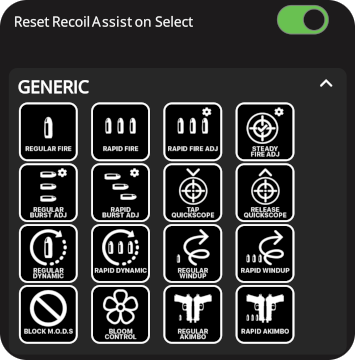
**Weapon Slots** play an important role in managing different settings between your favourite in-game weapons; each slot able to assign its own Fire Mode & Anti-Recoil settings.  This will all be covered in great detail later.  You can bring up a Weapon Slot's **Weapon Selector** by <img src="https://1841283601-files.gitbook.io/~/files/v0/b/gitbook-x-prod.appspot.com/o/spaces%2FFYraHizgjOptWmwCAGKE%2Fuploads%2FZJbYYncrEvgR9kdjLoL0%2FHold_Icon.png?alt=media&#x26;token=d690c237-048b-48d3-b147-0f0a52116811" alt="" data-size="line">holding your finger on the setting until it fully traces itself.  This will present you with a sub-menu of its Fire Modes for you to <img src="https://1841283601-files.gitbook.io/~/files/v0/b/gitbook-x-prod.appspot.com/o/spaces%2FFYraHizgjOptWmwCAGKE%2Fuploads%2F0zAKxtU3XqgjkE0tSZ9u%2FTap_Icon.png?alt=media&#x26;token=5e6ad0e0-afcf-4a92-993e-837c83422b7f" alt="" data-size="line">select from:

| <img src="https://1841283601-files.gitbook.io/~/files/v0/b/gitbook-x-prod.appspot.com/o/spaces%2FFYraHizgjOptWmwCAGKE%2Fuploads%2F1RVF9XO7iicQZauAWwsQ%2FPrimary_Weapon_Setup.png?alt=media&#x26;token=1f93eb47-f9fb-4945-bd86-5d9d0d586266" alt="" data-size="original"> | <img src="https://1841283601-files.gitbook.io/~/files/v0/b/gitbook-x-prod.appspot.com/o/spaces%2FFYraHizgjOptWmwCAGKE%2Fuploads%2FosAZ75WNws7PXFxkbEVg%2FWeapon_Option_Selector_Full_Set.png?alt=media&#x26;token=4946f062-16f5-476b-8e99-f3153b89292c" alt="" data-size="original"> |
| ------------------------------------------------------------------------------------------------------------------------------------------------------------------------------------------------------------------------------------------------------------------------- | ------------------------------------------------------------------------------------------------------------------------------------------------------------------------------------------------------------------------------------------------------------------------------------ |

On the Dashboard, the highlighted Weapon Slot is the one that is actively taking effect, or currently swapped to.  You can <img src="https://1841283601-files.gitbook.io/~/files/v0/b/gitbook-x-prod.appspot.com/o/spaces%2FFYraHizgjOptWmwCAGKE%2Fuploads%2F0zAKxtU3XqgjkE0tSZ9u%2FTap_Icon.png?alt=media&#x26;token=5e6ad0e0-afcf-4a92-993e-837c83422b7f" alt="" data-size="line">tap a slot **once** to swap to it.  Repeated <img src="https://1841283601-files.gitbook.io/~/files/v0/b/gitbook-x-prod.appspot.com/o/spaces%2FFYraHizgjOptWmwCAGKE%2Fuploads%2F0zAKxtU3XqgjkE0tSZ9u%2FTap_Icon.png?alt=media&#x26;token=5e6ad0e0-afcf-4a92-993e-837c83422b7f" alt="" data-size="line">taps will cycle the slot between its currently assigned Fire Mode, Regular Fire, & Rapid Fire.
{% endtab %}
{% endtabs %}

{% tabs %}
{% tab title="Slider Setting" %}
The **Slider** setting can be precisely adjusted by <img src="https://1841283601-files.gitbook.io/~/files/v0/b/gitbook-x-prod.appspot.com/o/spaces%2FFYraHizgjOptWmwCAGKE%2Fuploads%2F0zAKxtU3XqgjkE0tSZ9u%2FTap_Icon.png?alt=media&#x26;token=5e6ad0e0-afcf-4a92-993e-837c83422b7f" alt="" data-size="line">tapping its <img src="https://1841283601-files.gitbook.io/~/files/v0/b/gitbook-x-prod.appspot.com/o/spaces%2FFYraHizgjOptWmwCAGKE%2Fuploads%2FNVKpJbkPv5Pqwj5wWwIX%2F__minus.png?alt=media&#x26;token=a3f70733-e8d0-4bb6-93b4-629ae5437e49" alt="" data-size="original">minus or <img src="https://1841283601-files.gitbook.io/~/files/v0/b/gitbook-x-prod.appspot.com/o/spaces%2FFYraHizgjOptWmwCAGKE%2Fuploads%2FDsBxaw5oEC5I7k3Et76x%2F__plus.png?alt=media&#x26;token=7584028a-046b-47a5-b982-80039666e1f9" alt="" data-size="line">plus icons.  It can be adjusted more quickly by <img src="https://1841283601-files.gitbook.io/~/files/v0/b/gitbook-x-prod.appspot.com/o/spaces%2FFYraHizgjOptWmwCAGKE%2Fuploads%2FZJbYYncrEvgR9kdjLoL0%2FHold_Icon.png?alt=media&#x26;token=d690c237-048b-48d3-b147-0f0a52116811" alt="" data-size="line">holding & dragging its slider thumb:

<figure><img src="https://1841283601-files.gitbook.io/~/files/v0/b/gitbook-x-prod.appspot.com/o/spaces%2FFYraHizgjOptWmwCAGKE%2Fuploads%2F90IcZDf1CVVc7AsXeAvD%2FSlider_Settings_Shooter.png?alt=media&#x26;token=ebdecfda-ef4c-45e8-bfd0-53a536824e1b" alt=""><figcaption></figcaption></figure>
{% endtab %}
{% endtabs %}

{% tabs %}
{% tab title="Toggle Setting" %}
The **Toggle** setting can be <img src="https://1841283601-files.gitbook.io/~/files/v0/b/gitbook-x-prod.appspot.com/o/spaces%2FFYraHizgjOptWmwCAGKE%2Fuploads%2F0zAKxtU3XqgjkE0tSZ9u%2FTap_Icon.png?alt=media&#x26;token=5e6ad0e0-afcf-4a92-993e-837c83422b7f" alt="" data-size="line">tapped to switch it <img src="https://1841283601-files.gitbook.io/~/files/v0/b/gitbook-x-prod.appspot.com/o/spaces%2FFYraHizgjOptWmwCAGKE%2Fuploads%2FAqayLbEmTbPr7qeipb4N%2FToggle_On.png?alt=media&#x26;token=fb772aa5-c15e-49ce-bfef-e22935546d30" alt="" data-size="original">**ON**  / <img src="https://1841283601-files.gitbook.io/~/files/v0/b/gitbook-x-prod.appspot.com/o/spaces%2FFYraHizgjOptWmwCAGKE%2Fuploads%2Ffq6pvzgYIzNYCuRMECmg%2FToggle_Off.png?alt=media&#x26;token=8da93e98-e5f5-4cbf-b033-ff6ec06f0ea9" alt="" data-size="original">**OFF**.
{% endtab %}
{% endtabs %}

{% tabs %}
{% tab title="Controller Shortcuts" %}
Dashboard settings sometimes have **Controller Shortcuts** that will become visible when the <img src="https://1841283601-files.gitbook.io/~/files/v0/b/gitbook-x-prod.appspot.com/o/spaces%2FFYraHizgjOptWmwCAGKE%2Fuploads%2FjeFucKQmm4rrUhSHlHZZ%2Fview.png?alt=media&#x26;token=a2cc8763-fb61-455c-a427-838c9d2b0042" alt="" data-size="line">***ACTIVATOR*** controller button is <img src="https://1841283601-files.gitbook.io/~/files/v0/b/gitbook-x-prod.appspot.com/o/spaces%2FFYraHizgjOptWmwCAGKE%2Fuploads%2FZJbYYncrEvgR9kdjLoL0%2FHold_Icon.png?alt=media&#x26;token=d690c237-048b-48d3-b147-0f0a52116811" alt="" data-size="line">***HELD**.*  These shortcuts will be covered later on:

<div align="center"><figure><img src="https://1841283601-files.gitbook.io/~/files/v0/b/gitbook-x-prod.appspot.com/o/spaces%2FFYraHizgjOptWmwCAGKE%2Fuploads%2FOi0NjZvumZXal7THqNq7%2FController_Shortcuts_Example.png?alt=media&#x26;token=a873c786-e35c-4ec9-b78a-2caa602abb79" alt=""><figcaption></figcaption></figure></div>
{% endtab %}
{% endtabs %}

{% hint style="warning" %} <img src="https://1841283601-files.gitbook.io/~/files/v0/b/gitbook-x-prod.appspot.com/o/spaces%2FFYraHizgjOptWmwCAGKE%2Fuploads%2F0zAKxtU3XqgjkE0tSZ9u%2FTap_Icon.png?alt=media&#x26;token=5e6ad0e0-afcf-4a92-993e-837c83422b7f" alt="" data-size="line">Tap the <img src="https://1841283601-files.gitbook.io/~/files/v0/b/gitbook-x-prod.appspot.com/o/spaces%2FFYraHizgjOptWmwCAGKE%2Fuploads%2FzWnofBKazOjFti5igHFf%2F__info.png?alt=media&#x26;token=6da9a014-f18c-4732-8d22-8d10a367e4b1" alt="" data-size="line">**Information** icon on settings to learn more about them.

***

There is **NO** need to rush into changing Dashboard settings as their functionality will be covered piece by piece throughout this entire manual.
{% endhint %}

<figure><img src="https://1841283601-files.gitbook.io/~/files/v0/b/gitbook-x-prod.appspot.com/o/spaces%2FFYraHizgjOptWmwCAGKE%2Fuploads%2FTfmAGiSjZda1qLX7RCfA%2Fline_horizon_flipped.png?alt=media&#x26;token=89672410-9e30-495d-9551-51526f156405" alt=""><figcaption></figcaption></figure>

## Match Settings

<figure><img src="https://1841283601-files.gitbook.io/~/files/v0/b/gitbook-x-prod.appspot.com/o/spaces%2FFYraHizgjOptWmwCAGKE%2Fuploads%2F5Jx5Tu6u1wor8lUxYxMw%2Fline_horizon.png?alt=media&#x26;token=7db97041-9d92-468c-9c18-a0fcbb400984" alt=""><figcaption></figcaption></figure>

<table data-header-hidden><thead><tr><th>Instructions</th><th>Image</th><th data-hidden></th></tr></thead><tbody><tr><td>All <mark style="color:red;"><strong>REQUIRED</strong></mark> GAMEPACK Setup settings &#x26; less frequently accessed settings are tucked away in the <strong>Settings</strong> area, which is accessible by <img src="https://1841283601-files.gitbook.io/~/files/v0/b/gitbook-x-prod.appspot.com/o/spaces%2FFYraHizgjOptWmwCAGKE%2Fuploads%2F0zAKxtU3XqgjkE0tSZ9u%2FTap_Icon.png?alt=media&#x26;token=5e6ad0e0-afcf-4a92-993e-837c83422b7f" alt="" data-size="line">tapping the <img src="https://1841283601-files.gitbook.io/~/files/v0/b/gitbook-x-prod.appspot.com/o/spaces%2FFYraHizgjOptWmwCAGKE%2Fuploads%2FX8HTWU7KRxdrP81G4yrN%2FSettings_Icon.png?alt=media&#x26;token=944585bb-7223-4d4a-b87b-1b0068e80520" alt="" data-size="line"><em><strong>GEAR</strong></em> icon, located at the top-right.</td><td><img src="https://1841283601-files.gitbook.io/~/files/v0/b/gitbook-x-prod.appspot.com/o/spaces%2FFYraHizgjOptWmwCAGKE%2Fuploads%2FSswXIBcCzx7OLVhpCTuQ%2FEnter_Settings_Alt_Example.png?alt=media&#x26;token=112c0e6f-9bca-4190-827b-3d94f30fc8be" alt="" data-size="original"></td><td></td></tr></tbody></table>

From the <img src="https://1841283601-files.gitbook.io/~/files/v0/b/gitbook-x-prod.appspot.com/o/spaces%2FFYraHizgjOptWmwCAGKE%2Fuploads%2FX8HTWU7KRxdrP81G4yrN%2FSettings_Icon.png?alt=media&#x26;token=944585bb-7223-4d4a-b87b-1b0068e80520" alt="" data-size="line">**Settings** area, <img src="https://1841283601-files.gitbook.io/~/files/v0/b/gitbook-x-prod.appspot.com/o/spaces%2FFYraHizgjOptWmwCAGKE%2Fuploads%2F0zAKxtU3XqgjkE0tSZ9u%2FTap_Icon.png?alt=media&#x26;token=5e6ad0e0-afcf-4a92-993e-837c83422b7f" alt="" data-size="line">tap the drop-down arrows to expand each section of the grey border area & ensure that these settings are **MATCHED** to your in-game settings.

* Behind the scenes, each setting points various **M**.**O**.**D**.s (**M**acros **O**n **D**emand) to the correct controller buttons at the correct level of optimization for your in-game settings.

{% hint style="danger" %}
IMPORTANT:  Type A (Toggle Aim) is UNSUPPORTED with several M.O.D.s.  These include ADS Anti-Recoil, Auto Hold Breath, Auto Lean, Crouch Aim, Quickscope, and Rapid Crouch Aim.  This is because these M.O.D.s require you to HOLD the Aim Down Sights button, which goes against the concept of toggle aim.
{% endhint %}

<div align="center"><figure><img src="https://1841283601-files.gitbook.io/~/files/v0/b/gitbook-x-prod.appspot.com/o/spaces%2FFYraHizgjOptWmwCAGKE%2Fuploads%2FztMVXPFUSJvhqSlb1232%2FExample_Match_Settings.png?alt=media&#x26;token=f6484d38-fcec-4423-a8db-c78195a1f1ce" alt=""><figcaption><p>Placeholder image does not represent actual settings.</p></figcaption></figure></div>

{% hint style="danger" %} <mark style="color:red;">**Warning:**</mark> **DO NOT** miss any settings within the grey border or you risk an adversely affected experience, but keep in mind that it **ONLY** covers in-game settings that are relevant to the M.O.D.s.  Keep an eye on the **Settings** area between GAMEPACK updates in case new settings are added & ensure that your settings remain **MATCHED**.

***

Unfortunately, it is **NOT** viable for our team to support every possible game or in-game configuration, but we have tried to catch as many as possible in **Shooter**.
{% endhint %}

:bangbang: There is **NO** need to concern yourself with the settings that are **NOT** surrounded by a grey border yet, as these will be covered throughout this manual.

***

When you are done matching settings, tap the <img src="https://1841283601-files.gitbook.io/~/files/v0/b/gitbook-x-prod.appspot.com/o/spaces%2FFYraHizgjOptWmwCAGKE%2Fuploads%2FWe9m0nwKLCdpphfPtiEl%2F__back_arrow.png?alt=media&#x26;token=0e7bf075-4e3a-4570-8554-3aaf56b047c3" alt="" data-size="line">back-arrow, located at the top-left, to return to the **Dashboard**.

<figure><img src="https://1841283601-files.gitbook.io/~/files/v0/b/gitbook-x-prod.appspot.com/o/spaces%2FFYraHizgjOptWmwCAGKE%2Fuploads%2FTfmAGiSjZda1qLX7RCfA%2Fline_horizon_flipped.png?alt=media&#x26;token=89672410-9e30-495d-9551-51526f156405" alt=""><figcaption></figcaption></figure>

## Bottom-Bar

<figure><img src="https://1841283601-files.gitbook.io/~/files/v0/b/gitbook-x-prod.appspot.com/o/spaces%2FFYraHizgjOptWmwCAGKE%2Fuploads%2F5Jx5Tu6u1wor8lUxYxMw%2Fline_horizon.png?alt=media&#x26;token=7db97041-9d92-468c-9c18-a0fcbb400984" alt=""><figcaption></figcaption></figure>

The **Dashboard** "**Bottom**-**Bar**" settings will be covered throughout the subpages linked below:

### <img src="https://1841283601-files.gitbook.io/~/files/v0/b/gitbook-x-prod.appspot.com/o/spaces%2FFYraHizgjOptWmwCAGKE%2Fuploads%2FC81Sjv3wduy9bCRja69o%2FMapping_Icon.png?alt=media&#x26;token=4478ed32-62a1-49b3-8a17-9317e1a633a8" alt="" data-size="line"> [**Mapping**](https://guide.strikepack.com/horizon/manuals/pubroyale/broken-reference)

...access to per profile Paddle Button Mapping & Paddle Button M.O.D.s.

***

### <img src="https://1841283601-files.gitbook.io/~/files/v0/b/gitbook-x-prod.appspot.com/o/spaces%2FFYraHizgjOptWmwCAGKE%2Fuploads%2Fol5W9apm6hNF6sbVK0eR%2F__controller.png?alt=media&#x26;token=e92335d9-99b7-4f26-8d23-a6aa07510f1e" alt="" data-size="line"> [**Controller**](https://guide.strikepack.com/horizon/manuals/pubroyale/broken-reference)

...access to per profile Controller settings such as Block Controller Rumble.

***

### <img src="https://1841283601-files.gitbook.io/~/files/v0/b/gitbook-x-prod.appspot.com/o/spaces%2FFYraHizgjOptWmwCAGKE%2Fuploads%2FxtsXJtZ2t4fVNAaDmiED%2F__stop.png?alt=media&#x26;token=51b5d972-9584-4919-9f1d-2ba40c76e2e5" alt="" data-size="line"> [**Block M**.**O**.**D**.**s**](https://guide.strikepack.com/horizon/manuals/pubroyale/broken-reference)

...toggle for M.O.D.s.

***

### <img src="https://1841283601-files.gitbook.io/~/files/v0/b/gitbook-x-prod.appspot.com/o/spaces%2FFYraHizgjOptWmwCAGKE%2Fuploads%2FlVcQyGwBVvdQTwVZcmho%2F__audio.png?alt=media&#x26;token=0baf3c1b-8eaa-44a9-ae55-485a248c3b5d" alt="" data-size="line"> [**Audio**](https://guide.strikepack.com/horizon/manuals/pubroyale/broken-reference)

...access to Audio volume controls for sounds & alerts.

***

### <img src="https://1841283601-files.gitbook.io/~/files/v0/b/gitbook-x-prod.appspot.com/o/spaces%2FFYraHizgjOptWmwCAGKE%2Fuploads%2FHqgstKPE1Dcb69h6DR4r%2F__support.png?alt=media&#x26;token=c39d1aa5-9369-4149-a356-e39e725ec34d" alt="" data-size="line"> [**Support**](https://guide.strikepack.com/horizon/manuals/pubroyale/broken-reference)

...access to Support resources.

<figure><img src="https://1841283601-files.gitbook.io/~/files/v0/b/gitbook-x-prod.appspot.com/o/spaces%2FFYraHizgjOptWmwCAGKE%2Fuploads%2FTfmAGiSjZda1qLX7RCfA%2Fline_horizon_flipped.png?alt=media&#x26;token=89672410-9e30-495d-9551-51526f156405" alt=""><figcaption></figcaption></figure>

## 2. Weapon Swap Mode

<figure><img src="https://1841283601-files.gitbook.io/~/files/v0/b/gitbook-x-prod.appspot.com/o/spaces%2FFYraHizgjOptWmwCAGKE%2Fuploads%2F5Jx5Tu6u1wor8lUxYxMw%2Fline_horizon.png?alt=media&#x26;token=7db97041-9d92-468c-9c18-a0fcbb400984" alt=""><figcaption></figcaption></figure>

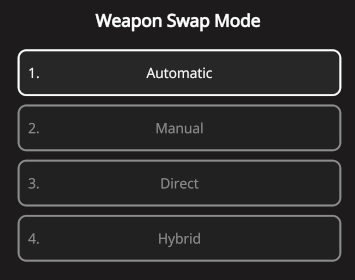
And that covers the <mark style="color:red;">**REQUIRED**</mark> "**GAMEPACK Setup**".  "[**Weapon Swap Mode**](https://guide.strikepack.com/horizon/manuals/shooter/weaponswap)" will be covered next...

<img src="https://1841283601-files.gitbook.io/~/files/v0/b/gitbook-x-prod.appspot.com/o/spaces%2FFYraHizgjOptWmwCAGKE%2Fuploads%2FgMRiQVLnoKDqPLo71KeH%2FWeapon_Swap_Mode_Option_Selector.png?alt=media&#x26;token=02cf10a6-e94a-4346-8686-81c9c775ddca" alt="" data-size="original">