
 |
| 
 **Settings**, "**Weapon Swap Mode**" covers managing Weapon M.O.D.s (Macros On Demand) through **8** Weapon Slots & swapping between slots during gameplay.
***
To fully take advantage of the powerful customization on offer, such as per Weapon Slot Fire Modes, Anti-Recoil, & Quick Edit Adjustments, you will **definitely** need to be aware of which Weapon Slot is **ACTIVE** within the moment to avoid unintentionally applying the wrong M.O.D.s to the wrong weapon.
***
Fortunately, in addition to RGB LED indication on the STRIKEPACK™ itself, the app provides clear indication of the GAMEPACK's current position & exactly what is being applied.
**Settings**, "**Weapon Swap Mode**" covers managing Weapon M.O.D.s (Macros On Demand) through **8** Weapon Slots & swapping between slots during gameplay.
***
To fully take advantage of the powerful customization on offer, such as per Weapon Slot Fire Modes, Anti-Recoil, & Quick Edit Adjustments, you will **definitely** need to be aware of which Weapon Slot is **ACTIVE** within the moment to avoid unintentionally applying the wrong M.O.D.s to the wrong weapon.
***
Fortunately, in addition to RGB LED indication on the STRIKEPACK™ itself, the app provides clear indication of the GAMEPACK's current position & exactly what is being applied.
| Instructions | Image | |
|---|---|---|
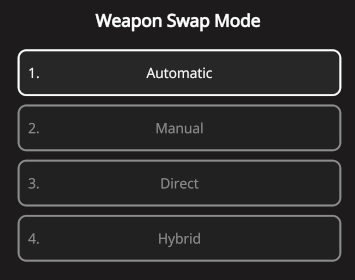
 Tap the GEAR icon at the top-right of the Dashboard to go to the "Settings" area, then find the "Weapon Swap Mode" setting. Tap the GEAR icon at the top-right of the Dashboard to go to the "Settings" area, then find the "Weapon Swap Mode" setting. |  |
tapping your Switch Weapon button (default: ) switches between your Primary & Secondary Weapon. **Manual** is also structured for a **2** weapon system.
***
**Direct** is a fallback that will work with virtually any shooter, regardless of weapon system.
|
) switches between your Primary & Secondary Weapon. **Manual** is also structured for a **2** weapon system.
***
**Direct** is a fallback that will work with virtually any shooter, regardless of weapon system.
|  |
|  |
| ------------------------------------------------------------------------------------------------------------------------------------------------------------------------------------------------------------------------------------------------------------------------------------ | -------------------------------------------------------------------------------------------------------------------------------------------------------------------------------------------------------------------------------------------------------------------- |
### Extended Support
The remaining options are for games that switch between a larger number of weapons; some of which will play nicely with some of the more popular games out there!
* More options may be added in the future, but keep in mind that our team **CANNOT** support everything & you can always fallback to Direct.
***
**Cycle** - **Switch** is for games where tapping your Switch Weapon button (default:) cycles through weapons (adjustable up to a maximum of **8 Cycle Slots**).
***
**Cycle** - **Bumpers** is for games where tapping
|
| ------------------------------------------------------------------------------------------------------------------------------------------------------------------------------------------------------------------------------------------------------------------------------------ | -------------------------------------------------------------------------------------------------------------------------------------------------------------------------------------------------------------------------------------------------------------------- |
### Extended Support
The remaining options are for games that switch between a larger number of weapons; some of which will play nicely with some of the more popular games out there!
* More options may be added in the future, but keep in mind that our team **CANNOT** support everything & you can always fallback to Direct.
***
**Cycle** - **Switch** is for games where tapping your Switch Weapon button (default:) cycles through weapons (adjustable up to a maximum of **8 Cycle Slots**).
***
**Cycle** - **Bumpers** is for games where tapping  Left or Right
  Bumper cycles back & forth between weapons (adjustable up to a maximum of **8 Cycle Slots**). (**Cycle** - **Triggers** is available for compatibility with flipped play).
***
**Cycle** - **D**-**Pad** is for games where tapping
Bumper cycles back & forth between weapons (adjustable up to a maximum of **8 Cycle Slots**). (**Cycle** - **Triggers** is available for compatibility with flipped play).
***
**Cycle** - **D**-**Pad** is for games where tapping  Left or Right
  D-Pad cycles back & forth between weapons (adjustable up to a maximum of **8 Cycle Slots**).
***
**Select** - **D**-**Pad** is for games that assign each weapon to the 4 D-Pad directions
D-Pad cycles back & forth between weapons (adjustable up to a maximum of **8 Cycle Slots**).
***
**Select** - **D**-**Pad** is for games that assign each weapon to the 4 D-Pad directions 
 .
* You can still use this option if your game only uses part of the D-Pad for weapons; just be aware that the unused directions will still change slots.
***
**Third** - **Hold Switch** is for games where
.
* You can still use this option if your game only uses part of the D-Pad for weapons; just be aware that the unused directions will still change slots.
***
**Third** - **Hold Switch** is for games where  holding your Switch Weapon button (default:) switches to your Third Weapon.
* This option assumes that switching back from your Third Weapon will always switch to your Primary Weapon. If your game does otherwise, it will constantly lose sync & you should use Hybrid instead.
***
See the links below to learn about each option, then after making your selection, tap the
holding your Switch Weapon button (default:) switches to your Third Weapon.
* This option assumes that switching back from your Third Weapon will always switch to your Primary Weapon. If your game does otherwise, it will constantly lose sync & you should use Hybrid instead.
***
See the links below to learn about each option, then after making your selection, tap the  back-arrow at the top-left to return to the Dashboard & observe the Weapon Slot layout.