> For the complete documentation index, see [llms.txt](https://guide.strikepack.com/llms.txt). Markdown versions of documentation pages are available by appending `.md` to page URLs; this page is available as [Markdown](https://guide.strikepack.com/horizon/manuals/rdr2/gamepacksetup/mapping.md).

# Mapping

## <mark style="color:red;">Mapping</mark>

<div align="left"><figure><img src="/files/kW4J6Dw0LaTuupS0L3ud" alt=""><figcaption></figcaption></figure></div>

{% hint style="info" %}
"**Paddle Button**" is a universal term for Paddle or Action/Back Button.

STRIKEPACK HORIZON™ features 4 numbered Paddles:

<img src="/files/Tzu3Mtwrps72TmlQbzGN" alt="" data-size="original">
{% endhint %}

<figure><img src="/files/n1hXc4rkEVnRhEinN7AO" alt=""><figcaption></figcaption></figure>

### <img src="/files/BULjBLozdVBZ7lpkzHWx" alt="" data-size="line"> Paddle Button Mapping

<figure><img src="/files/EoZ7m9C4dcmsd1t0Vcxd" alt=""><figcaption></figcaption></figure>

{% hint style="success" %}
STRIKEPACK HORIZON™ features per GAMEPACK Profile Paddle Button Mapping:
{% endhint %}

<figure><img src="/files/17OGNf3T18lqY1RP8XyP" alt=""><figcaption></figcaption></figure>

<table data-header-hidden><thead><tr><th>Instructions</th><th>Image</th><th data-hidden></th></tr></thead><tbody><tr><td><img src="/files/FTIPMMo2lFVsDuBcyTX7" alt="" data-size="line">Tap the <img src="/files/BULjBLozdVBZ7lpkzHWx" alt="" data-size="line"><strong>Mapping</strong> icon, located on the bottom-bar, to either open or close the "<strong>Paddle Button Mapping</strong>" section.</td><td><img src="/files/kW4J6Dw0LaTuupS0L3ud" alt="" data-size="original"></td><td></td></tr></tbody></table>

This features **Controller Button to Paddle Button Mapping** & **Paddle Button M**.**O**.**D**.**s**.

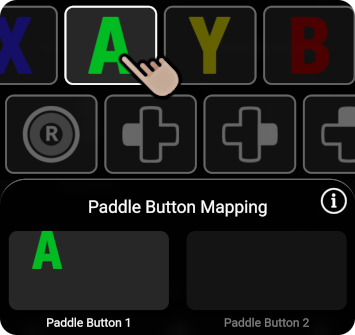
<table data-header-hidden><thead><tr><th>Instructions</th><th>Image</th><th data-hidden></th></tr></thead><tbody><tr><td><strong>On the app</strong>, <img src="/files/FTIPMMo2lFVsDuBcyTX7" alt="" data-size="line">tap the Paddle Button option that you wish to map.</td><td><img src="/files/Vbl8gC8zC9XcURCr1xHX" alt="" data-size="original"></td><td></td></tr></tbody></table>

It will be singled out as highlighted & selected, with **16** mappable controller buttons on display for you to swipe through.

<table data-header-hidden><thead><tr><th>Instructions</th><th>Image</th><th data-hidden></th></tr></thead><tbody><tr><td>To <strong>map</strong> to the Paddle Button, <img src="/files/FTIPMMo2lFVsDuBcyTX7" alt="" data-size="line">tap a button icon to highlight &#x26; map it.</td><td><img src="/files/twMtG650Y4yIpUySfb2h" alt="" data-size="original"></td><td></td></tr></tbody></table>

You can map up to **4** controller buttons to be simultaneously pressed, **per** Paddle Button:

<table data-header-hidden><thead><tr><th>Instructions</th><th>Image</th><th data-hidden></th></tr></thead><tbody><tr><td><p></p><p>To <strong>unmap</strong> from the Paddle Button, <img src="/files/FTIPMMo2lFVsDuBcyTX7" alt="" data-size="line">tap a highlighted button icon to unmap it, or <img src="/files/FTIPMMo2lFVsDuBcyTX7" alt="" data-size="line">tap <strong>Clear ALL Mapped Buttons</strong> to clear the Paddle Button.</p></td><td><img src="/files/WnuSxFiQHTpcCZDeqpFt" alt="" data-size="original"></td><td></td></tr></tbody></table>

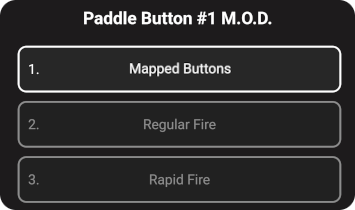
You can bring up a Paddle Button's **Option Selector** with a **M**.**O**.**D**. list to choose from:

<table data-header-hidden><thead><tr><th>Instructions</th><th>Image</th><th data-hidden></th></tr></thead><tbody><tr><td><img src="/files/WKxGM5nEvfMbZOqHLzmA" alt="" data-size="line">Hold your finger on the Paddle Button option until it fully traces itself.</td><td><img src="/files/tKl2HMtxxymXwcfUDReF" alt=""></td><td></td></tr><tr><td><strong>Mapped Buttons</strong> is the default option.  If you wish, you can assign this Paddle Button to a different function instead.</td><td><p><img src="/files/kY56NEzkm0OICx4O9gJS" alt="" data-size="original"><img src="/files/0gl5NUWpqEw2u17Dp8K3" alt="" data-size="original"> </p><p></p><p><span data-gb-custom-inline data-tag="emoji" data-code="203c">‼️</span> <strong>Paddle Button M</strong>.<strong>O</strong>.<strong>D</strong>.<strong>s</strong> are easy to use, due to them being separate from normal controller functionality.  They will be covered much later.</p></td><td></td></tr></tbody></table>

#### Notable Paddle Button M.O.D.s:

* The optional **Alt Activator** Paddle Button M.O.D. replaces the **Controller Shortcut** <img src="/files/2lTbgkJvbrlMoA8jc7kj" alt="" data-size="line">***ACTIVATOR*** button, while restoring <img src="/files/2lTbgkJvbrlMoA8jc7kj" alt="" data-size="line">***VIEW*** to a normal controller button.
* The **Toggle M**.**O**.**D**.**s** Paddle Button M.O.D. is a shortcut toggle for <img src="/files/9592moAEM7NWTANckpTn" alt="" data-size="line">**M**.**O**.**D**.**S BLOCKED**.

{% hint style="info" %}
Remember that tapping the <img src="/files/BULjBLozdVBZ7lpkzHWx" alt="" data-size="line">**Mapping** icon again will close the section.
{% endhint %}

<figure><img src="/files/n1hXc4rkEVnRhEinN7AO" alt=""><figcaption></figcaption></figure>

### Hardware Mapping

<figure><img src="/files/EoZ7m9C4dcmsd1t0Vcxd" alt=""><figcaption></figcaption></figure>

It is possible to map Paddle Buttons on the **STRIKEPACK HORIZON**™ controller adapter without reaching for the app.  The video below shows this process for both **Tournament Mapping** & <mark style="color:green;">**GAMEPACK Mapping**</mark>:

### Mapping Video

{% embed url="<https://youtu.be/LYjLsVwYzh4>" %}

<div align="left"><figure><img src="/files/BuvW7dW551II95QXyp5x" alt=""><figcaption></figcaption></figure></div>

1. <img src="/files/WKxGM5nEvfMbZOqHLzmA" alt="" data-size="line">***HOLD*** either **one** of the ***MAPPING*** buttons on the **STRIKEPACK HORIZON**™ until the Gearhead Eyes & both RGB LEDs turn a shade of <mark style="color:purple;">**PURPLE**</mark>.  You can now ***RELEASE*** the Mapping Mode button.
   * *<mark style="color:green;">**If you are in a GAMEPACK profile**</mark>,* "**Paddle Button Mapping**" will have automatically popped up on the app to provide visual indication.
2. You can <img src="/files/WKxGM5nEvfMbZOqHLzmA" alt="" data-size="line">***HOLD 1**-**4*** controller buttons **together** to be mapped to a Paddle Button.  While you are <img src="/files/WKxGM5nEvfMbZOqHLzmA" alt="" data-size="line">***HOLDING*** the controller button(s) that you wish to map, <img src="/files/FTIPMMo2lFVsDuBcyTX7" alt="" data-size="line">***TAP*** the ***PADDLE BUTTON*** that you want to map to.  A successful mapping assignment will flash <mark style="color:green;">**GREEN**</mark>.
3. To unmap (**clear**) a Paddle Button, while **NO** controller buttons are held, <img src="/files/FTIPMMo2lFVsDuBcyTX7" alt="" data-size="line">***TAP*** the ***PADDLE BUTTON*** that you want to clear.  A successful unmapping will flash <mark style="color:red;">**RED**</mark>.
4. Repeat **STEP 2** for each Paddle Button that you want to map controller buttons to.
5. To **exit** Mapping Mode, <img src="/files/FTIPMMo2lFVsDuBcyTX7" alt="" data-size="line">**TAP** either **one** of the ***MAPPING*** buttons.
   * *<mark style="color:green;">**If you are in a GAMEPACK profile**</mark>,* this will close "**Paddle Button Mapping**".

<figure><img src="/files/n1hXc4rkEVnRhEinN7AO" alt=""><figcaption></figcaption></figure>

## Controller

<figure><img src="/files/EoZ7m9C4dcmsd1t0Vcxd" alt=""><figcaption></figcaption></figure>

And that covers "**Mapping**".  "[**Controller**](/horizon/manuals/fc/gamepacksetup/controller.md)" will be covered next...

<div align="left"><figure><img src="/files/bJyms5L4WTFEisjZrR2k" alt=""><figcaption></figcaption></figure></div>


---

# Agent Instructions
This documentation is published with GitBook. GitBook is the documentation platform designed so that both humans and AI agents can read, navigate, and reason over technical content effectively. Learn more at gitbook.com.

## Querying This Documentation
If you need additional information that is not directly available in this page, you can query the documentation dynamically by asking a question.

Perform an HTTP GET request on the current page URL with the `ask` query parameter:

```
GET https://guide.strikepack.com/horizon/manuals/rdr2/gamepacksetup/mapping.md?ask=<question>
```

The question should be specific, self-contained, and written in natural language.
The response will contain a direct answer to the question and relevant excerpts and sources from the documentation.

Use this mechanism when the answer is not explicitly present in the current page, you need clarification or additional context, or you want to retrieve related documentation sections.