> For the complete documentation index, see [llms.txt](https://guide.strikepack.com/llms.txt). Markdown versions of documentation pages are available by appending `.md` to page URLs; this page is available as [Markdown](https://guide.strikepack.com/horizon/manuals/rust/weaponsetup.md).
# Weapon Setup | Rust
Weapon Setup on the app in Rust, STRIKEPACK CENTRAL™ GAMEPACK for STRIKEPACK HORIZON™.
| |
3. Weapon Setup
|
| ------------------------------------------------------------------------------------------------------------------------------------------------------------------------------------------------------------------------------------------------------------ | -------------------------------------------------------- |
***
***
Weapon Setup Page Contents
[**Overview**](#overview)
[**Weapon Setup**](#weapon-setup)
[**GENERIC: Fire Mode**](#generic-fire-mode)
[**4. Weapon Selector Mode**](#4.-weapon-selector-mode)
## Overview
This section covers "**Weapon Setup**" on the app, featured in our **Rust** GAMEPACK for the **STRIKEPACK HORIZON**™ controller adapter & powered by the **STRIKEPACK CENTRAL**™ smartphone app.
{% hint style="danger" %}
Before continuing, please ensure that you have at least completed [**GAMEPACK Setup**](/horizon/manuals/rust/gamepacksetup.md) & [**Direct Swap**](/horizon/manuals/rust/weaponswap.md). You MUST be comfortable with managing your ACTIVE Weapon Slot to proceed...
{% endhint %}
When you are first starting out, you should just focus on setting up the first 2 of the 8 available Weapon Slots on the Dashboard, so that you at least have slots setup to use with an in-game set of Primary & Secondary Weapons.
## Weapon Setup
Just focus on the first 2 slots from left to right.
| Hold your finger on **Weapon 1**, until its **Weapon Selector** appears. | |
| ----------------------------------------------------------------------------------------------------------------------------------------------------------------------------------------------------------------------------------------------------------------------------------------------------------------------------------- | ------------------------------------------------------------------------------------------------------------------------------------------------------------------------------------------------------------------------------------------------------------------ |
You can toggle to either **Reset Anti**-**Recoil on Select**, or leave your current Anti-Recoil values alone:
| Everything is organized into **Weapon Categories** that you can collapse & expand. The "**GENERIC**" category contains a selection of GENERIC: Fire Modes. | |
| ----------------------------------------------------------------------------------------------------------------------------------------------------------- | ------------------------------------------------------------------------------------------------------------------------------------------------------------------------------------------------------------------------------------------------------------------------------------ |
You have the option of assigning a GENERIC: Fire Mode, such as Regular Fire for use with a Fully Automatic Weapon, or Rapid Fire for use with a Semi-Automatic Weapon, which will be fine for UNSUPPORTED weapons.
* Each GENERIC: Fire Mode will be covered on the next page.
* Later in this manual, you will learn how to apply your own Anti-Recoil with Quick Edit.
***
For the absolute best experience :partying\_face:, ignore the GENERIC category & assign a **SUPPORTED** Weapon from the Rust category instead. If you are unsure as to which in-game weapon you will be using, assign your favourite weapon. Even if you are unwilling to adhere to the GAMEPACK requirements, such as **40** sensitivity, you can still adjust the Anti-Recoil with Quick Edit afterwards:
{% embed url="" fullWidth="false" %}
| Depending on the weapon, features may include an Optimized Anti-Recoil pattern, an appropriate Fire Mode, etc. | |
| -------------------------------------------------------------------------------------------------------------- | --------------------------------------------------------------------------------------------------------------------------------------------------------------------------------------------------------------------------------------------------------------------------------- |
| Now repeat the process & assign a weapon for **Weapon 2**. | |
{% hint style="info" %}
Even after you have assigned a Weapon Slot, for your convenience, you can tap the Weapon Slot to quickly cycle between its assigned Fire Mode or Weapon, Regular Fire, & Rapid Fire.
{% endhint %}
## GENERIC: Fire Mode
See the links below:
### [**GENERIC: Fire Mode**](/horizon/manuals/rust/weaponsetup/genericfiremode.md)
### [**GENERIC Fire Adjust**](/horizon/manuals/rust/weaponsetup/genericfireadjust.md)
### [**Quickscope & AHB Delay**](/horizon/manuals/rust/weaponsetup/quickscopebreathdelay.md)
## 4. Weapon Selector Mode
"[**Weapon Selector Mode**](/horizon/manuals/rust/weaponselector.md)" will be covered next...
---
# Agent Instructions
This documentation is published with GitBook. GitBook is the documentation platform designed so that both humans and AI agents can read, navigate, and reason over technical content effectively. Learn more at gitbook.com.
## Querying This Documentation
If you need additional information that is not directly available in this page, you can query the documentation by asking a question.
Perform an HTTP GET request on the following URL with the `ask` and `goal` query parameters:
```
GET https://guide.strikepack.com/horizon/manuals/rust/weaponsetup.md?ask=&goal=
```
`ask` is the immediate question: it should be specific, self-contained, and written in natural language.
`goal` is what the user is ultimately trying to achieve, the reason they need the answer. Sharing it helps GitBook give you a better, more relevant answer. A goal is most helpful when it describes the outcome the user wants rather than restating the question. For example, with `ask=how do I create an API token`, a goal like `automate deployments from our CI pipeline` lets GitBook tailor the answer to that use case.
The response will contain a direct answer to the question and relevant excerpts and sources from the documentation.
Use this mechanism when the answer is not explicitly present in the current page, you need clarification or additional context, or you want to retrieve related documentation sections.

 |
| 
 Hold your finger on **Weapon 1**, until its **Weapon Selector** appears. |
  |
| ----------------------------------------------------------------------------------------------------------------------------------------------------------------------------------------------------------------------------------------------------------------------------------------------------------------------------------- | ------------------------------------------------------------------------------------------------------------------------------------------------------------------------------------------------------------------------------------------------------------------ |
You can toggle to either **Reset Anti**-**Recoil on Select**
|
| ----------------------------------------------------------------------------------------------------------------------------------------------------------------------------------------------------------------------------------------------------------------------------------------------------------------------------------- | ------------------------------------------------------------------------------------------------------------------------------------------------------------------------------------------------------------------------------------------------------------------ |
You can toggle to either **Reset Anti**-**Recoil on Select** , or leave your current Anti-Recoil values alone
 :
| Everything is organized into **Weapon Categories** that you can collapse & expand. The "**GENERIC**" category contains a selection of GENERIC: Fire Modes. |
:
| Everything is organized into **Weapon Categories** that you can collapse & expand. The "**GENERIC**" category contains a selection of GENERIC: Fire Modes. | 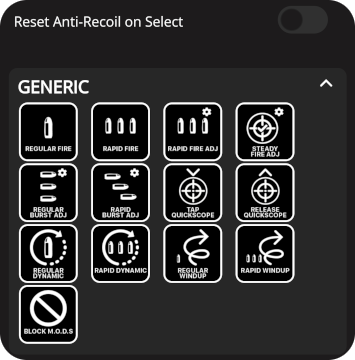 |
| ----------------------------------------------------------------------------------------------------------------------------------------------------------- | ------------------------------------------------------------------------------------------------------------------------------------------------------------------------------------------------------------------------------------------------------------------------------------ |
You have the option of assigning a GENERIC: Fire Mode, such as Regular Fire for use with a Fully Automatic Weapon, or Rapid Fire for use with a Semi-Automatic Weapon, which will be fine for UNSUPPORTED weapons.
* Each GENERIC: Fire Mode will be covered on the next page.
* Later in this manual, you will learn how to apply your own Anti-Recoil with Quick Edit.
***
For the absolute best experience :partying\_face:, ignore the GENERIC category & assign a **SUPPORTED** Weapon from the Rust category instead. If you are unsure as to which in-game weapon you will be using, assign your favourite weapon. Even if you are unwilling to adhere to the GAMEPACK requirements, such as **40** sensitivity, you can still adjust the Anti-Recoil with Quick Edit afterwards:
{% embed url="
|
| ----------------------------------------------------------------------------------------------------------------------------------------------------------- | ------------------------------------------------------------------------------------------------------------------------------------------------------------------------------------------------------------------------------------------------------------------------------------ |
You have the option of assigning a GENERIC: Fire Mode, such as Regular Fire for use with a Fully Automatic Weapon, or Rapid Fire for use with a Semi-Automatic Weapon, which will be fine for UNSUPPORTED weapons.
* Each GENERIC: Fire Mode will be covered on the next page.
* Later in this manual, you will learn how to apply your own Anti-Recoil with Quick Edit.
***
For the absolute best experience :partying\_face:, ignore the GENERIC category & assign a **SUPPORTED** Weapon from the Rust category instead. If you are unsure as to which in-game weapon you will be using, assign your favourite weapon. Even if you are unwilling to adhere to the GAMEPACK requirements, such as **40** sensitivity, you can still adjust the Anti-Recoil with Quick Edit afterwards:
{% embed url=" |
| -------------------------------------------------------------------------------------------------------------- | --------------------------------------------------------------------------------------------------------------------------------------------------------------------------------------------------------------------------------------------------------------------------------- |
| Now repeat the process & assign a weapon for **Weapon 2**. |
|
| -------------------------------------------------------------------------------------------------------------- | --------------------------------------------------------------------------------------------------------------------------------------------------------------------------------------------------------------------------------------------------------------------------------- |
| Now repeat the process & assign a weapon for **Weapon 2**. |  |
{% hint style="info" %}
Even after you have assigned a Weapon Slot, for your convenience, you can
|
{% hint style="info" %}
Even after you have assigned a Weapon Slot, for your convenience, you can  tap the Weapon Slot to quickly cycle between its assigned Fire Mode or Weapon, Regular Fire, & Rapid Fire.
{% endhint %}
tap the Weapon Slot to quickly cycle between its assigned Fire Mode or Weapon, Regular Fire, & Rapid Fire.
{% endhint %}