
 |
| 

 ***ACTIVATOR*** is
  ***HELD***, :warning: **DO NOT** hold left trigger :warning:, then your controller's ***FACE*** buttons can be
  ***TAPPED*** to swap between the following slots: |
| -------------------------------------------------------------------------------------------------------------------------------------------------------------------------------------------------------------------------------------------------------------------------------------------------------------------------------------------------------------------------------------------------------------------------------------------------------------------------------------------------------------------------------------------------------------------------------------------------------------------------------------------------------------------------------------------------------------------------------------------------------------------------------------------------------------------------------------------------------------------------------------------------------------------------------------------------------------------------------------------------------------------------------------------------------------------------------------------------------------------------------------------------------------------------------------------------------------------------------------------------------------------------------------- |
|
***TAPPED*** to swap between the following slots: |
| -------------------------------------------------------------------------------------------------------------------------------------------------------------------------------------------------------------------------------------------------------------------------------------------------------------------------------------------------------------------------------------------------------------------------------------------------------------------------------------------------------------------------------------------------------------------------------------------------------------------------------------------------------------------------------------------------------------------------------------------------------------------------------------------------------------------------------------------------------------------------------------------------------------------------------------------------------------------------------------------------------------------------------------------------------------------------------------------------------------------------------------------------------------------------------------------------------------------------------------------------------------------------------------- |
|  Weapon 1
 Weapon 2
 Weapon 3
 Weapon 4
tap a slot **once** to swap to it. Repeated taps will cycle the slot between its currently assigned Fire Mode, Regular Fire, & Rapid Fire. |
| Check which slot is **ACTIVE** via the Dashboard highlight, or RGB LED. |
| :warning: If ***ACTIVATOR*** is ***RELEASED QUICKLY*** or ***HELD LONG**,* it will pass through to your game*.* Use the **Controller Shortcut** before an in-game menu pops up. |
| {% endtab %} |
{% tab title="Direct - 5-8" %}
:video\_game: **See All Tabs**...
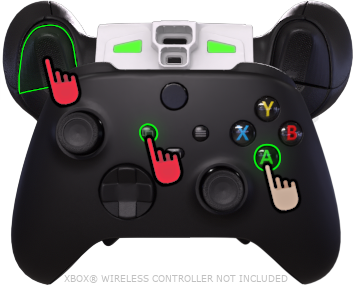
 ***ACTIVATOR*** is ***HELD***,
  ***LEFT TRIGGER*** is ***HELD*** alongside it, your controller's ***FACE*** buttons can be ***TAPPED*** to swap between following slots: |
| ------------------------------------------------------------------------------------------------------------------------------------------------------------------------------------------------------------------------------------------------------------------------------------------------------------------------------------------------------------------------------------------------------------------------------------------------------------------------------------------------------------------------------------------------------------------------------------------------------------------------------------------------------------------------------------------------------------------------------------------------------------------------------------------------------------------------------------------------------------------------------------------------------------------------------------------------------------------------------------------------------------------------------------------------------------------------------------------------------------------------------------------------------------------------------------------------------------------------------------------------------------------------------------------------------------------------------------------------------------------------------------------------------------------------------------------------------------------------- |
|
***LEFT TRIGGER*** is ***HELD*** alongside it, your controller's ***FACE*** buttons can be ***TAPPED*** to swap between following slots: |
| ------------------------------------------------------------------------------------------------------------------------------------------------------------------------------------------------------------------------------------------------------------------------------------------------------------------------------------------------------------------------------------------------------------------------------------------------------------------------------------------------------------------------------------------------------------------------------------------------------------------------------------------------------------------------------------------------------------------------------------------------------------------------------------------------------------------------------------------------------------------------------------------------------------------------------------------------------------------------------------------------------------------------------------------------------------------------------------------------------------------------------------------------------------------------------------------------------------------------------------------------------------------------------------------------------------------------------------------------------------------------------------------------------------------------------------------------------------------------- |
| - Weapon 5
- Weapon 6
- Weapon 7
- Weapon 8
tap a slot **once** to swap to it. Repeated taps will cycle the slot between its currently assigned Fire Mode, Regular Fire, & Rapid Fire. |
| Check which slot is **ACTIVE** via the Dashboard highlight, or **pulsing** RGB LED. |
| :warning: If ***ACTIVATOR*** is ***RELEASED QUICKLY*** or ***HELD LONG**,* it will pass through to your game*.* Use the **Controller Shortcut** before an in-game menu pops up. |
| {% endtab %} |
{% tab title="App View" %}
| (App Control)
Active Weapon
| |
| -------------------------------------------------------------------------------------------------------------------------------------------------------------------------------------------------------------------------------------------------------------------------------------------------- | ------------------------------------------------------------------------------------------------------------------------------------------------------------------------------------------------------------------------------------------------------------------------------------------------------------------------------------------------------ |
|
|
| -------------------------------------------------------------------------------------------------------------------------------------------------------------------------------------------------------------------------------------------------------------------------------------------------- | ------------------------------------------------------------------------------------------------------------------------------------------------------------------------------------------------------------------------------------------------------------------------------------------------------------------------------------------------------ |
| 

Weapon 1
| |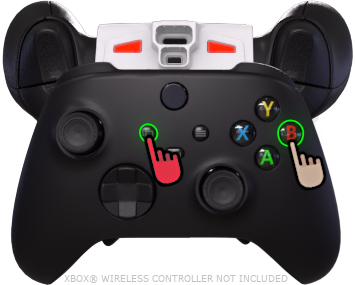 |
| 
Weapon 2
| |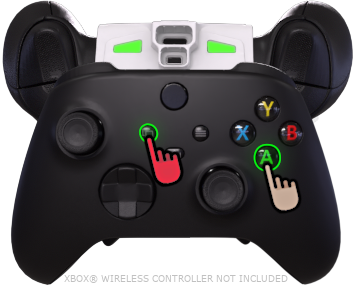 |
| 
Weapon 3
| | | **Weapon 4** |
|
| **Weapon 4** |
| 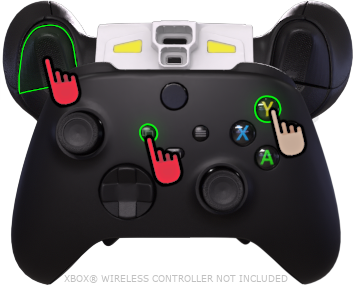 |
| Weapon 5
(Pulsing)
| |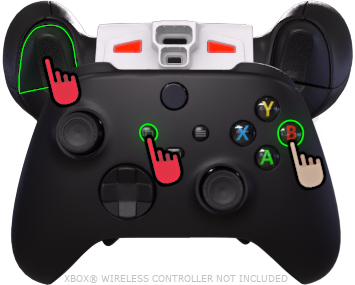 |
| Weapon 6
(Pulsing)
| | |
| Weapon 7
(Pulsing)
| | |
| Weapon 8
(Pulsing)
| | {% endtab %} | | | {% endtabs %} | | ### :question: [**Troubleshooting**](broken://pages/f18KL7dKTf5mtL0kdvhm)