
 |
| ----------------------------------------------------------------------------------------------------------------------------------------------------------------------------------------------------------- | ----------------------------------------------------------------------------------------------------------------------------------------------------------------------------------------------------------------------------------------------------------- |
You can select **Fighter Combos** & play them back with ease!
{% hint style="info" %}
Currently, either the left or right side of the RGB LED should be , indicating idle or **NO** active combo, and the current [**Fighter Direction**](/horizon/manuals/sf6/fighterdirection.md), or side of the screen that the GAMEPACK thinks you are on:
|
| ----------------------------------------------------------------------------------------------------------------------------------------------------------------------------------------------------------- | ----------------------------------------------------------------------------------------------------------------------------------------------------------------------------------------------------------------------------------------------------------- |
You can select **Fighter Combos** & play them back with ease!
{% hint style="info" %}
Currently, either the left or right side of the RGB LED should be , indicating idle or **NO** active combo, and the current [**Fighter Direction**](/horizon/manuals/sf6/fighterdirection.md), or side of the screen that the GAMEPACK thinks you are on:
 {% endhint %}


Select your
Current Fighter:
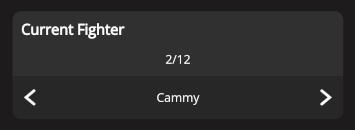
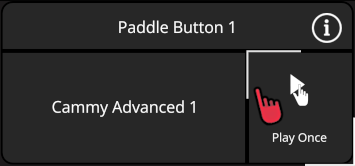
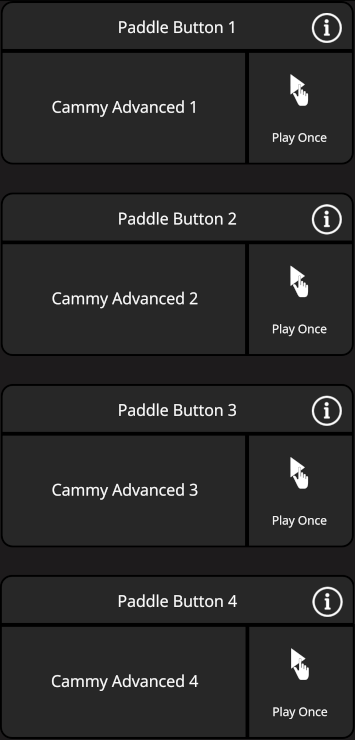
Change up a Fighter Combo by  holding your finger on the small square until it fully traces itself. This lists all of its options for you to tap on the one that you want selected:
 |
|
 Toggle
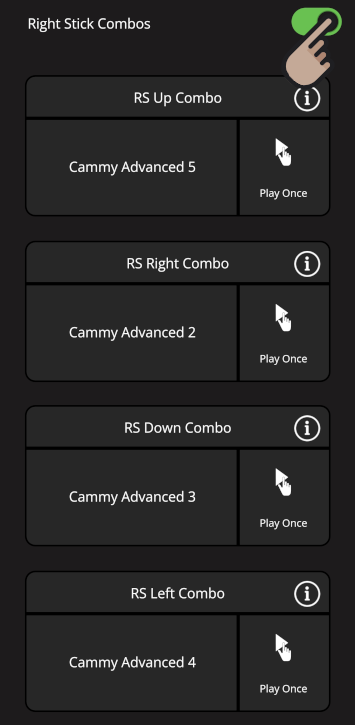
  ON "**Right Stick Combos**" if you wish. This feature is useful for fighters with more than 4 **Fighter Combos**, allowing you to assign more, or free up Paddle Buttons for other functions:
|
ON "**Right Stick Combos**" if you wish. This feature is useful for fighters with more than 4 **Fighter Combos**, allowing you to assign more, or free up Paddle Buttons for other functions:
| FLICK RIGHT STICK in 1 of 4 directions to perform the corresponding RS Combo:

 Flick RS Up.
 Flick RS Right.
 Flick RS Down.
 Flick RS Left.
 |
| ----------------------------------------------------------------------------------------------------------------------------------------------------------------------------------------------------------------------------------------------------------------------------------------------------------------------------------------------------------------------------------------------------------------------------------------------------------------------------------------------------------------------------------------------------------------------------------------------------------------------------------------------------------------------------------------------------------------------------------------------------------------------------------------------------------------------------------------------------------------------------------------------------------------------------------------------------------------------------------------------------------------------------------------------------------------------------------------------------------------------------------------------------------------------------------------------------------------------------------------------------------------------------------------------------------------------------------------------------------------------------------------------------------------------------------------------------------------------------------------------------------------------------------------------- | ----------------------------------------------------------------------------------------------------------------------------------------------------------------------------------------------------------------------------------------------------------------- |
***TAP*** the desired ***PADDLE BUTTON*** to play once. For "**Right Stick Combos**", ***FLICK RIGHT STICK*** in the desired direction to play once.
***
***TAPPING***
|
| ----------------------------------------------------------------------------------------------------------------------------------------------------------------------------------------------------------------------------------------------------------------------------------------------------------------------------------------------------------------------------------------------------------------------------------------------------------------------------------------------------------------------------------------------------------------------------------------------------------------------------------------------------------------------------------------------------------------------------------------------------------------------------------------------------------------------------------------------------------------------------------------------------------------------------------------------------------------------------------------------------------------------------------------------------------------------------------------------------------------------------------------------------------------------------------------------------------------------------------------------------------------------------------------------------------------------------------------------------------------------------------------------------------------------------------------------------------------------------------------------------------------------------------------------- | ----------------------------------------------------------------------------------------------------------------------------------------------------------------------------------------------------------------------------------------------------------------- |
***TAP*** the desired ***PADDLE BUTTON*** to play once. For "**Right Stick Combos**", ***FLICK RIGHT STICK*** in the desired direction to play once.
***
***TAPPING***  ***ACTIVATOR*** will stop the **Fighter Combo**.
 **Settings**
**Controller Interrupt Behavior**" covers moving sticks or pressing buttons during playback. See the link below to learn more:
### [**Controller Interrupt Behavior**](/horizon/manuals/sf6/controlinterrupt.md)
---
# Agent Instructions
This documentation is published with GitBook. GitBook is the documentation platform designed so that both humans and AI agents can read, navigate, and reason over technical content effectively. Learn more at gitbook.com.
## Querying This Documentation
If you need additional information that is not directly available in this page, you can query the documentation by asking a question.
Perform an HTTP GET request on the following URL with the `ask` and `goal` query parameters:
```
GET https://guide.strikepack.com/horizon/manuals/sf6/fightercombo.md?ask=
**Settings**
**Controller Interrupt Behavior**" covers moving sticks or pressing buttons during playback. See the link below to learn more:
### [**Controller Interrupt Behavior**](/horizon/manuals/sf6/controlinterrupt.md)
---
# Agent Instructions
This documentation is published with GitBook. GitBook is the documentation platform designed so that both humans and AI agents can read, navigate, and reason over technical content effectively. Learn more at gitbook.com.
## Querying This Documentation
If you need additional information that is not directly available in this page, you can query the documentation by asking a question.
Perform an HTTP GET request on the following URL with the `ask` and `goal` query parameters:
```
GET https://guide.strikepack.com/horizon/manuals/sf6/fightercombo.md?ask=