# Weapon Swap | Shooter

| <img src="https://1841283601-files.gitbook.io/~/files/v0/b/gitbook-x-prod.appspot.com/o/spaces%2FFYraHizgjOptWmwCAGKE%2Fuploads%2F3IUMob5bh0CWrb1a5YAh%2FSHOOTER_APP.png?alt=media&#x26;token=f94355d5-ec77-4e85-84ad-553f42430fff" alt="" data-size="original"> | <h2>2. <mark style="color:red;">Weapon Swap Mode</mark></h2> |
| ---------------------------------------------------------------------------------------------------------------------------------------------------------------------------------------------------------------------------------------------------------------- | ------------------------------------------------------------ |

<details>

<summary><strong>Shooter: Video Playlist</strong></summary>

[<mark style="color:red;">**Shooter**</mark>](https://youtu.be/1EJpjZTqGyk)

</details>

***

{% embed url="<https://youtu.be/UtxSWCb4hQ4>" fullWidth="false" %}
Video tutorials are strictly for educational purposes & may not reflect all current features.
{% endembed %}

***

<details>

<summary><mark style="color:red;">Weapon Swap Mode</mark> Page Contents</summary>

[**Overview**](#overview)

[**Weapon Swap Mode**](#weapon-swap-mode)

[**Options Explained**](#options-explained)

[**3. Weapon Setup**](#3.-weapon-setup)

</details>

<figure><img src="https://1841283601-files.gitbook.io/~/files/v0/b/gitbook-x-prod.appspot.com/o/spaces%2FFYraHizgjOptWmwCAGKE%2Fuploads%2FTfmAGiSjZda1qLX7RCfA%2Fline_horizon_flipped.png?alt=media&#x26;token=89672410-9e30-495d-9551-51526f156405" alt=""><figcaption></figcaption></figure>

## Overview

<figure><img src="https://1841283601-files.gitbook.io/~/files/v0/b/gitbook-x-prod.appspot.com/o/spaces%2FFYraHizgjOptWmwCAGKE%2Fuploads%2F5Jx5Tu6u1wor8lUxYxMw%2Fline_horizon.png?alt=media&#x26;token=7db97041-9d92-468c-9c18-a0fcbb400984" alt=""><figcaption></figcaption></figure>

This section covers the "**Weapon Swap Mode**" setting, featured in our **Shooter** GAMEPACK for the **STRIKEPACK HORIZON**™ controller adapter & powered by the **STRIKEPACK CENTRAL**™ smartphone app.

{% hint style="danger" %}
Before continuing, please ensure that you have completed [**GAMEPACK Setup**](https://guide.strikepack.com/horizon/manuals/militaryshooter22/gamepacksetup) & matched your in-game settings!
{% endhint %}

***Featured under*** <img src="https://1841283601-files.gitbook.io/~/files/v0/b/gitbook-x-prod.appspot.com/o/spaces%2FFYraHizgjOptWmwCAGKE%2Fuploads%2FX8HTWU7KRxdrP81G4yrN%2FSettings_Icon.png?alt=media&#x26;token=944585bb-7223-4d4a-b87b-1b0068e80520" alt="" data-size="line">**Settings**, "**Weapon Swap Mode**" covers managing Weapon M.O.D.s (Macros On Demand) through **8** Weapon Slots & swapping between slots during gameplay.

***

To fully take advantage of the powerful customization on offer, such as per Weapon Slot Fire Modes, Anti-Recoil, & Quick Edit Adjustments, you will **definitely** need to be aware of which Weapon Slot is **ACTIVE** within the moment to avoid unintentionally applying the wrong M.O.D.s to the wrong weapon.

***

Fortunately, in addition to RGB LED indication on the STRIKEPACK™ itself, the app provides clear indication of the GAMEPACK's current position & exactly what is being applied.

<figure><img src="https://1841283601-files.gitbook.io/~/files/v0/b/gitbook-x-prod.appspot.com/o/spaces%2FFYraHizgjOptWmwCAGKE%2Fuploads%2FTfmAGiSjZda1qLX7RCfA%2Fline_horizon_flipped.png?alt=media&#x26;token=89672410-9e30-495d-9551-51526f156405" alt=""><figcaption></figcaption></figure>

### Weapon Swap Mode

<figure><img src="https://1841283601-files.gitbook.io/~/files/v0/b/gitbook-x-prod.appspot.com/o/spaces%2FFYraHizgjOptWmwCAGKE%2Fuploads%2F5Jx5Tu6u1wor8lUxYxMw%2Fline_horizon.png?alt=media&#x26;token=7db97041-9d92-468c-9c18-a0fcbb400984" alt=""><figcaption></figcaption></figure>

<table data-header-hidden><thead><tr><th>Instructions</th><th>Image</th><th data-hidden></th></tr></thead><tbody><tr><td><img src="https://1841283601-files.gitbook.io/~/files/v0/b/gitbook-x-prod.appspot.com/o/spaces%2FFYraHizgjOptWmwCAGKE%2Fuploads%2F0zAKxtU3XqgjkE0tSZ9u%2FTap_Icon.png?alt=media&#x26;token=5e6ad0e0-afcf-4a92-993e-837c83422b7f" alt="" data-size="line">Tap the <img src="https://1841283601-files.gitbook.io/~/files/v0/b/gitbook-x-prod.appspot.com/o/spaces%2FFYraHizgjOptWmwCAGKE%2Fuploads%2FX8HTWU7KRxdrP81G4yrN%2FSettings_Icon.png?alt=media&#x26;token=944585bb-7223-4d4a-b87b-1b0068e80520" alt="" data-size="line"><em><strong>GEAR</strong></em> icon at the top-right of the Dashboard to go to the "<strong>Settings</strong>" area, then find the "<strong>Weapon Swap Mode</strong>" setting.</td><td><img src="https://1841283601-files.gitbook.io/~/files/v0/b/gitbook-x-prod.appspot.com/o/spaces%2FFYraHizgjOptWmwCAGKE%2Fuploads%2FSswXIBcCzx7OLVhpCTuQ%2FEnter_Settings_Alt_Example.png?alt=media&#x26;token=112c0e6f-9bca-4190-827b-3d94f30fc8be" alt="" data-size="original"></td><td></td></tr></tbody></table>

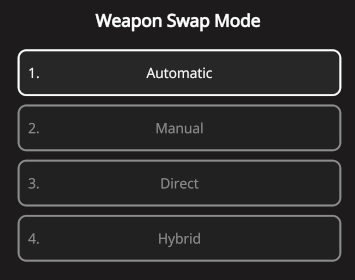
There are **9** options to select from...

***

The first **4** options; **Automatic**, **Manual**, **Direct**, & **Hybrid**, are commonly included in most GAMEPACKs.

***

**Automatic** & **Hybrid** are solely intended for games that utilize a **2** weapon system where <img src="https://1841283601-files.gitbook.io/~/files/v0/b/gitbook-x-prod.appspot.com/o/spaces%2FFYraHizgjOptWmwCAGKE%2Fuploads%2F0zAKxtU3XqgjkE0tSZ9u%2FTap_Icon.png?alt=media&#x26;token=5e6ad0e0-afcf-4a92-993e-837c83422b7f" alt="" data-size="line">tapping your Switch Weapon button (default:<img src="https://1841283601-files.gitbook.io/~/files/v0/b/gitbook-x-prod.appspot.com/o/spaces%2FFYraHizgjOptWmwCAGKE%2Fuploads%2FZKh4ehZEFvhyfhRC4UZl%2Fy_new.png?alt=media&#x26;token=4a17d0da-696e-4d72-8e2b-da88a7be4dc2" alt="" data-size="line">) switches between your Primary & Secondary Weapon.  **Manual** is also structured for a **2** weapon system.

***

**Direct** is a fallback that will work with virtually any shooter, regardless of weapon system.

| <img src="https://1841283601-files.gitbook.io/~/files/v0/b/gitbook-x-prod.appspot.com/o/spaces%2FFYraHizgjOptWmwCAGKE%2Fuploads%2FgMRiQVLnoKDqPLo71KeH%2FWeapon_Swap_Mode_Option_Selector.png?alt=media&#x26;token=02cf10a6-e94a-4346-8686-81c9c775ddca" alt="" data-size="original"> | <img src="https://1841283601-files.gitbook.io/~/files/v0/b/gitbook-x-prod.appspot.com/o/spaces%2FFYraHizgjOptWmwCAGKE%2Fuploads%2FxI9tv72tvC7V3YvRmBjE%2FWeapon_Swap_Mode.png?alt=media&#x26;token=23ecd5f6-9ffa-4f5d-bb11-cc58f03a4cf2" alt="" data-size="original"> |
| ------------------------------------------------------------------------------------------------------------------------------------------------------------------------------------------------------------------------------------------------------------------------------------- | --------------------------------------------------------------------------------------------------------------------------------------------------------------------------------------------------------------------------------------------------------------------- |

### Extended Support

The remaining options are for games that switch between a larger number of weapons; some of which will play nicely with some of the more popular games out there!

* More options may be added in the future, but keep in mind that our team **CANNOT** support everything & you can always fallback to Direct.

***

**Cycle** - **Switch** is for games where <img src="https://1841283601-files.gitbook.io/~/files/v0/b/gitbook-x-prod.appspot.com/o/spaces%2FFYraHizgjOptWmwCAGKE%2Fuploads%2F0zAKxtU3XqgjkE0tSZ9u%2FTap_Icon.png?alt=media&#x26;token=5e6ad0e0-afcf-4a92-993e-837c83422b7f" alt="" data-size="line">tapping your Switch Weapon button (default:<img src="https://1841283601-files.gitbook.io/~/files/v0/b/gitbook-x-prod.appspot.com/o/spaces%2FFYraHizgjOptWmwCAGKE%2Fuploads%2FZKh4ehZEFvhyfhRC4UZl%2Fy_new.png?alt=media&#x26;token=4a17d0da-696e-4d72-8e2b-da88a7be4dc2" alt="" data-size="line">) cycles through weapons (adjustable up to a maximum of **8 Cycle Slots**).

***

**Cycle** - **Bumpers** is for games where <img src="https://1841283601-files.gitbook.io/~/files/v0/b/gitbook-x-prod.appspot.com/o/spaces%2FFYraHizgjOptWmwCAGKE%2Fuploads%2F0zAKxtU3XqgjkE0tSZ9u%2FTap_Icon.png?alt=media&#x26;token=5e6ad0e0-afcf-4a92-993e-837c83422b7f" alt="" data-size="line">tapping <img src="https://1841283601-files.gitbook.io/~/files/v0/b/gitbook-x-prod.appspot.com/o/spaces%2FFYraHizgjOptWmwCAGKE%2Fuploads%2FCcuyjwieYIDOMl2ZaOoi%2Flb.png?alt=media&#x26;token=73af41c2-512b-476b-b578-0cbcdcd21406" alt="" data-size="line"> Left or Right <img src="https://1841283601-files.gitbook.io/~/files/v0/b/gitbook-x-prod.appspot.com/o/spaces%2FFYraHizgjOptWmwCAGKE%2Fuploads%2FAu61tnd4gjMQNTdsc9SV%2Frb.png?alt=media&#x26;token=b05b5da4-0277-4906-940c-df0a53a0dc1e" alt="" data-size="line"> Bumper cycles back & forth between weapons (adjustable up to a maximum of **8 Cycle Slots**).  (**Cycle** - **Triggers** is available for compatibility with flipped play).

***

**Cycle** - **D**-**Pad** is for games where <img src="https://1841283601-files.gitbook.io/~/files/v0/b/gitbook-x-prod.appspot.com/o/spaces%2FFYraHizgjOptWmwCAGKE%2Fuploads%2F0zAKxtU3XqgjkE0tSZ9u%2FTap_Icon.png?alt=media&#x26;token=5e6ad0e0-afcf-4a92-993e-837c83422b7f" alt="" data-size="line">tapping <img src="https://1841283601-files.gitbook.io/~/files/v0/b/gitbook-x-prod.appspot.com/o/spaces%2FFYraHizgjOptWmwCAGKE%2Fuploads%2Flsg3N9o9cN17lvwnMKqn%2Fdpad_left.png?alt=media&#x26;token=db84d363-05f4-4b91-b1f8-74f1569b4964" alt="" data-size="line"> Left or Right <img src="https://1841283601-files.gitbook.io/~/files/v0/b/gitbook-x-prod.appspot.com/o/spaces%2FFYraHizgjOptWmwCAGKE%2Fuploads%2FC3AjtBgEd1NBQ0T4oeUY%2Fdpad_right.png?alt=media&#x26;token=e0d7aebd-46d6-4de1-b4b4-4db2cab7e99e" alt="" data-size="line"> D-Pad cycles back & forth between weapons (adjustable up to a maximum of **8 Cycle Slots**).

***

**Select** - **D**-**Pad** is for games that assign each weapon to the 4 D-Pad directions <img src="https://1841283601-files.gitbook.io/~/files/v0/b/gitbook-x-prod.appspot.com/o/spaces%2FFYraHizgjOptWmwCAGKE%2Fuploads%2FcsMJvNL7JbrEUiO9dNlj%2Fdpad_up.png?alt=media&#x26;token=efc370a6-9846-4bc1-ba60-d0d977fe8f77" alt="" data-size="line"><img src="https://1841283601-files.gitbook.io/~/files/v0/b/gitbook-x-prod.appspot.com/o/spaces%2FFYraHizgjOptWmwCAGKE%2Fuploads%2FC3AjtBgEd1NBQ0T4oeUY%2Fdpad_right.png?alt=media&#x26;token=e0d7aebd-46d6-4de1-b4b4-4db2cab7e99e" alt="" data-size="line"><img src="https://1841283601-files.gitbook.io/~/files/v0/b/gitbook-x-prod.appspot.com/o/spaces%2FFYraHizgjOptWmwCAGKE%2Fuploads%2FCjU4ltqS1IKCiiNU9V7L%2Fdpad_down.png?alt=media&#x26;token=1d93c318-cc72-4d99-abcd-6306b45acb32" alt="" data-size="line"><img src="https://1841283601-files.gitbook.io/~/files/v0/b/gitbook-x-prod.appspot.com/o/spaces%2FFYraHizgjOptWmwCAGKE%2Fuploads%2Flsg3N9o9cN17lvwnMKqn%2Fdpad_left.png?alt=media&#x26;token=db84d363-05f4-4b91-b1f8-74f1569b4964" alt="" data-size="line">.

* You can still use this option if your game only uses part of the D-Pad for weapons; just be aware that the unused directions will still change slots.

***

**Third** - **Hold Switch** is for games where <img src="https://1841283601-files.gitbook.io/~/files/v0/b/gitbook-x-prod.appspot.com/o/spaces%2FFYraHizgjOptWmwCAGKE%2Fuploads%2FZJbYYncrEvgR9kdjLoL0%2FHold_Icon.png?alt=media&#x26;token=d690c237-048b-48d3-b147-0f0a52116811" alt="" data-size="line">holding your Switch Weapon button (default:<img src="https://1841283601-files.gitbook.io/~/files/v0/b/gitbook-x-prod.appspot.com/o/spaces%2FFYraHizgjOptWmwCAGKE%2Fuploads%2FZKh4ehZEFvhyfhRC4UZl%2Fy_new.png?alt=media&#x26;token=4a17d0da-696e-4d72-8e2b-da88a7be4dc2" alt="" data-size="line">) switches to your Third Weapon.

* This option assumes that switching back from your Third Weapon will always switch to your Primary Weapon.  If your game does otherwise, it will constantly lose sync & you should use Hybrid instead.

***

See the links below to learn about each option, then after making your selection, <img src="https://1841283601-files.gitbook.io/~/files/v0/b/gitbook-x-prod.appspot.com/o/spaces%2FFYraHizgjOptWmwCAGKE%2Fuploads%2F0zAKxtU3XqgjkE0tSZ9u%2FTap_Icon.png?alt=media&#x26;token=5e6ad0e0-afcf-4a92-993e-837c83422b7f" alt="" data-size="line">tap the <img src="https://1841283601-files.gitbook.io/~/files/v0/b/gitbook-x-prod.appspot.com/o/spaces%2FFYraHizgjOptWmwCAGKE%2Fuploads%2FWe9m0nwKLCdpphfPtiEl%2F__back_arrow.png?alt=media&#x26;token=0e7bf075-4e3a-4570-8554-3aaf56b047c3" alt="" data-size="line">back-arrow at the top-left to return to the Dashboard & observe the Weapon Slot layout.

<figure><img src="https://1841283601-files.gitbook.io/~/files/v0/b/gitbook-x-prod.appspot.com/o/spaces%2FFYraHizgjOptWmwCAGKE%2Fuploads%2FTfmAGiSjZda1qLX7RCfA%2Fline_horizon_flipped.png?alt=media&#x26;token=89672410-9e30-495d-9551-51526f156405" alt=""><figcaption></figcaption></figure>

## **Options Explained**

<figure><img src="https://1841283601-files.gitbook.io/~/files/v0/b/gitbook-x-prod.appspot.com/o/spaces%2FFYraHizgjOptWmwCAGKE%2Fuploads%2F5Jx5Tu6u1wor8lUxYxMw%2Fline_horizon.png?alt=media&#x26;token=7db97041-9d92-468c-9c18-a0fcbb400984" alt=""><figcaption></figcaption></figure>

See the links below:

### [**Automatic & Manual**](https://collectiveminds.gitbook.io/strikepackhorizon/manuals/gamepack/weaponswapmode/automaticmanual)

### [**Direct**](https://collectiveminds.gitbook.io/strikepackhorizon/manuals/gamepack/weaponswapmode/direct)

### [**Hybrid**](https://guide.strikepack.com/horizon/manuals/militaryshooter22/weaponswap/hybrid)

### [**Cycle - All Options**](https://guide.strikepack.com/horizon/manuals/shooter/weaponswap/cycle)

### [**Select - D-Pad**](https://guide.strikepack.com/horizon/manuals/shooter/weaponswap/select)

### [**Third - Hold Switch**](https://guide.strikepack.com/horizon/manuals/shooter/weaponswap/third)

<figure><img src="https://1841283601-files.gitbook.io/~/files/v0/b/gitbook-x-prod.appspot.com/o/spaces%2FFYraHizgjOptWmwCAGKE%2Fuploads%2FTfmAGiSjZda1qLX7RCfA%2Fline_horizon_flipped.png?alt=media&#x26;token=89672410-9e30-495d-9551-51526f156405" alt=""><figcaption></figcaption></figure>

## 3. Weapon Setup

<figure><img src="https://1841283601-files.gitbook.io/~/files/v0/b/gitbook-x-prod.appspot.com/o/spaces%2FFYraHizgjOptWmwCAGKE%2Fuploads%2F5Jx5Tu6u1wor8lUxYxMw%2Fline_horizon.png?alt=media&#x26;token=7db97041-9d92-468c-9c18-a0fcbb400984" alt=""><figcaption></figcaption></figure>

Decide on a "**Weapon Swap Mode**" option, then "[**Weapon Setup**](https://guide.strikepack.com/horizon/manuals/shooter/weaponsetup)" will be covered next...
