


 Settings, remember to select the appropriate Cycle option for your game's controls:
| **Cycle** - **Switch** is for games where
Settings, remember to select the appropriate Cycle option for your game's controls:
| **Cycle** - **Switch** is for games where  tapping your Switch Weapon button (default:
 ) cycles through weapons: |
  |
| ---------------------------------------------------------------------------------------------------------------------------------------------------------------------------------------------------------------------------------------------------------------------------------------------------------------------------------------------------------------------------------------------------------------------------------------------------------------------------------------------------------------------------------------------------------------------------------------------------------------------------------------------------------------------------------------------------------------------------------------------------------------------------------------------------------------------------------------------------------------------------------------------------------------------------------------------------------------- | ---------------------------------------------------------------------------------------------------------------------------------------------------------------------------------------------------------------------------------------------------------------------------- |
| | |
| **Cycle** - **Bumpers** is for games where tapping
|
| ---------------------------------------------------------------------------------------------------------------------------------------------------------------------------------------------------------------------------------------------------------------------------------------------------------------------------------------------------------------------------------------------------------------------------------------------------------------------------------------------------------------------------------------------------------------------------------------------------------------------------------------------------------------------------------------------------------------------------------------------------------------------------------------------------------------------------------------------------------------------------------------------------------------------------------------------------------------- | ---------------------------------------------------------------------------------------------------------------------------------------------------------------------------------------------------------------------------------------------------------------------------- |
| | |
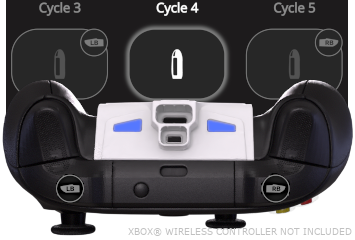
| **Cycle** - **Bumpers** is for games where tapping  Left or Right
  Bumper cycles back & forth between weapons. (**Cycle** - **Triggers** is available for compatibility with flipped play): |
  |
| | |
| **Cycle** - **D**-**Pad** is for games where tapping
|
| | |
| **Cycle** - **D**-**Pad** is for games where tapping  Left or Right
  D-Pad cycles back & forth between weapons: |
  |
After making your selection, tap the
|
After making your selection, tap the  back-arrow at the top-left to return to the Dashboard. If none of the Cycle options sufficiently support your game, you will need to fallback to Direct.
***
back-arrow at the top-left to return to the Dashboard. If none of the Cycle options sufficiently support your game, you will need to fallback to Direct.
***
| Info | Image |
|---|---|
| You MUST ALWAYS adjust the "Cycle Slots" slider setting on the Dashboard to MATCH the number of weapons that you are currently carrying in-game: |  |
| Instructions | Image | |
|---|---|---|
In your game, switch to the "first weapon in the in-game cycle", ⚠️ DO NOT hold left trigger ⚠️, then while  HOLDING HOLDING  ACTIVATOR, TAP to sync, indicated as a YELLOW RGB LED & Dashboard Cycle 1 highlight. ACTIVATOR, TAP to sync, indicated as a YELLOW RGB LED & Dashboard Cycle 1 highlight. |  |
 ***ACTIVATOR*** is ***HELD***, :warning: **DO NOT** hold left trigger :warning:, then your controller's ***FACE*** buttons can be ***TAPPED*** to swap between the following slots: |
| ------------------------------------------------------------------------------------------------------------------------------------------------------------------------------------------------------------------------------------------------------------------------------------------------------------------------------------------------------------------------------------------------------------------------------------------------------------------------------------------------------------------------------------------------------------------------------------------------------------------------------------------------------------------------------------------------------------------------------------------------------------------------------------------------------------------------------------------------------------------------------------------------------------------------------------------------------------------------------------------------------------------------------------------------------------------------------------------------------------------------------------------------------------------------------------------------------------------------------------------------------------------------------------------------------------------------------------------------ |
|
***ACTIVATOR*** is ***HELD***, :warning: **DO NOT** hold left trigger :warning:, then your controller's ***FACE*** buttons can be ***TAPPED*** to swap between the following slots: |
| ------------------------------------------------------------------------------------------------------------------------------------------------------------------------------------------------------------------------------------------------------------------------------------------------------------------------------------------------------------------------------------------------------------------------------------------------------------------------------------------------------------------------------------------------------------------------------------------------------------------------------------------------------------------------------------------------------------------------------------------------------------------------------------------------------------------------------------------------------------------------------------------------------------------------------------------------------------------------------------------------------------------------------------------------------------------------------------------------------------------------------------------------------------------------------------------------------------------------------------------------------------------------------------------------------------------------------------------------ |
| Cycle/Weapon 1 Use In-game First Weapon
 Cycle/Weapon 2
 Cycle/Weapon 3
 Cycle/Weapon 4
tap a slot **once** to swap to it. Repeated taps will cycle the slot between its currently assigned Fire Mode, Regular Fire, & Rapid Fire. |
| Check which slot is **ACTIVE** via the Dashboard highlight, or RGB LED. |
| :warning: If ***ACTIVATOR*** is ***RELEASED QUICKLY*** or ***HELD LONG**,* it will pass through to your game*.* Use the **Controller Shortcut** before an in-game menu pops up. |
| {% endtab %} |
{% tab title="Cycle - 5-8" %}
:video\_game: **See All Tabs**...
 ***ACTIVATOR*** is ***HELD***,
  ***LEFT TRIGGER*** is ***HELD*** alongside it, your controller's ***FACE*** buttons can be ***TAPPED*** to swap between following slots: |
| ------------------------------------------------------------------------------------------------------------------------------------------------------------------------------------------------------------------------------------------------------------------------------------------------------------------------------------------------------------------------------------------------------------------------------------------------------------------------------------------------------------------------------------------------------------------------------------------------------------------------------------------------------------------------------------------------------------------------------------------------------------------------------------------------------------------------------------------------------------------------------------------------------------------------------------------------------------------------------------------------------------------------------------------------------------------------------------------------------------------------------------------------------------------------------------------------------------------------------------------------------------------------------------------------------------------------------------------------------------------------------------------------------------------------------------------------------------------------- |
|
***LEFT TRIGGER*** is ***HELD*** alongside it, your controller's ***FACE*** buttons can be ***TAPPED*** to swap between following slots: |
| ------------------------------------------------------------------------------------------------------------------------------------------------------------------------------------------------------------------------------------------------------------------------------------------------------------------------------------------------------------------------------------------------------------------------------------------------------------------------------------------------------------------------------------------------------------------------------------------------------------------------------------------------------------------------------------------------------------------------------------------------------------------------------------------------------------------------------------------------------------------------------------------------------------------------------------------------------------------------------------------------------------------------------------------------------------------------------------------------------------------------------------------------------------------------------------------------------------------------------------------------------------------------------------------------------------------------------------------------------------------------------------------------------------------------------------------------------------------------- |
| Cycle/Weapon 5
Cycle/Weapon 6
Cycle/Weapon 7
Cycle/Weapon 8
tap a slot **once** to swap to it. Repeated taps will cycle the slot between its currently assigned Fire Mode, Regular Fire, & Rapid Fire. |
| Check which slot is **ACTIVE** via the Dashboard highlight, or **pulsing** RGB LED. |
| :warning: If ***ACTIVATOR*** is ***RELEASED QUICKLY*** or ***HELD LONG**,* it will pass through to your game*.* Use the **Controller Shortcut** before an in-game menu pops up. |
| {% endtab %} |
{% tab title="Indicators" %}
| (App Control)
Active Weapon
| |
| ----------------------------------------------------------------------------------------------------------------------------------------------------------------------------------------------------------------------------------------------------------------------------------------- | ----------------------------------------------------------------------------------------------------------------------------------------------------------------------------------------------------------------------------------------------------------------------------------------------------------------------------------------------------- |
| |
|
| ----------------------------------------------------------------------------------------------------------------------------------------------------------------------------------------------------------------------------------------------------------------------------------------- | ----------------------------------------------------------------------------------------------------------------------------------------------------------------------------------------------------------------------------------------------------------------------------------------------------------------------------------------------------- |
| | 
Cycle/Weapon 1
| |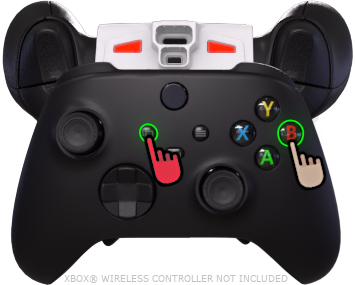 |
| 
Cycle/Weapon 2
| |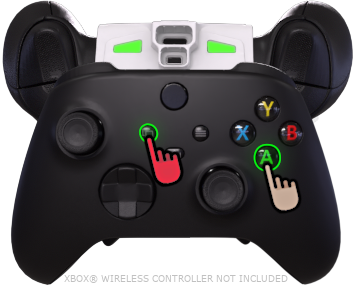 |
| 
Cycle/Weapon 3
| | | **Cycle/Weapon 4** |
|
| **Cycle/Weapon 4** |
| 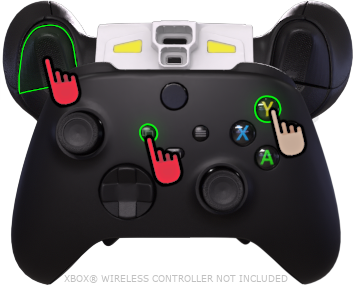 |
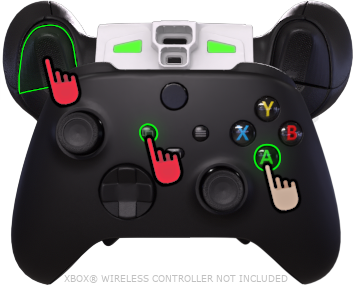
| Cycle/Weapon 5
(Pulsing)
| |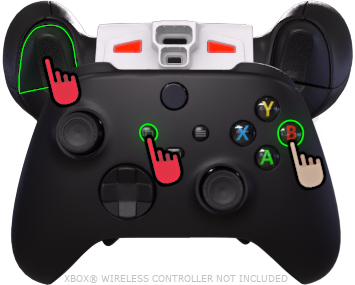 |
| Cycle/Weapon 6
(Pulsing)
| | |
| Cycle/Weapon 7
(Pulsing)
| | |
| Cycle/Weapon 8
(Pulsing)
| | {% endtab %} | | | {% endtabs %} | | --- # Agent Instructions This documentation is published with GitBook. GitBook is the documentation platform designed so that both humans and AI agents can read, navigate, and reason over technical content effectively. Learn more at gitbook.com. ## Querying This Documentation If you need additional information that is not directly available in this page, you can query the documentation by asking a question. Perform an HTTP GET request on the following URL with the `ask` and `goal` query parameters: ``` GET https://guide.strikepack.com/horizon/manuals/shooter/weaponswap/cycle.md?ask=